
Discounts
Create promotional discounts for your bookings
From the Discounts section of Agency settings, you can create and manage promotional discounts that reduce the sale price of bookings made through your agency. Each discount can apply to specific connections and products, with usage limits, a validity period, and eligibility rules.
Discounts are configured as campaigns: you define the value, which products they apply to, how many times they can be used, and during what period they're active.
Accessing Discounts
- Log in to the Bundleport platform.
- In the left-hand side menu, select Agency Panel.
- Click your username in the bottom left corner of the Agency Panel.
- In the dropdown menu, select Agency settings.
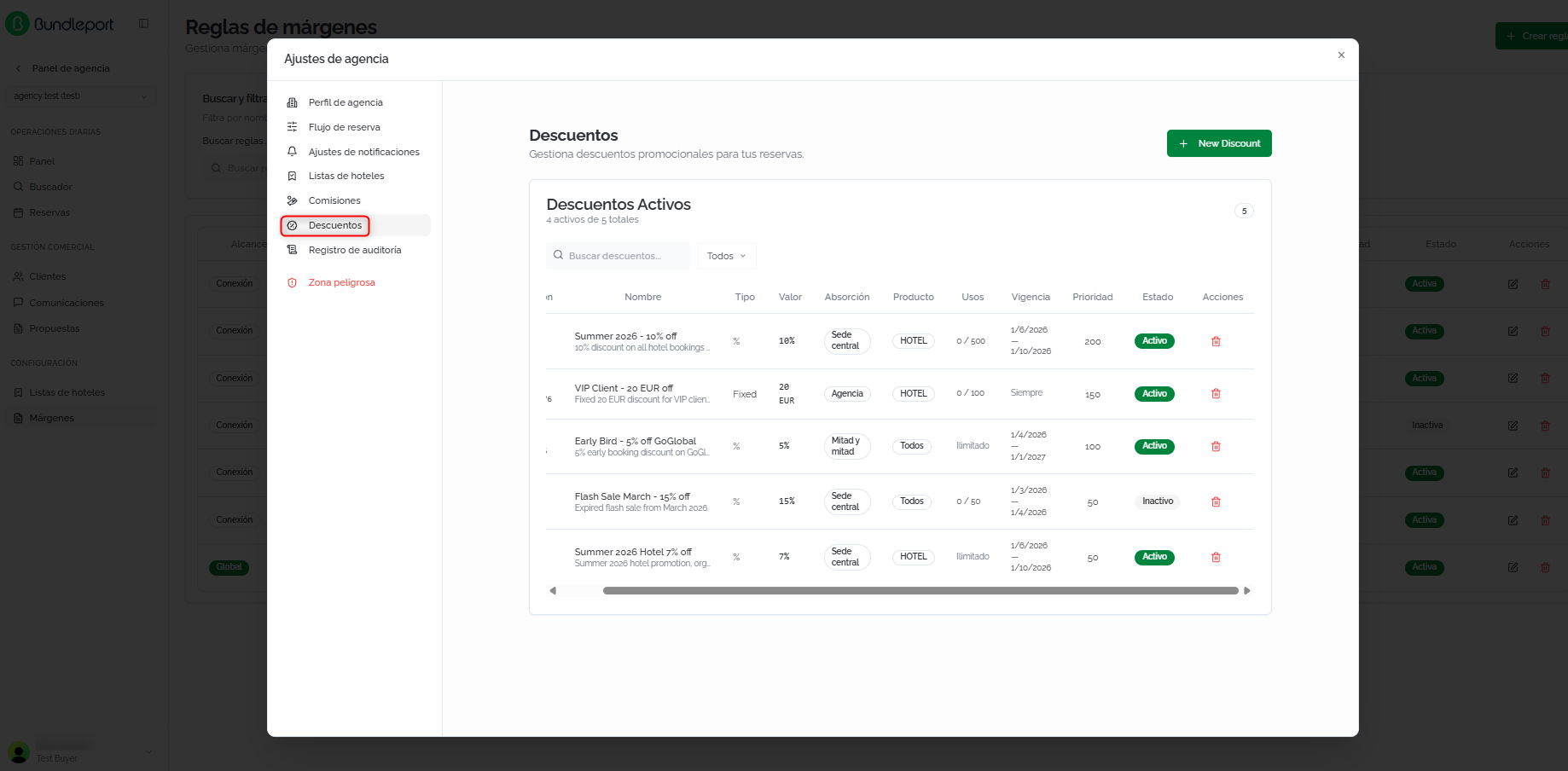
- In the left side panel of the dialog, select Discounts.
Discounts list
At the top, a summary shows the number of active discounts out of the total number created.
Search and filters
- Search discounts: free-text search.
- Product: filter by service type: All, Hotel, Flight, or Ground.
Discounts table
Each discount is displayed as a row with the following columns:
- Connection: the connection the discount applies to, or All if it's global.
- Name: campaign name and short description.
- Type: Percentage (%) or Fixed (fixed amount).
- Value: the discount value applied.
- Absorption: who bears the cost of the discount: Head office, Agency, or Split.
- Product: the type of service it applies to (Hotel, All, etc.).
- Uses: number of uses consumed out of the maximum allowed (for example, 0 / 500). If unlimited, it shows Unlimited.
- Validity: the discount's validity period (start date – end date, or Always if it doesn't expire).
- Priority: a numeric value that determines which discount takes precedence when several apply. The higher the number, the higher the priority.
- Status: Active or Inactive.
- Actions: delete the discount.
Creating a discount
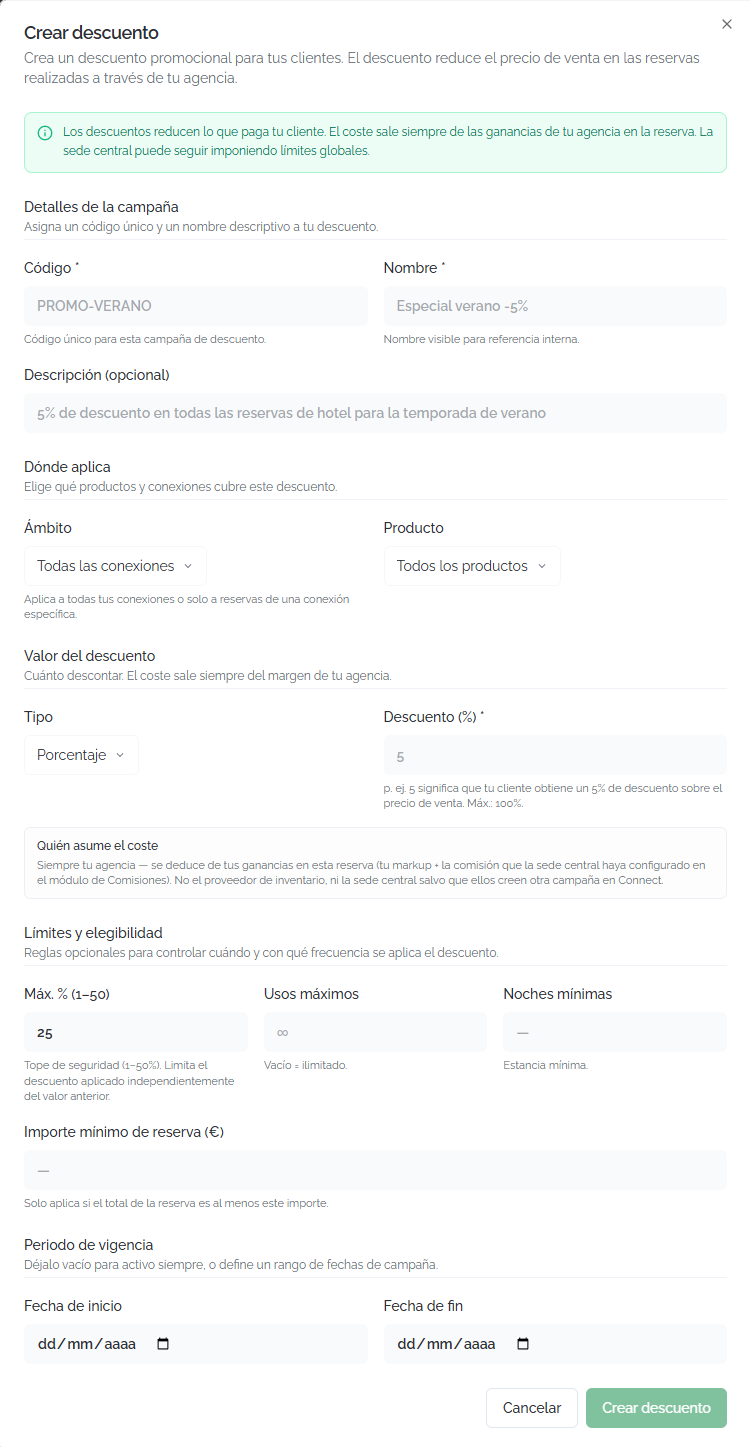
Click New discount in the top right corner. The creation form will open with the following fields:
Campaign details:
- Code: unique code for the promotional campaign (for example, PROMO-SUMMER).
- Name: display name for internal reference.
- Description (optional): free text to describe the campaign's purpose.
Where it applies:
- Scope: select whether it applies to all connections (All connections) or to a specific connection.
- Product: service type: All products, Hotel, Flight, or Ground.
Discount value:
- Type: Percentage (%) or fixed amount.
- Discount: numeric value of the discount. For example, 5 means a 5% discount on the sale price. Maximum value: 1000.
⚠️ Important
The cost of the discount is deducted from the agency's earnings on the booking (your markup + the commission set by the organization). It is not borne by the inventory supplier. Before creating a discount, check that your margins and commissions are enough to absorb the discount without operating at a loss
Limits and eligibility:
- Max % (1–50): a safety cap that limits the maximum discount percentage applied, regardless of the value configured above.
- Maximum uses: the maximum number of times the discount can be used. Leave blank for unlimited uses.
- Minimum nights: the minimum stay required for the discount to apply.
- Minimum booking amount (€): the minimum booking amount for the discount to activate.
💡 Tip
The Max % field acts as a safety net: if you set a 10% discount but set a Max % of 5%, the effective discount will be 5%. This is especially useful for limiting the impact of fixed-amount discounts on low-value bookings.
Validity period:
- Valid from: the campaign's start date.
- Valid until (optional): the end date. Leave blank for the discount to remain active indefinitely.
Click Create discount to save, or Cancel to discard.
Deleting a discount
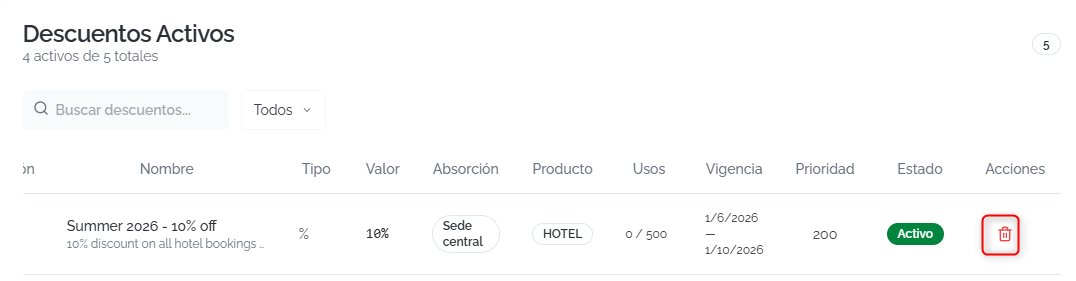
Click the trash icon in the Actions column of the list. This action permanently deletes the discount and cannot be undone. Bookings already made with this discount are not affected.
FAQs
Who bears the cost of the discount?
For discounts, the cost is deducted from your earnings (markup + commission).
What's the difference between discounts and margins?
Margins (markup) are markups the agency adds to the supplier's net price to earn its profit. Discounts are promotional reductions on the sale price that the agency offers the client. The discount is funded from the agency's earnings.
What is "Max %" and what is it for?
It's a safety cap (between 1% and 50%) that limits the maximum effective discount percentage, regardless of the configured value. It protects against disproportionate discounts that could cause the agency to operate at a loss.
Can I limit the number of times a discount is used?
Yes. The Maximum uses field lets you set a limit. The Uses column in the list shows how many times it's been consumed (for example, 12 / 500). If you leave the field blank, the discount is unlimited.
Can I apply a discount only to bookings with a minimum stay?
Yes. The Minimum nights field lets you set the required minimum stay. The discount will only apply to bookings that meet that minimum.
What happens when several discounts match a booking?
Only the discount with the highest priority is applied. The other rules are ignored.
Do changes to discounts affect bookings already made?
No. Discounts are applied at the time of booking. Editing, deactivating, or deleting a discount does not modify bookings that have already been confirmed.
Can I deactivate a discount without deleting it?
Check whether the discount has a Valid until date so it deactivates automatically when that date arrives. For immediate deactivation, delete the discount and recreate it when needed.
Where can I see the discount applied to a booking?
In the Booking summary (side panel during checkout or on the confirmation page) and in the price breakdown on the results page, the Discount line shows the amount deducted from the subtotal.
No comments to display
No comments to display