
Booking Tool: Ground
BuscaSearch yand reservabook trenestrains yand autobusesbuses
ElThe BuscadorSearch esEngine elis motorthe desearch búsquedaand ybooking reservasengine integradobuilt eninto elthe PanelAgency dePanel. agencia.From Desde la pestañathe TerrestreGround puedestab, buscaryou trayectoscan ensearch trentrain yand autobúsbus entrejourneys múltiplesacross operadores,multiple compararoperators, horarios,compare tarifasschedules, yfares, precios,and yprices, completarand reservascomplete directamentebookings desdedirectly lafrom plataforma.the platform.
EsteThis artículoarticle cubrecovers elthe flujofull completoflow parafor transporteground terrestre:transportation: desdefrom lasearch búsquedato hastabooking laconfirmation. confirmaciónUnlike de la reserva. A diferencia de los modosthe PaqueteDynamic Dinámico y Multi-destinoPackage, elthe buscadorGround Terrestresearch estáengine orientadois exclusivamentefocused aexclusively transporte,on sintransportation, componentewith hotelero.no Admitehotel búsquedascomponent. deIt idasupports yround-trip vueltaor oone-way solo ida.searches.
AccederAccessing althe BuscadorSearch Engine
EntraLogeninlato theplataformaBundleportde Bundleportplatform.EnInelthemenúleft-handlateralsideizquierdo,menu,seleccionaselect Agency Panelde agencia.SeleccionaSelectBuscadorSearch.SeleccionaSelectla pestañatheTerrestreGround.tab.
BuscarSearching transportesfor transportation
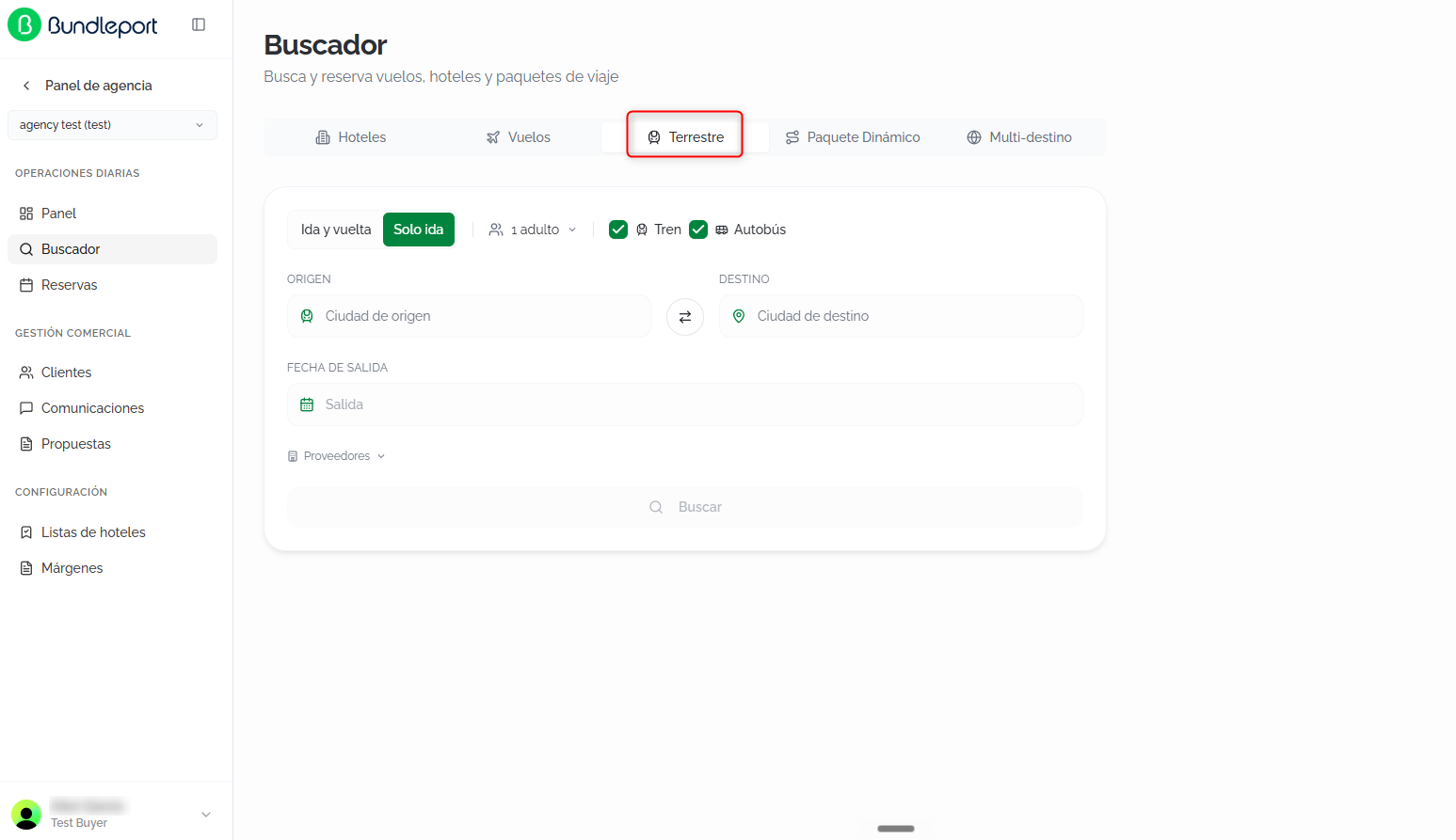
RellenaFill losin siguientesthe campos:following fields:
ModoTripde viajemode:seleccionaselectelthetipotripde trayecto:type:IdaRoundy vueltatrip:buscasearchesunfortrayectoandeoutboundidaandyaotroreturnde vuelta.journey.SoloOneidaway:buscasearchesúnicamenteonlyelfortrayectothedeoutboundida.journey.
PasajerosPassengers:configuraconfigureelthenúmeronumberdeofpasajerospassengersporbytipo:type:adultos,adults,niñoschildren,yandbebésinfants (menores deunder 2años)years old).TipoTransportde transportetype:dostwocasillasindependentindependientescheckboxesquetopermitenincludeincluiroroexcludeexcluir resultados:results:TrenTrain (activadoenabledporbydefecto)default).AutobúsBus (activadoenabledporbydefecto)default).
OrigenOrigin:escribetypeelthenombrecitydenamelaandciudadselectyanseleccionaoptionunafromopciónthedelautocompleteautocompletado.suggestions.DestinoDestination:escribetypeelthedestinodestinationyandseleccionaselectdelfromautocompletado.theHazautocompleteclicsuggestions.enClickeltheiconoswapde intercambioicon ⇄paratoinvertirreverselatheruta.route.FechasDates:En modoInSoloOneidaway:selectormode:deafechadeparturededatesalida.selector.En modoInIdaRoundytripvuelta:mode:calendarioadetwo-monthdoblecalendarmestoparaselectseleccionarthefechadeparturedeandsalidareturny de vuelta.dates.
ProveedoresSuppliers:haz clic enclickProveedoresSuppliersparatoseleccionarselectquéwhichproveedoresgrounddetransportationtransportesuppliersterrestretoincluirincludeeninlathebúsqueda.search.
Haz clic enClick BuscarSearch parato iniciarstart lathe búsqueda.search.
ResultadosSearch de búsquedaresults
LaThe plataformaplatform consultaqueries laavailability disponibilidadacross enall todosselected lossuppliers proveedoresand seleccionadosdisplays yresults muestraprogressively losas resultadoseach desupplier formaresponds.
At the top, a medidasummary queof cadathe proveedoractive responde.
Enis lashown: parteroute, superiordate, seand muestranumber unof resumenpassengers. de la búsqueda activa: ruta, fecha y número de pasajeros. Haz clic enClick EditarEdit búsquedasearch parato modificarmodify losthe criterioscriteria sinwithout perderlosing elcontext, contexto, o enor NuevaNew búsquedasearch parato volverreturn alto formulariothe inicial.initial form.
TarjetasResult de resultadocards
CadaEach opciónoption seis muestrashown comoas unaa tarjetacard conwith lathe siguientefollowing información:information:
NombreOperatordel operadorname (porforejemplo,example, BlaBlaCar Bus)yandtipotransportde transportetype (porforejemplo,example, Bus).HoraDeparturedetimesalidaandystationestaciónorooriginpunto de origen.point.DuraciónTotaltotaljourneydeldurationtrayectoandy tipotype (directodirectoorconwithescalas)stops).HoraArrivaldetimellegadaandystationestaciónorodestinationpunto de destino.point.PrecioPriceporperpersona.person.BotónViewVer tarifasfaresparabuttonconsultartolaschecktarifasthedisponiblesavailableparafaresesaforopción.that option.
ℹ️ InformaciónInformationSi laIf horathe dearrival llegadatime esis posteriorafter midnight, this is indicated with a la medianoche, se indica con la etiqueta +1 juntolabel anext lato hora,the señalandotime, queshowing lathat llegadaarrival estakes alplace díathe siguiente.following day.

DetalleFare de tarifasdetails
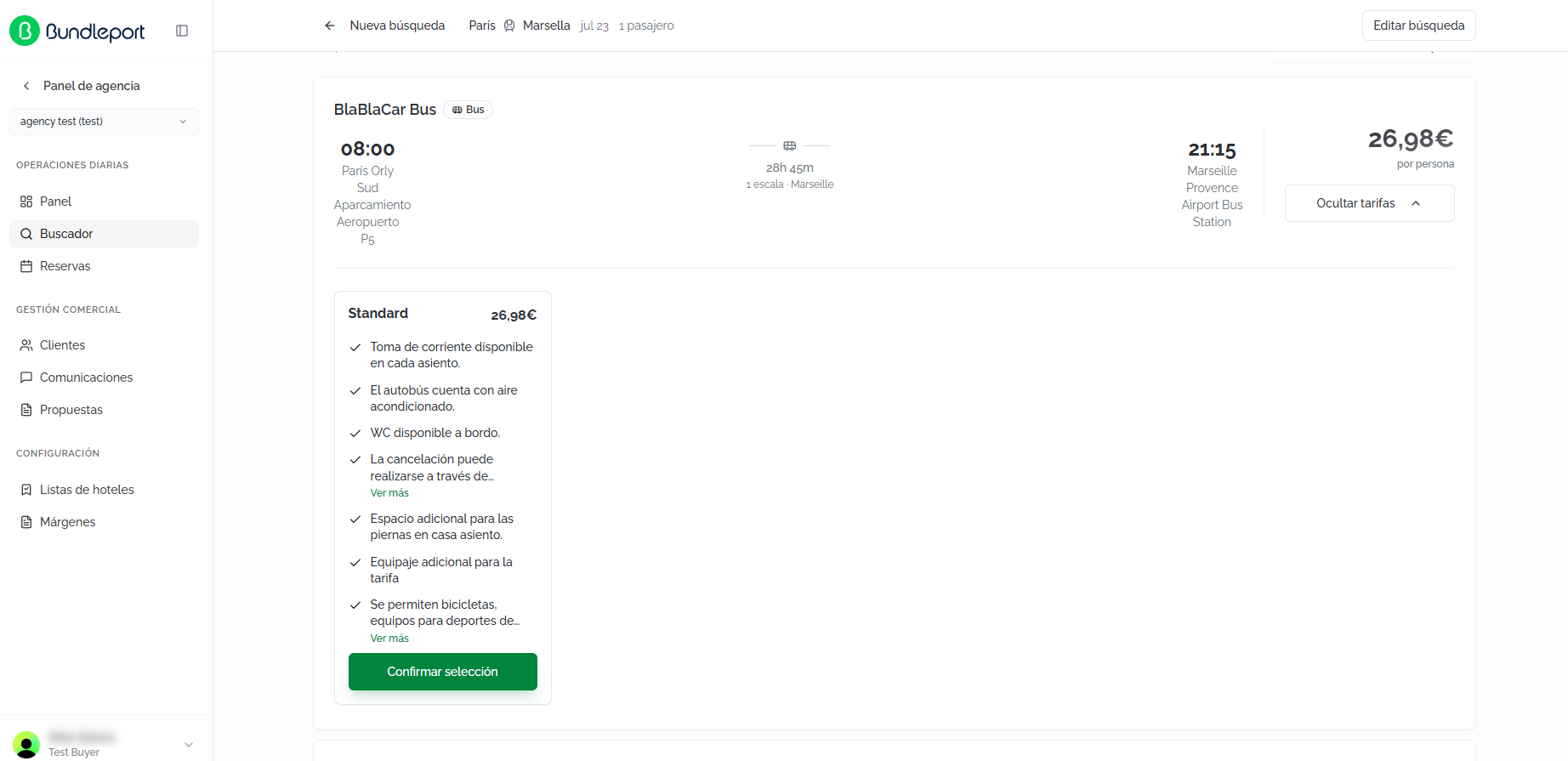
Al hacer clic enClicking VerView tarifasfares seexpands desplieganthe lasavailable opcionesfare deoptions tarifafor disponiblesthat paracombination. esaEach combinación.fare Cada tarifa incluye:includes:
NombreFareynameprecioandde la tarifaprice (porforejemplo,example, Standard —19,€19.99€).CaracterísticasFeaturesincluidasincludedeninlathetarifa.fare.BotónConfirmConfirmar selecciónselectionparabuttonelegirtoesachoosetarifathatyfareavanzar.and proceed.
OrdenarSorting resultadosresults
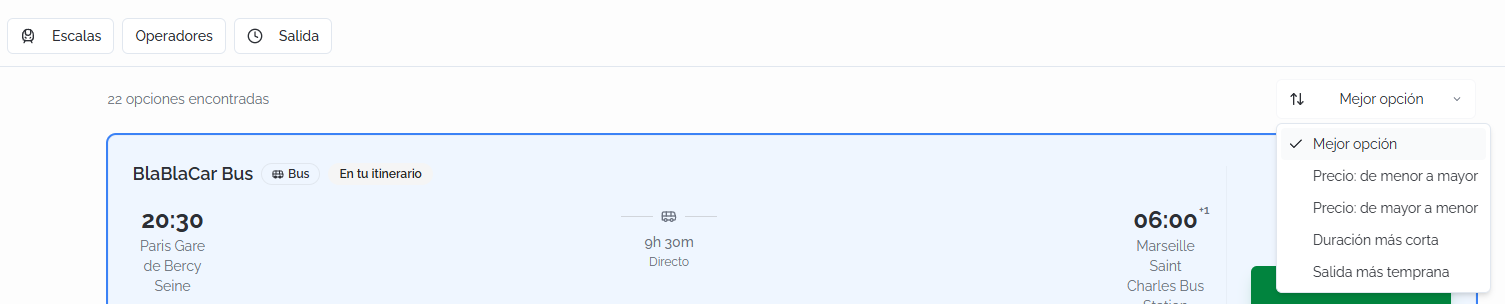
Se muestra el númeroThe total denumber opcionesof encontradasoptions found is shown (porfor ejemplo,example, 22 opcionesoptions encontradasfound). LosThe criteriosavailable desorting ordenacióncriteria disponibles son:are:
MejorBestopciónoption (por defecto)default).Precio:Price:delowmenortoa mayorhigh.Precio:Price:dehighmayortoa menorlow.DuraciónShortestmás cortaduration.SalidaEarliestmás tempranadeparture.
FiltrosFilters
PuedesYou filtrarcan losfilter resultadosthe medianteresults lasusing siguientesthe opciones:following options:
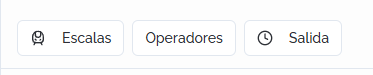
EscalasStops:filtrarfilterporbynúmeronumberdeofescalas.stops.OperadoresOperators:seleccionarselectunooneoorvariosmoreoperadorestransportde transporte.operators.SalidaDeparture:filtrarfilterporbyrangodeparturehorariotimede salida.range.
ℹ️ InformaciónInformationCuandoWhen hayfilters filtrosare activos,active, se muestra el enlacethe BorrarClear todoall conlink elis númeroshown dealong filtroswith aplicados.the number of filters applied.
BúsquedasRound-trip de ida y vueltasearches
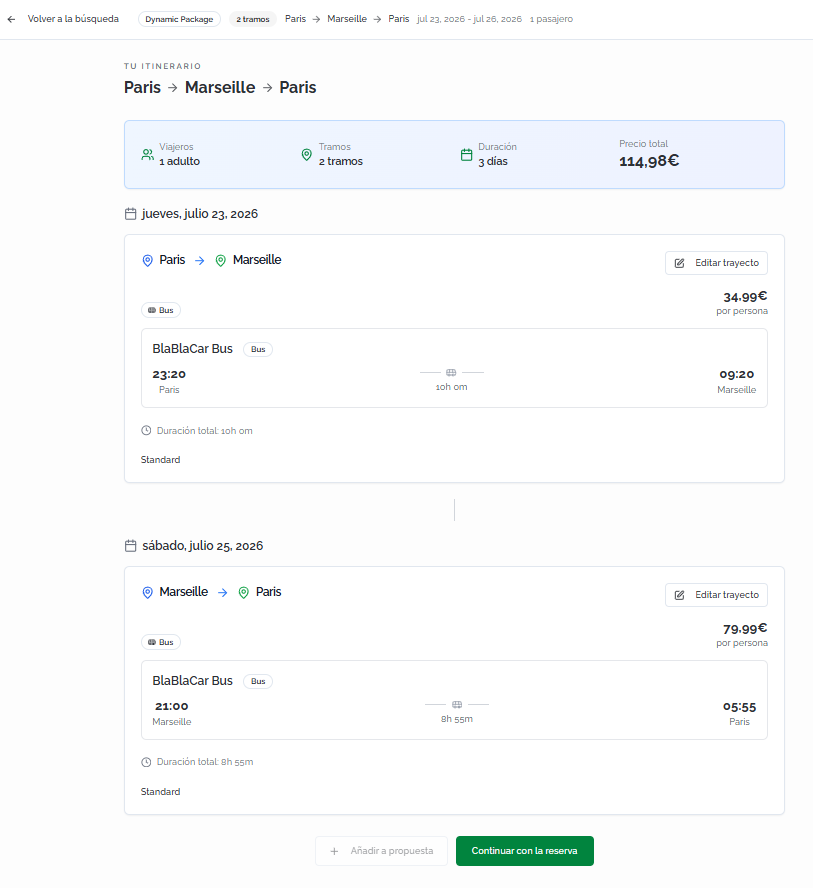
EnIn modoround-trip idamode, yselection vuelta,is laorganized seleccióninto setwo organizasteps: enfirst dosyou pasos:choose primerothe eligesoutbound eljourney, trayectothen dethe idareturn yjourney. despuésAt elthe detop, vuelta.the Encurrent lastep parteis superior se indica el paso actualshown (porfor ejemplo,example, PasoStep 1 deof 2) juntoalong conwith lathe descripciónjourney del trayectodescription (porfor ejemplo,example, DeFrom ParísParis ato MarsellaMarseille).
UnaOnce vezthe seleccionadooutbound eljourney trayectois deselected, ida,the elsearch buscadorengine avanzaautomatically automáticamenteadvances alto pasostep 2 parato seleccionarselect elthe trayectoreturn dejourney. vuelta.The Laoption opciónchosen elegidaat eneach cadastep pasois sevisually resaltahighlighted visualmentewith con la etiquetathe EnIn tuyour itinerarioitinerary ylabel laand marcathe SeleccionadoSelected. mark.
💡 ConsejoTipHaz clic enClick VolverBack alto itinerarioitinerary parato accederaccess athe laoverview vistaof generalthe delfull viajetrip. completo.From Desdethis estaview, vistayou puedescan revisarreview ambosboth trayectos,journeys, modificarchange layour selecciónselection conwith el botónthe EditarEdit trayectojourney debutton cadaon tramo,each hacerleg, clic enclick AñadirAdd ato propuestaproposal parato guardarsave elthe itinerarioitinerary sinwithout reservar,booking, oor hacer clic enclick ContinuarContinue conwith la reservabooking parato avanzarproceed alto checkout.

CompletarCompleting lathe reservabooking
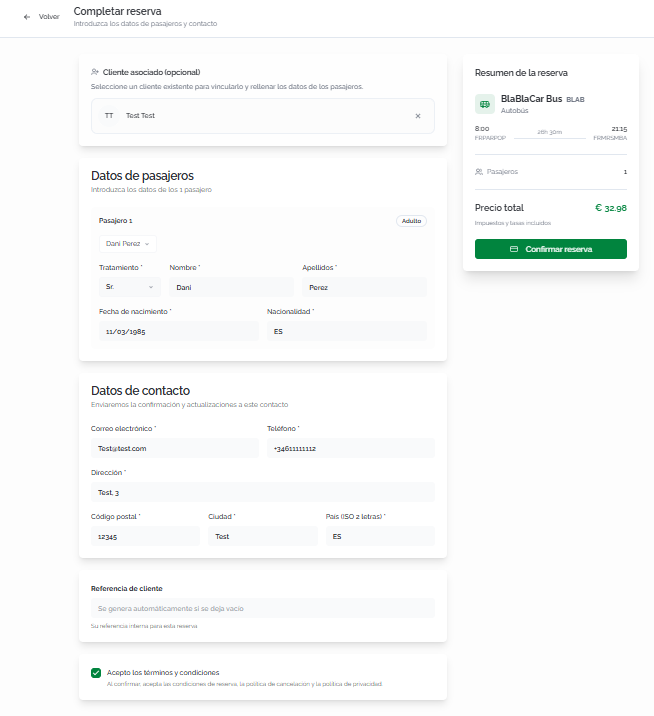
Haz clic enClick ConfirmarConfirm selecciónselection (soloone ida)way) oor ContinuarContinue conwith la reservabooking (idaround ytrip) vuelta)to paraaccess accederthe acheckout la página de checkout.page.
RellenaFill lain siguientethe información:following information:
ClienteAssociatedasociadoclient (opcional)optional):vinculalinklathereservabookingatounanclienteexistingexistenteclientparasoqueit'squederecordedregistradainentheirsuhistory.historial. Haz clic enClickBuscarSearchcliente.client...paratobuscarsearchporbynombrenameoor email.SiIfeltheclienteclientnodoesn'texiste,exist,haz clic enclickNuevoNewclienteclientparatocrearlocreatedirectamente.one directly.DatosPassengerde pasajerosdetails:introduceenterloseachdatospassenger'sde cada pasajero:information:TratamientoTitle:seleccionaselectelthetratamientotitle (Sr.Mr.,Sra.Mrs., etc.).NombreFirst nameyandApellidosLast namedelofpasajero.the passenger.FechaDatedeofnacimientobirth.NacionalidadNationality.
DatosContactde contactodetails:seusedusarántoparasendenviarbookingconfirmacionesconfirmationsyandactualizaciones de la reserva:updates:Correo electrónicoEmailyandTeléfonoPhone.DirecciónAddress,CódigoPostalpostalcode,CiudadCity,yandPaísCountry (código2-letter ISOde 2 letras)code).
ReferenciaClientde clientereference (opcional)optional):campofieldparatointroducirentertuyourreferenciaowninternainternalparareferenceestaforreserva.thisSibooking.seIfdejaleftvacío,blank,seonegeneraisautomáticamente.generated automatically.AceptaciónAcceptancedeoftérminosterms:marcachecklathecasillaboxdeacceptingaceptaciónthedebookinglasconditions,condicionesthedecancellationreserva,policy,laandpolíticathedeprivacycancelación y la política de privacidad.policy.
ℹ️ InformaciónInformationEnThe elright side panel lateralshows derecho se muestra elthe ResumenBooking de la reservasummary conwith elthe operador,operator, tipotransport detype, transporte,schedules, horarios,origin estacionesand dedestination origenstations, ynumber destino,of númeropassengers, de pasajeros y precioand total price (impuestostaxes yand tasasfees incluidos)included). VerificaVerify quethat lathe informacióninformation esis correctacorrect antesbefore de confirmar.confirming.
Haz clic enClick ConfirmarConfirm reservabooking parato completarcomplete lathe reserva.booking.
ConfirmaciónBooking de la reservaconfirmation
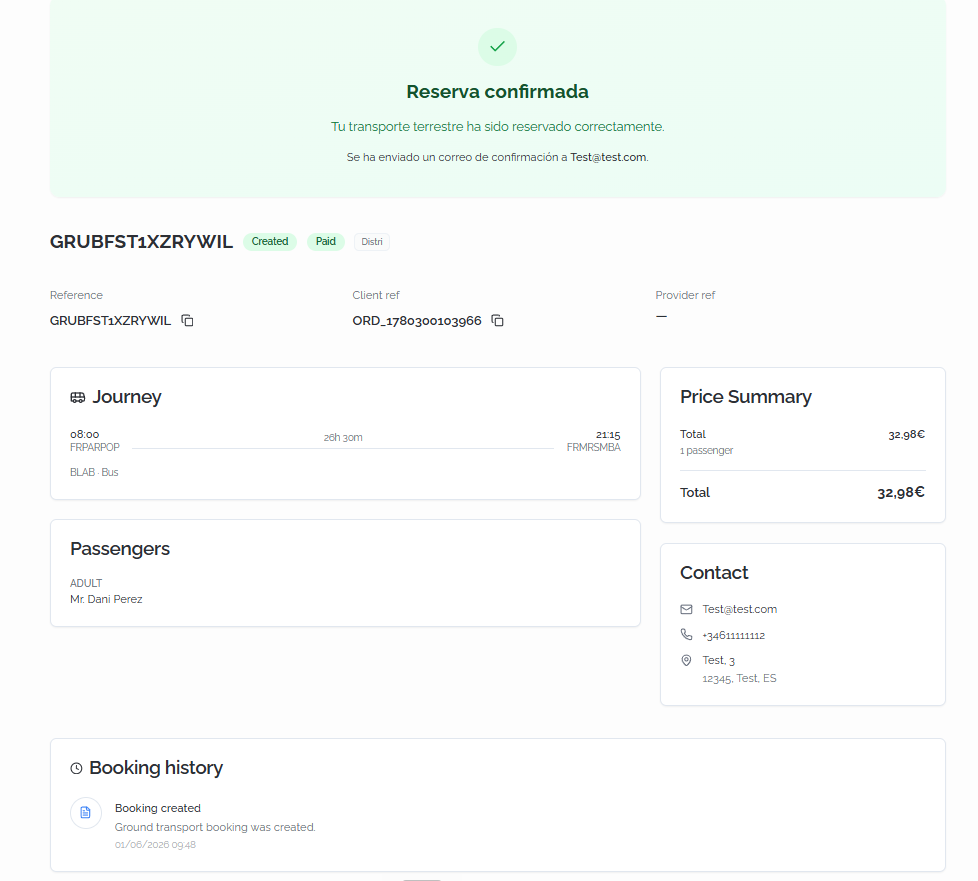
AlOnce confirmar,confirmed, sea muestrapage unais páginashown conwith elthe detallefull completodetails deof lathe reserva:booking:
CabeceraHeader: a confirmation bannerdeindicatingconfirmacióntheindicandogroundquetransportationelhastransportebeenterrestresuccessfullyhabookedsidoandreservadothatcorrectamenteayconfirmationqueemailsehashabeenenviadosent.unBelowcorreoit,detheconfirmación.BundleportDebajoreference,aparecen la referencia de Bundleport, el estadostatus (porforejemplo,example, Created, Paid),elsupplier,proveedor,clientlareference,referenciaanddelsupplierclientereferenceyarela referencia del proveedor.shown.- Journey:
detalledetailsdeloftrayectothereservado:bookedhorajourney:dedeparturesalidatimeyandestaciónorigindestation,origen,totalduraciónduration,total,arrivalhoratimedeandllegadadestinationystation,estaciónoperator,deanddestino,transportoperador y tipo de transporte.type. - Price Summary:
desglosefinancialeconómicobreakdownconwithelthepreciopriceporperpasajeropassengeryandelthepreciobooking's totalde la reserva.price. - Passengers:
listadolistdeofpasajerospassengersconwithel tipotype (adulto,adult,niño)child),tratamiento,title,nombrefirstyname,apellidos.and last name. - Contact:
datoscontactdedetailscontactoassociatedasociadoswithathelabooking:reserva:email,correophone,electrónico,andteléfonofully dirección completa.address. - Booking history:
registrochronologicalcronológicologdeoflostheeventoseventsasociadosassociated with the booking, indicating the action taken, aladescription,reserva,andindicandothela acción realizada, una descripción y la fecha.date.
FAQs
¿QuéWhat tipostypes deof transportetransport puedocan buscar?I search for?
ElThe buscadorGround Terrestresearch permiteengine buscarlets trayectosyou ensearch trentrain yand autobús.bus Puedesjourneys. activarYou ocan desactivarenable cadaor tipodisable deeach transportetransport entype elin formulariothe desearch búsquedaform parato incluirinclude oor excluirexclude resultados.results.
¿CómoHow funcionadoes laselection selecciónwork enin búsquedasround-trip de ida y vuelta?searches?
LaSelection selecciónis seorganized organizainto entwo dossteps: pasos:first primeroyou eligeschoose elthe trayectooutbound dejourney, idathen ythe despuésreturn eljourney. deThe vuelta.search Elengine buscadorautomatically avanzaadvances automáticamenteto althe segundosecond pasostep unaonce vezthe seleccionadaoutbound lajourney ida.is Puedesselected. revisarYou elcan itinerarioreview completothe haciendofull clicitinerary enby clicking VolverBack alto itinerarioitinerary.
¿QuéWhat significadoes la etiquetathe "+1" juntolabel anext lato horathe dearrival llegada?time mean?
IndicaIt queindicates lathat llegadaarrival estakes alplace díathe siguienteday deafter ladeparture. salida.This Sueleusually ocurrirhappens enon trayectosovernight nocturnosor olong-distance de larga distancia.journeys.
¿PuedoCan verI lassee tarifasthe disponiblesavailable antesfares debefore seleccionarselecting una trayecto?journey?
Sí.Yes. Haz clic enClick VerView tarifasfares enon cualquierany tarjetaresult decard resultadoto paracheck consultarthe lasavailable opcionesfare deoptions, tarifaalong disponibles,with contheir susprices preciosand yincluded características incluidas.features.
¿QuéWhat criteriocriteria usadoes "MejorBest opción"option" parause ordenar?for sorting?
EsThis elis criteriothe porGround defectosearch delengine's buscadordefault Terrestre.criteria. CombinaIt factorescombines comofactors precio,such duraciónas yprice, tipoduration, deand trayectojourney type (directodirect vs. conwith escalas)stops) parato mostrarshow primerothe lasmost opcionesbalanced másoptions equilibradas.first.
¿PuedoCan reservarI sinbook asociarwithout unlinking cliente?a client?
Sí.Yes. AsociarLinking una clienteclient esis opcional,optional, perobut recomendablerecommended parato mantenerkeep unan historialorganized debooking reservas organizado.history.
¿QuéWhat esis lathe "ReferenciaClient dereference" cliente" en elat checkout?
EsIt's unan campooptional opcionalfield quethat permitelets asociaryou tuassociate propiayour referenciaown internainternal reference with the booking (for example, a lacase reserva (por ejemplo, un número de expediente)number). SiIf loleft dejasblank, vacío,the laplatform plataformagenerates generaa unareference referencia automáticamente.automatically.
¿PuedoCan guardarI unsave itinerarioa deround-trip idaitinerary ywithout vuelta sin reservar?booking?
Sí.Yes. DesdeFrom lathe vistafull delitinerary itinerarioview, completoyou puedescan hacer clic enclick AñadirAdd to proposal to save the journeys in a propuesta para guardar los trayectos en una propuestaproposal.
¿LasDo reservasground detransportation transportebookings terrestrerequire requierena documentotravel de viaje?document?
No. AUnlike diferenciaflight debookings, lasground reservas de vuelos, eltransportation checkout deonly transporterequires terrestreeach solopassenger's requierefirst nombre,name, apellidos,last fechaname, dedate nacimientoof ybirth, nacionalidadand de cada pasajero.nationality.