
Bookings
GestionaManage todasall lasof reservasyour deagency's tu agenciabookings
ReservasBookings esis elthe módulo delAgency Panel demodule agenciathat quecentralizes centralizaall todasof lasyour reservasagency's debookings, tuboth agencia,those tantogenerated lasfrom generadasthe desdeplatform laand plataformathose comoimported lasfrom importadasexternal desdesuppliers. proveedoresFrom externos.this Desdesection, estayou seccióncan puedescheck consultarthe elstatus estadoof deeach cadabooking, reserva,access accederits afull sudetails, detallemanage completo,cancellations, gestionarsearch cancelaciones,for buscarcheaper alternativasalternatives, másand baratasgenerate y generar vouchers.
AccederAccessing aBookings
EntraLogeninlato theplataformaBundleportde Bundleportplatform.EnInelthemenúleft-handlateralsideizquierdo,menu,seleccionaselect Agency Panelde agencia.SeleccionaSelectReservasBookings.
ListadoBookings de reservaslist
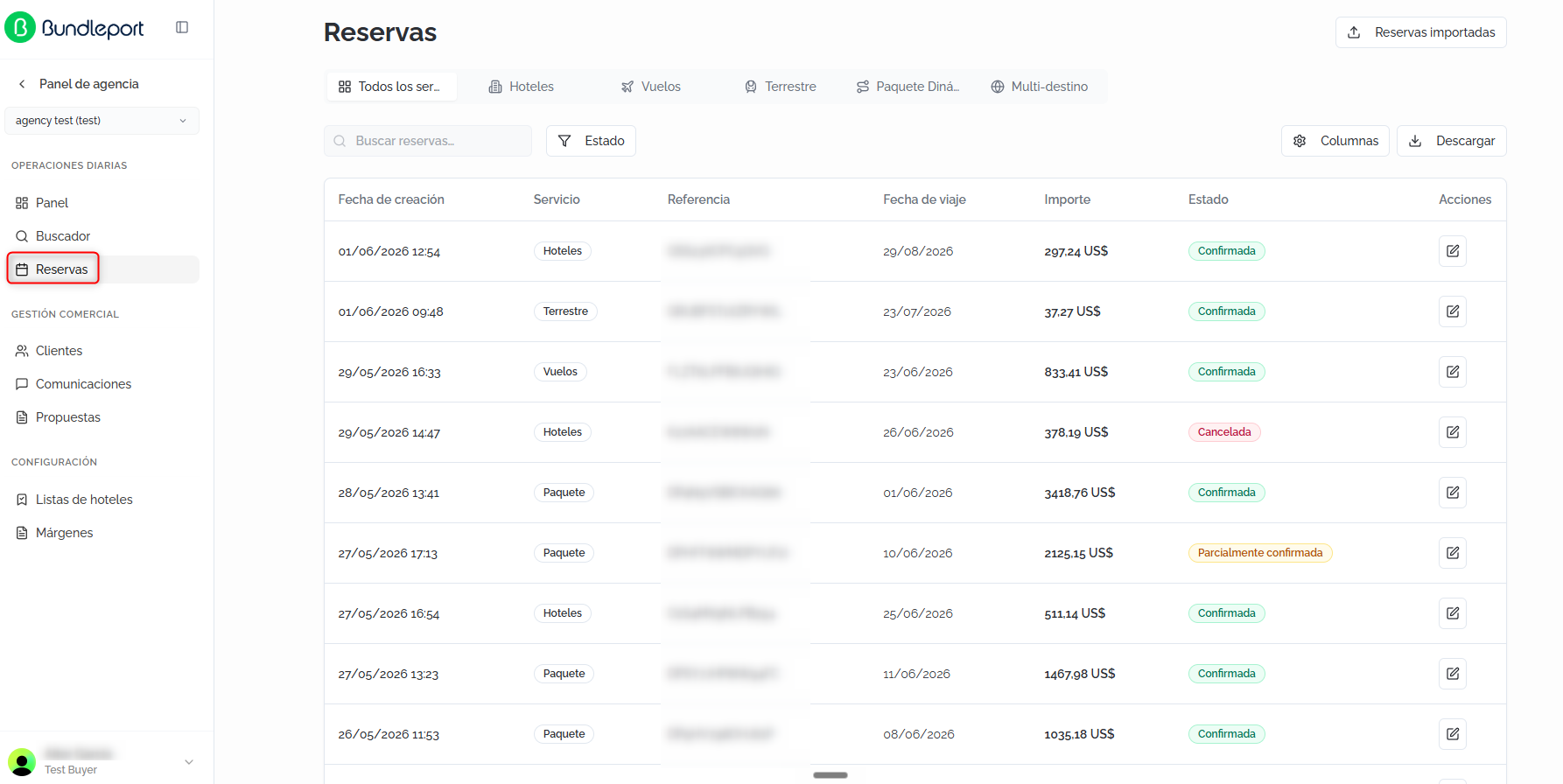
LaThe páginapage muestrashows una listadocentralized centralizadolist conof todasall lasthe reservasagency's debookings, laregardless agencia,of independientementeservice del tipo de servicio.type.
FiltrosFilters porby tiposervice de serviciotype
EnAt lathe partetop, superior,a unatab barrabar delets pestañasyou permitefilter filtrarbookings lasby reservas por tipo:type:
TodosAlllos serviciosservices (por defecto)default).HotelesHotels.VuelosFlights.TerrestreGround.PaqueteDynamicDinámicoPackage.- Multi-
destinodestination.

BúsquedaSearch yand filtrosfilters
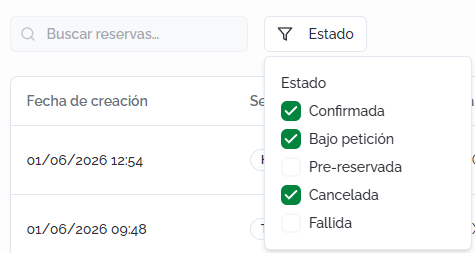
BuscarSearchreservasbookings:campofree-textdefieldtextotolibrelocateparabookingslocalizarbyreservasreference,porname,referencia,ornombreotheru otros criterios.criteria.EstadoStatus:filtrafilterporbyunooneoorvariosmoreestados:statuses:ConfirmadaConfirmed,CanceladaCancelled,BajoOnpeticiónrequest, Pre-reservadabooked,oorFallidaFailed.
TablaBookings de reservastable
LaBy tabladefault, muestrathe portable defectoshows lasthe siguientesfollowing columnas:columns:
FechaCreationde creacióndate:fechadateyandhoratimeenthequebookingsewasrealizó la reserva.made.ServicioService:tiposervicede serviciotype (Hoteles,Hotels,Vuelos,Flights,Terrestre,Ground, etc.).ReferenciaReference:códigothedebooking'sreferenciauniqueúnicoBundleportdereferencela reserva en Bundleport.code.FechaTravelde viajedate:fechathedetrip'siniciostartdel viaje.date.ImporteAmount:preciothe booking's totalde la reserva.price.EstadoStatus:estadocurrentactual,status,mostradoshownconwithetiquetaadecolorcolor:label:ConfirmadaConfirmed,CanceladaCancelled,FallidaFailed,oor Pre-reservadabooked (pendientependingdeconfirmationconfirmacióninenapropuesta)proposal).SugerenciasSuggestions:indicador dea colorqueindicatorseñalashowingsiwhetherexistencheaperalternativasalternativesmásexistbaratasforparathatesa reserva:booking:Verde:Green:existeanunaoptionopciónwithconthelassamemismasfeaturescaracterísticasexists,yandlathereservacurrentactualbookingpuedecancancelarsebesincancelledcoste.at no cost.Amarillo:Yellow:existeanunaoptionopciónwithconthelassamemismasfeaturescaracterísticas,exists,perobutlathereservacurrentactualbookingtienehasgastoscancellationde cancelación.fees.Rojo:Red: nohaycheaperopcionesoptionsmásarebaratas.available.
AccionesActions:iconoandeeditedicióniconparatoaccederaccessalthedetallebooking'sde la reserva.details.
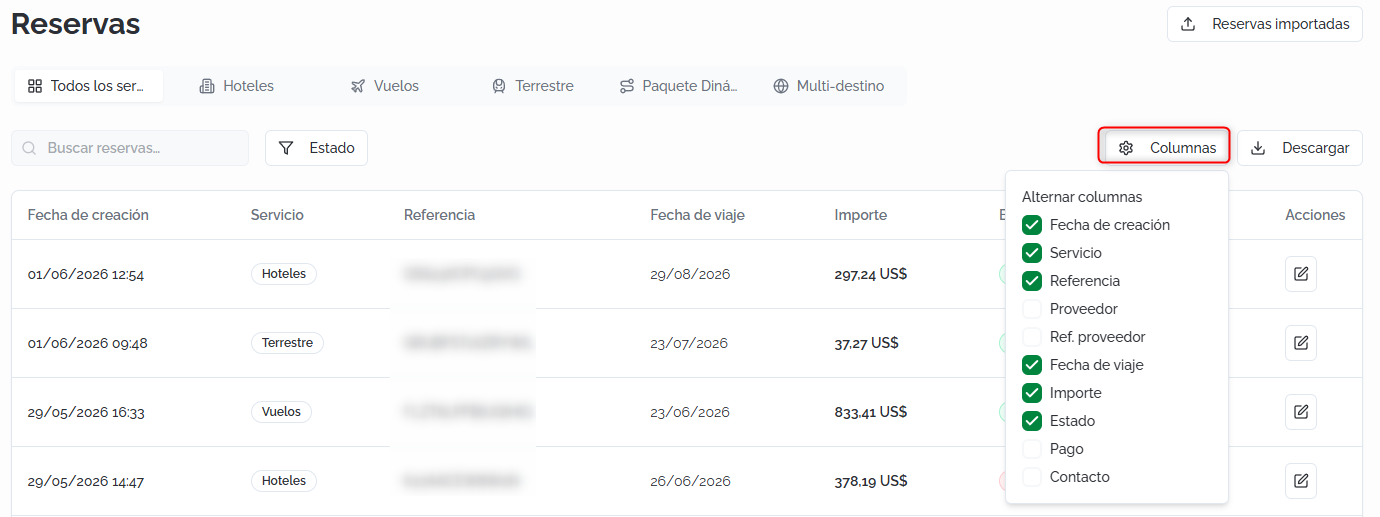
💡 ConsejoTipHaz clic enClick ColumnasColumns parato personalizarcustomize laswhich columnascolumns visibles.are Lasvisible. columnasThe adicionalesadditional disponiblesavailable son:columns Proveedor,are: Ref.Supplier, proveedor,Supplier Pagoref., yPayment, Contacto.and Contact.
DescargarDownloading elthe listadolist
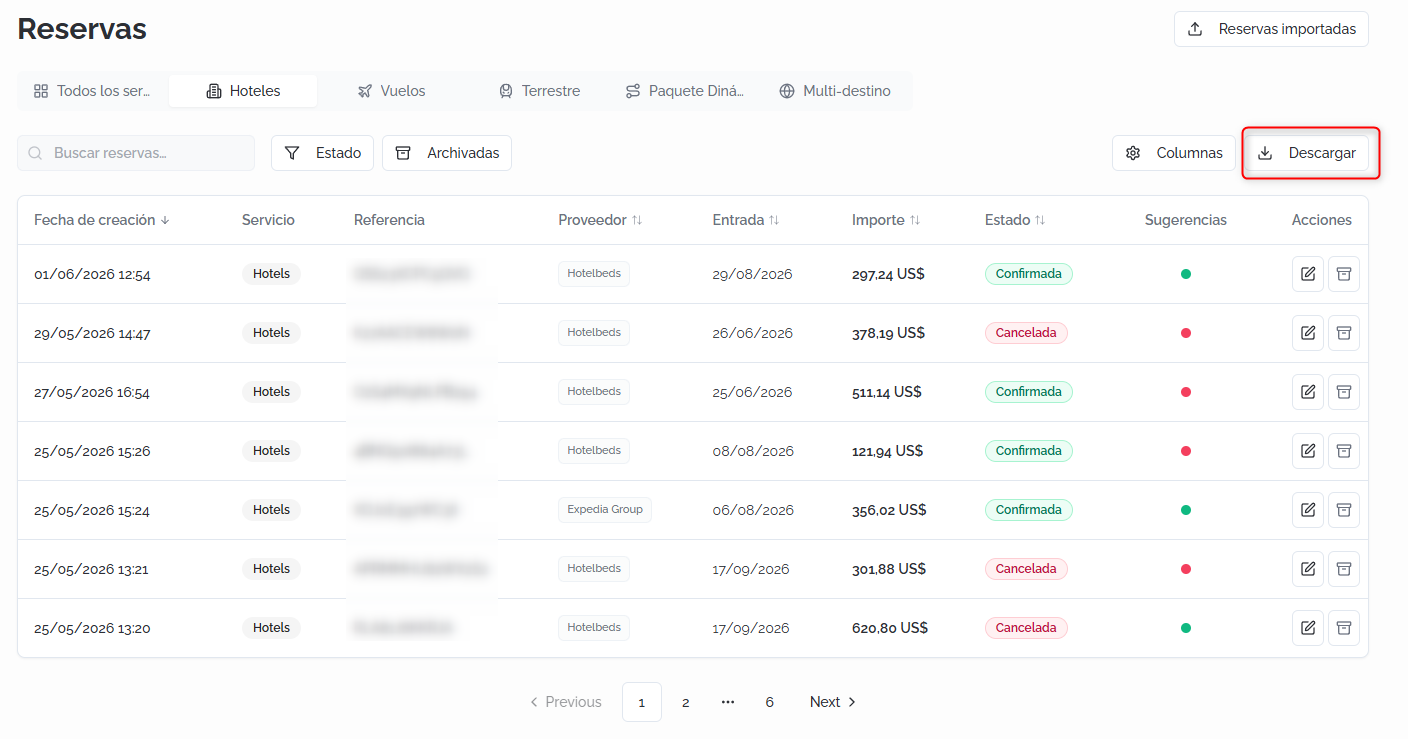
Haz clic enClick DescargarDownload parato exportarexport elthe listadobookings delist reservasas ena formatoCSV CSV.file.
ReservasImported importadasbookings
La secciónThe ReservasImported importadasbookings permitesection incorporarlets ayou labring plataformabookings reservasmade realizadasoutside fueraBundleport deinto Bundleport.the Puedesplatform. accederYou acan ellaaccess desdeit lafrom pestañathe correspondientecorresponding dentrotab dewithin lathe secciónBookings Reservas.section.
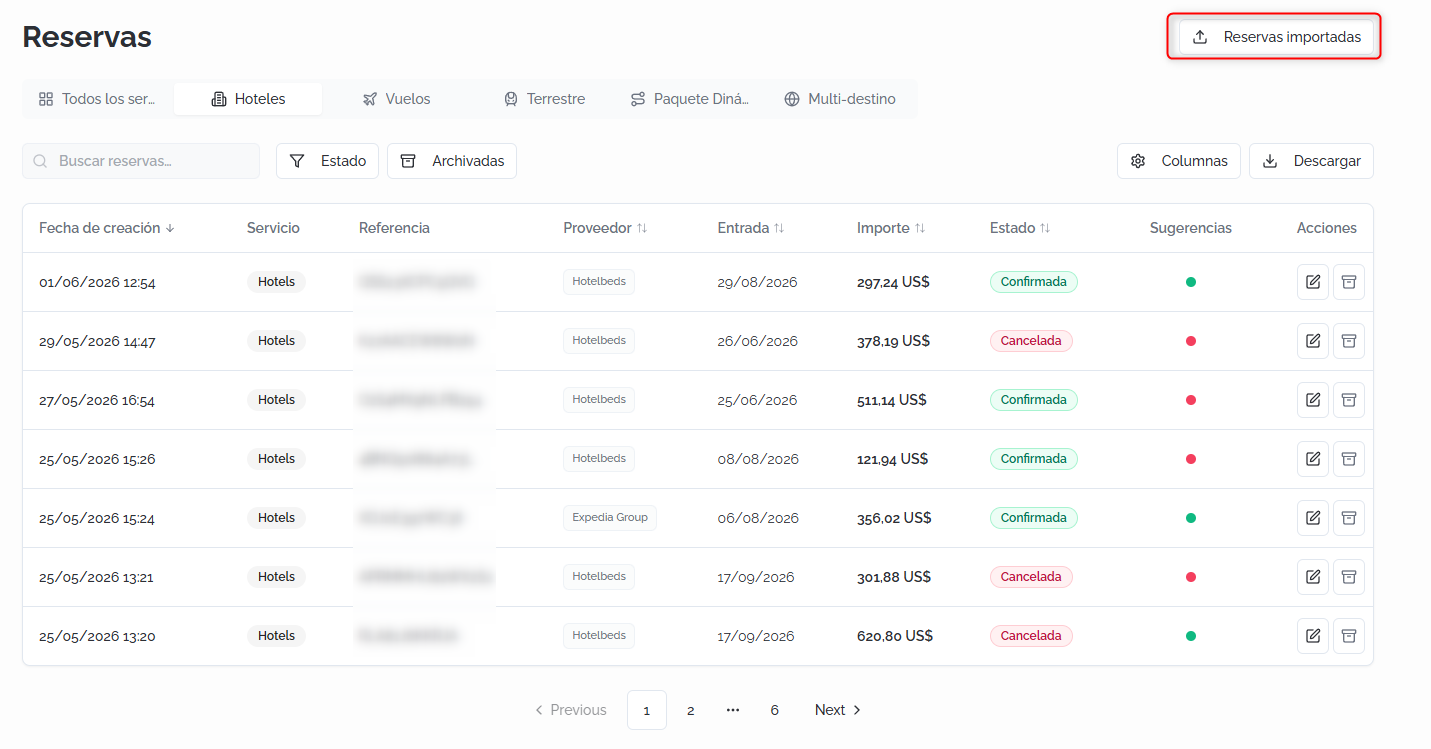
ElThe listadoimported debookings reservaslist importadasshows muestrathe lasfollowing siguientes columnas:columns:
FechaCreationde creacióndate:fechadateyandhoratimedeoflatheimportación.import.ServicioService:tipoproductde productotype (porforejemplo,example, Hotels).ReferenciaReference:códigothedeBundleportreferenciareferenceen Bundleport.code.ProveedorSupplier:origenthedelsupplierproveedorsource (porforejemplo,example, MANUAL).Ref.Supplierproveedorref.:referenciathedebookinglareferencereservainentheelsupplier'ssistema del proveedor.system.EntradaCheck-in:fechathedetrip'siniciostartdel viaje.date.ImporteAmount:preciothe booking's totalde la reserva.price.EstadoStatus:estadocurrentactualstatus (porforejemplo,example,ConfirmadaConfirmed).OrigenOrigin:cómohowsetheincorporóbookinglawasreservaadded (porforejemplo,example, Manual).SugerenciasSuggestions:mismothesistema de indicadores desame colorqueindicatorensystemelaslistadoinprincipalthe main list (disponibleavailableúnicamenteonlyparaforreservasbookingsimportadasimporteddesdefromproveedor)a supplier).AccionesActions:iconosiconsparatoeditar,edit,archivararchive,ooreliminardeletelathereserva.booking.
LosThe filtrosavailable disponiblesfilters son:are: búsquedatext porsearch, texto,status, estado,archived reservasbookings, archivadasand yimport origenorigin. deYou lacan importación.also Tambiéncustomize puedesthe personalizarvisible lascolumns columnasand visiblesexport ythe exportar el listado.list.
NuevaNew reservaimported importadabooking
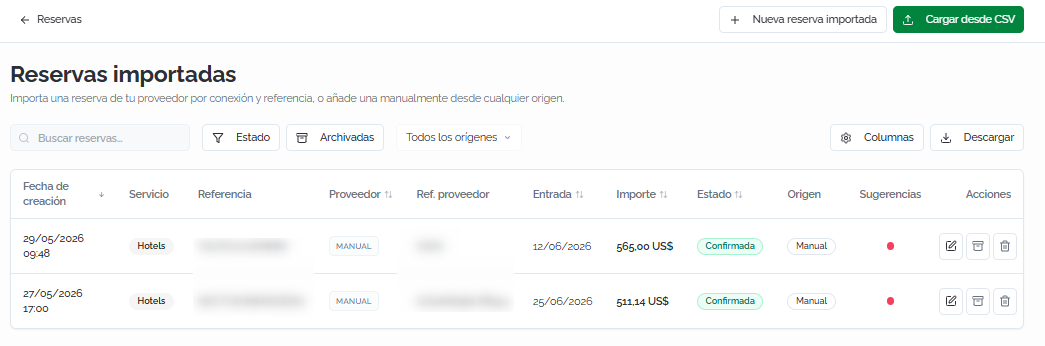
Al hacer clic enClicking NuevaNew reservaimported importadabooking seopens abrea unform formulariowith contwo dosentry modos de entrada:modes:
EntradaManualmanualentry:paratoañadiraddunaareservabookingdefromcualquieranyorigensourceintroduciendobylosenteringdatosthemanualmente.data manually.DesdeFromproveedorsupplier:paratoimportarimportunaanreservaexistingexistentebookingabasedpartirondethelaconnectionconexiónandythelasupplier'sreferencia del proveedor.reference.
ElThe formularioform incluye:includes:
DatosMainprincipalesdetails:proveedor,supplier,localizadorsupplierdel proveedor,locator, hotel,fechascheck-indeandentradacheck-outydates,salida,mealrégimen, precioplan, totalyprice,moneda.and currency.PersonaContactde contactoperson:opciónoptiondetoasociarlinkunan existingclienteclientexistentefromdelthe CRMparatoautocompletarauto-filllosthedatosholder'sdeldetails,titular,oroediteditarlosthemmanualmente.manually.DistribuciónRoomydistributionnotasand notes (opcional)optional):detalleroomde habitacionesdetails (nombre,name,adultos,adults,niñoschildren,yanddatoseachdeguest'scadainformation)huésped)andyancampoadditionaldenotesnotas adicionales.field.
Haz clic enClick GuardarSave eand importarimport parato incorporaradd lathe reserva.booking.
CargarUpload desdefrom CSV
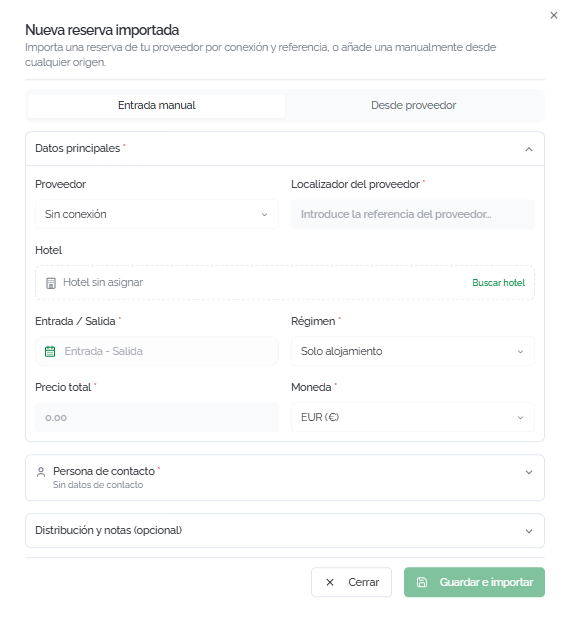
Haz clic enClick CargarUpload desdefrom CSV parato accederaccess a la secciónthe ProcesosImport deprocesses importación,section, quewhich permitelets realizaryou importacionesperform masivasbulk medianteimports archivosusing CSV.CSV files.
LaThe secciónsection muestrashows elthe historialimport dehistory importacioneswith conthe lacreation fechadate, deuser, creación,source, el usuario, el origen, el estado, el númerostatus, total denumber filas,of lasrows, filassuccessful correctas,rows, lasfailed fallidasrows, yand lasthe accionesavailable disponibles.actions.
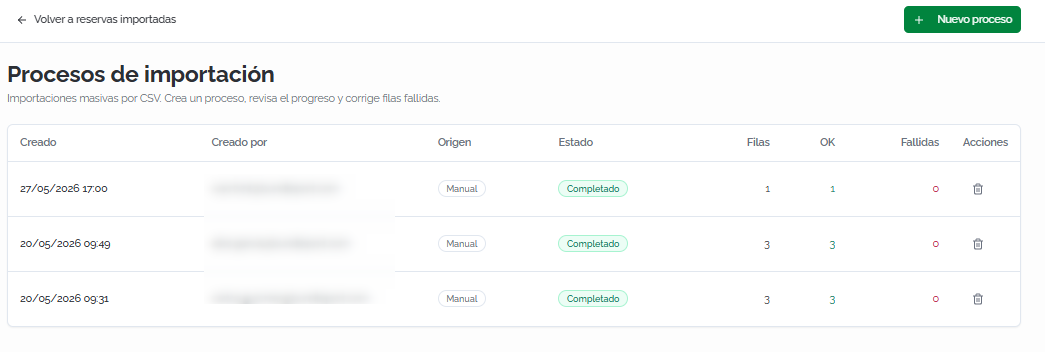
ParaTo crearcreate una nuevonew procesoimport de importación:process:
SeleccionaSelectelthemodoentryde entradamode (EntradaManualmanualentryoorDesdeFromproveedorsupplier).ConsultaCheckentheelguide in the left-hand panelizquierdodescribingla guía con la descripción de cada campo deleach CSV field (obligatoriosrequiredyandopcionales)optional).DescargaDownloadla plantillathe CSVdesdetemplateelfrompanelthederecho.right-hand panel.CompletaFilllainplantillatheytemplatesúbela.and upload it.RevisaReviewlathevistapreviewpreviaandy haz clic enclickIniciarStartimportaciónimport.
ℹ️ InformaciónInformationTrasAfter lathe importación,import, puedesyou corregircan erroresfix enerrors lasin filasthe fallidasfailed desderows elfrom detallethe delprocess's proceso.details. NoYou esdon't necesarioneed volverto are-upload subirthe elentire archivo completo. file.
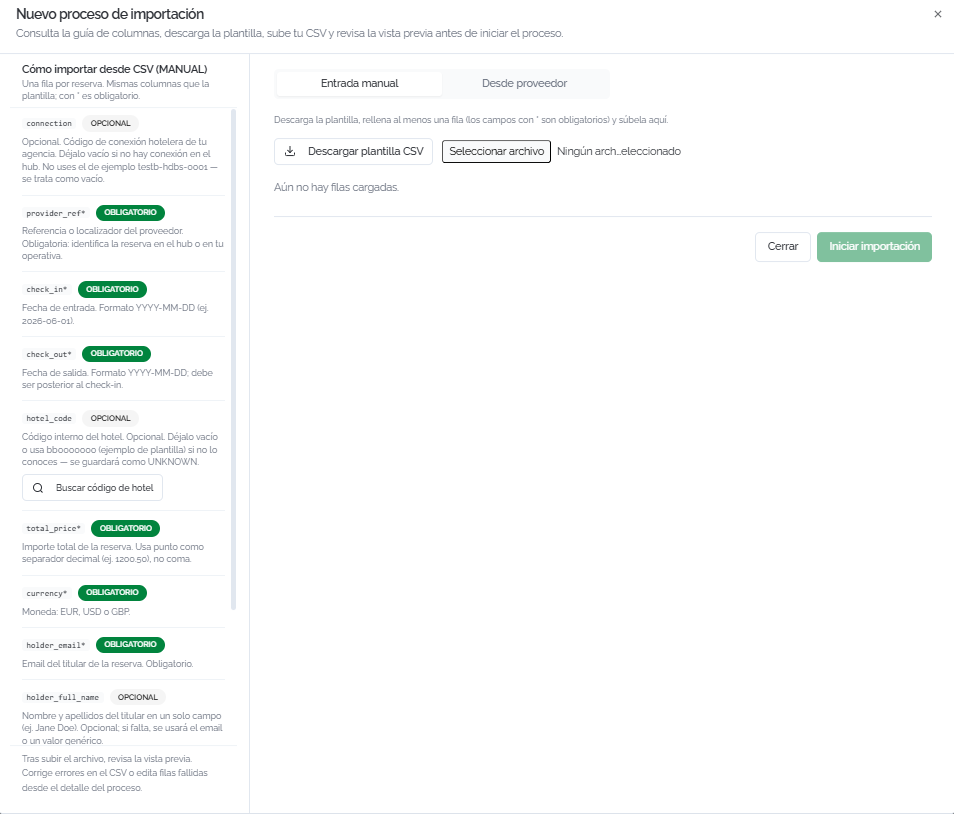
DetalleBooking de una reservadetails
HazClick clicthe enedit elicon iconoon deany ediciónbooking deto cualquieraccess reservaits paradetails accederpage, awhich sushows páginaall dethe detalle,associated queinformation muestraand todathe laavailable información asociada y las acciones disponibles.actions.
LaThe páginapage incluye:includes:
CabeceraHeader:referenciathedebooking'slaBundleportreservareference,en Bundleport, estadostatus (porforejemplo,example,ConfirmadaConfirmed),proveedorsupplier,yandreferenciasupplierdel proveedor.reference.DetalleHoteldel hoteldetails:fotografía,photo,nombre,name,categoríastarencategory,estrellas, dirección, fechas de entrada y salida con horarios deaddress, check-inyand check-out,outduracióndates with check-in and check-out times, length of stay (noches)nights),númeronumberdeofhuéspedesguests,yandrégimen.meal plan.HabitacionesRooms:tipothedetypehabitaciónofreservada,roomconbooked,elwithnombreeachyguest'sedadnamedeandcada huésped.age.ResumenBookingde la reservasummary (panelsidelateral)panel):desglosefinancialeconómicobreakdownconwith markup (porcentajepercentageeandimporte)amount), subtotal,descuentodiscount (siifaplica)applicable),yandpreciototaltotal.price.ContactoHolderdelcontacttitulardetails:nombre,name,correoemail,electrónico,phone,teléfonoandyfulldirección completa.address.ComentariosComments:campoadetexttextofieldparatoañadiraddoorconsultarviewcomentariosinternalinternoscommentssobreaboutlathereserva.booking.Haz clic enClickGuardarSaveparatoregistrarrecordelthecomentario.comment.InformaciónRelevantrelevantebookingde la reservainformation:políticathedeapplicablecancelacióncancellationaplicablepolicy (reembolsablerefundableoorno reembolsable)non-refundable),conwithlathefechafreelímitecancellationdedeadlinecancelaciónifgratuitaapplicable.si corresponde. DespliegaExpandVerViewcondiciones,conditions,cargoscharges,yandobservacionesremarksparatoconsultarcheckpenalizaciones,penalties,cargosadditionaladicionalescharges,yandobservacionessupplierdel proveedor.remarks.HistorialActivityde actividadhistory:registro cronológico de todos los eventos asociadosalachronologicalreservalog of all events associated with the booking (verificaciónpricedeverification,precio,supplierconfirmaciónconfirmation,conupdates)elwithproveedor,user,actualizaciones)eventcondescription,usuario,anddescripción del evento y fecha.date.
ℹ️ InformaciónInformationEnFor lasimported reservasbookings, importadas,in ademásaddition deto lasthe seccionessections anteriores,above, puedesyou editarcan directamentedirectly laedit informaciónthe delhotel hotel,information, lasrooms, habitaciones,dates, lascontact fechas,details, eland contactosummary. yA elsection resumen.with Sethe incluyeimport también un apartado con los datos de la importacióndetails (origen,source, fechadate, yand métodomethod deof incorporación).entry) is also included.
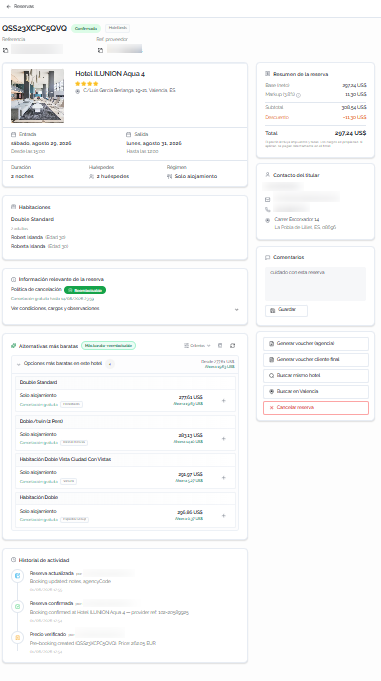
AlternativasCheaper más baratasalternatives
EstaThis secciónsection buscaautomatically automáticamentesearches opcionesfor máscheaper económicasoptions quethan lathe reservacurrent actualbooking parafor elthe mismosame hotel oor destino.destination. LosThe criteriosconfigurable desearch búsquedacriteria configurables son:are:
ÁmbitoScope:alternarswitchentrebetweenEsteThis hotel (buscasearchesdentrowithindelthemismosame hotel)yandDestinoDestination (incluyeincludesotrosotherhoteleshotelsdelindestino)the destination).MismoSamerégimenmeal plan:soloonlyopcionesoptionsconwithelthemismosamerégimenmealalimenticio.plan.MismaSamereembolsabilidadrefundability:soloonlyopcionesoptionsconwithlathemismasamepolíticacancellationde cancelación.policy.SoloCheapermás baratasonly:únicamenteonlyopcionesoptionsconwithprecioainferior.lower price.Máx.Maxopciones/options/hotel:númerothemáximomaximumdenumberalternativasofporalternatives per hotel.Haz clic enClickPor defectoDefaultparatorestaurarrestoreelthevalordefaultpredeterminadovaluey enandAplicarApplyparatoactualizarupdatelostheresultados.results.
CadaEach alternativaalternative muestrashows elthe tiporoom detype, habitación,meal elplan, régimen,cancellation lapolicy, políticasupplier, deprice, cancelación,and elestimated proveedor,savings. el precio y el ahorro estimado. Haz clic enClick + parato iniciarstart elthe procesochange de cambio.process.
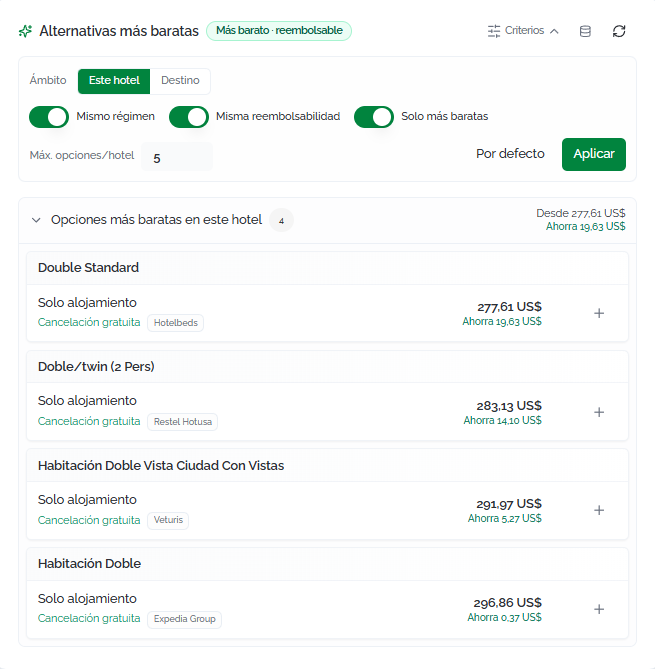
AlSelecting seleccionaran unaalternative alternativaopens sea abredialog unwith diálogothe condetails elof detallethe denew laoption, nuevathe opción, el titularholder (editable), lathe políticacurrent debooking's cancelacióncancellation de la reserva actualpolicy (conwith lathe opciónoption deto cancelarlacancel comoit parteas depart laof operación)the yoperation), unand resumena consummary lawith diferenciathe deprice preciodifference yand elthe ahorroestimated netonet estimado.savings. Haz clic enClick CrearCreate yand confirmarconfirm parato completarcomplete elthe cambio.change.
💡 Consejo:TipConsultaCheck la columnathe SugerenciasSuggestions encolumn elin listadothe debookings reservaslist parato identificarquickly rápidamenteidentify quéwhich reservasbookings tienenhave alternativascheaper másalternatives baratasbefore antesopening detheir entrardetails. alThe detalle.green Elindicator indicadorpoints verdeto señalathe lasopportunities oportunidadeswith conthe mayorhighest ahorropotential potencialsavings (cancelaciónfree sin costecancellation + alternativaalternative disponible)available).
AccionesAvailable disponiblesactions
DesdeFrom elthe right-hand side panel lateralof derechothe dedetails la página de detalle:page:
GenerarGenerate agency voucheragencia:generageneratesunandocumentointernal PDFinternodocumentconwithlosthedatosbooking'soperativosoperationalde la reserva.data.GenerarGenerate end client vouchercliente final:generageneratesun documentoa PDFparadocumententregartoalgivecliente.toAntesthedeclient.descargar,Beforepuedesdownloading,validaryouloscandatosvalidatedethelaagency'sagenciadetailseandincluirincludeunamensajepersonalizedpersonalizado.message.BuscarSearchmismosame hotel:lanzarunsunaanuevanewbúsquedaavailabilitydesearchdisponibilidadforparatheel mismosame hotel.BuscarSearchenin [destino]destination]:lanzarunsunaanuevanewbúsquedasearcheninelthedestinobooking'sde la reserva.destination.CancelarCancelreservabooking:iniciastartseltheprocesobooking'sdecancellationcancelación de la reserva.process.
⚠️ ImportanteImportantAntesBefore decancelling, cancelar,check revisathe lacancellation políticapolicy dein cancelación en la secciónthe InformaciónRelevant relevantebooking de la reservainformation parasection conocerto lassee posiblesany penalizaciones.possible Lapenalties. fechaThe límitefree decancellation cancelacióndeadline, gratuita,if siany, existe,is seshown muestrain enthat esa sección.section.
FAQs
¿QuéWhat significando los indicadores dethe color enindicators lain columnathe "Sugerencias"?Suggestions" column mean?
IndicanThey siindicate existenwhether alternativascheaper másalternatives baratasexist parafor esathat reserva.booking. VerdeGreen significameans quethere's haya unacheaper opciónoption másand baratathe ycurrent labooking reservacan actualbe secancelled puede cancelar sin coste. Amarillo significa que hay alternativa pero la cancelación tiene gastos. Rojo significa queat no haycost. opcionesYellow másmeans baratasthere's disponibles.an alternative but cancellation has fees. Red means no cheaper options are available.
¿PuedoCan importarI reservasimport realizadasbookings fueramade deoutside Bundleport?
Sí.Yes. La secciónThe ReservasImported importadasbookings permitesection incorporarlets reservasyou deadd dosbookings formas:in manualmentetwo ways: manually (rellenandofilling losin datos)the odata) desdeor unfrom proveedora conectadoconnected supplier (introduciendoentering lathe conexiónconnection yand la referencia)reference). TambiénYou puedescan haceralso importacionesperform masivasbulk medianteimports archivousing CSV.a CSV file.
¿QuéWhat estadosstatuses puedecan tenera unabooking reserva?have?
LosThe estadospossible posiblesstatuses son:are: ConfirmadaConfirmed (reservaactive activa)booking), CanceladaCancelled, BajoOn peticiónrequest (pendientepending de disponibilidad)availability), Pre-reservadabooked (pendientepending deconfirmation confirmaciónin ena propuesta)proposal), yand FallidaFailed (lathe reservabooking nocould pudonot completarse)be completed).
¿PuedoCan personalizarI lascustomize columnasthe delcolumns listadoin dethe reservas?bookings list?
Sí.Yes. Haz clic enClick ColumnasColumns parato añadiradd oor quitarremove columnas.columns. LasThe columnasadditional adicionalescolumns son:are: Proveedor,Supplier, Ref.Supplier proveedor,ref., PagoPayment, yand Contacto.Contact.
¿PuedoCan exportarI elexport listadothe debookings reservas?list?
Sí.Yes. Haz clic enClick DescargarDownload parato exportarexport elthe listadolist enas formatoa CSV confile loswith filtrosthe activosactive aplicados.filters applied.
¿CómoHow funcionadoes elswitching cambioto a unacheaper alternativaalternative más barata?work?
DesdeFrom elthe detallebooking's dedetails, la reserva, la secciónthe AlternativasCheaper más baratasalternatives muestrasection opcionesshows conoptions preciowith inferior.a Allower seleccionarprice. una,Selecting seone abreopens una diálogodialog dondewhere puedesyou revisarcan lareview nuevathe opción,new cancelaroption, lacancel reservathe actualcurrent comobooking parteas depart laof operaciónthe yoperation, confirmarand elconfirm cambio.the Elchange. sistemaThe calculasystem elcalculates ahorrothe netoestimated estimado.net savings.
¿QuéWhat's diferenciathe haydifference entrebetween elthe agency voucher deand agenciathe yend elclient voucher?
The agency voucher deis clientean final?internal
ElPDF document with all the operational data (supplier, references, conditions). The end client voucher deis agenciaaimed esat unthe documentotraveler PDFwith internothe coninformation todosneeded losfor datosthe operativostrip, (proveedor,and referencias,lets condiciones).you Elcustomize voucherthe deagency clientedetails finaland estáinclude orientadoa al pasajero con la información necesaria para el viaje, y permite personalizar los datos de la agencia e incluir un mensaje.message.
¿PuedoCan corregirI erroresfix enerrors unain importacióna CSV sinimport subirwithout dere-uploading nuevothe todoentire el archivo?file?
Sí.Yes. TrasAfter lathe importación,import, puedesyou accedercan alaccess detallethe delprocess's procesodetails yand corregirindividually individualmentefix lasthe filasrows quethat hayan fallado.failed.
¿LasDo reservasimported importadasbookings tambiénalso muestranshow alternativascheaper más baratas?alternatives?
SoloOnly lasbookings reservasimported importadasfrom desdea unconnected proveedorsupplier conectadoshow muestranthe elsuggestions indicador de sugerencias. indicator.