
Booking Tool: Dynamic Package
CombinaCombine transportetransportation yand alojamientoaccommodation enin una solosingle paquetepackage
ElThe BuscadorSearch esEngine elis motorthe desearch búsquedaand ybooking reservasengine integradobuilt eninto elthe PanelAgency dePanel. agencia. El modoThe PaqueteDynamic DinámicoPackage permitemode crearlets paquetesyou decreate viajetravel quepackages combinanthat transportecombine transportation (vuelo,flight, trentrain, oor autobús)bus) conwith estanciaa hotelerahotel enstay unain solaa búsqueda.single search.
EsteThis artículoarticle cubrecovers elthe flujofull completoDynamic delPackage Paqueteflow: Dinámico:from desdeconfiguring lathe configuraciónsearch deto lamanaging búsquedathe hastaconfirmed labooking. gestiónIt's dedesigned lafor reservaround-trip confirmada.itineraries Estáwith orientadoaccommodation aincluded itinerariosat dethe ida y vuelta con alojamiento incluido en el destino. Si necesitas crear itinerarios con varias ciudades o múltiples tramos, consulta el modo Multi-destino.destination.
AccederAccessing althe BuscadorSearch Engine
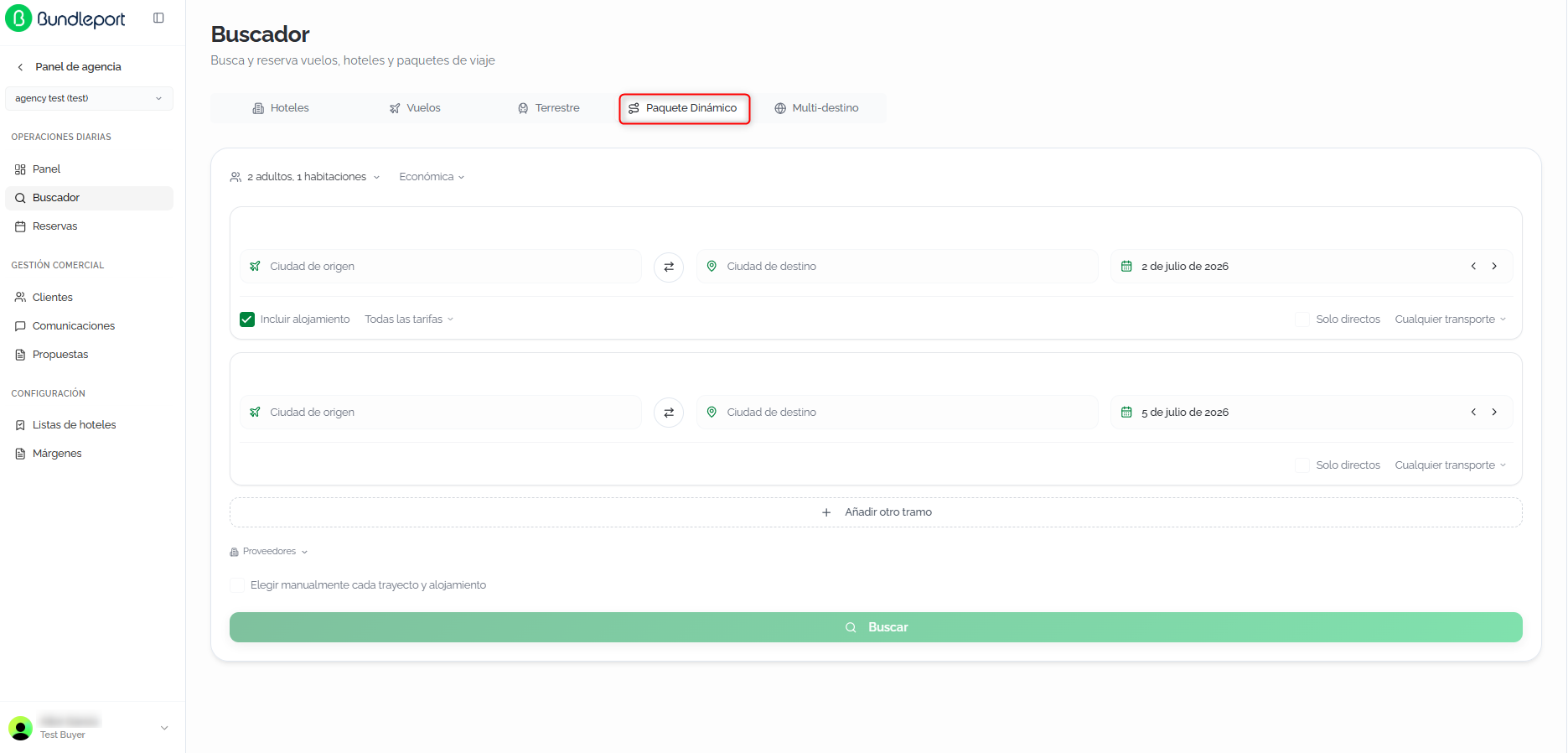
EntraLogeninlato theplataformaBundleportde Bundleportplatform.EnInelthemenúleft-handlateralsideizquierdo,menu,seleccionaselect Agency Panelde agencia.SeleccionaSelectBuscadorSearch.SeleccionaSelectla pestañathePaqueteDynamicDinámicoPackage.tab.
SeThe mostrarásearch elform formulariowill dedisplay búsquedawith contwo dospredefined tramos predefinidoslegs (idaoutbound yand vuelta)return) yand lasthe opcionesglobal deconfiguration configuración global.options.
ConfigurarConfiguring lathe búsquedasearch
ElThe formularioDynamic dePackage Paqueteform Dinámicolets permiteyou definirdefine una viajeround detrip idawith yaccommodation. vueltaFill conin alojamiento.the Rellenafollowing los siguientes campos:fields:
ClaseServicede servicioclass:seleccionaselectlatheclasetransportationdeclasstransportethatquewillseapplyaplicarátoaalltodos los trayectos:legs:EconómicaEconomy (por defecto)default)- Premium economy
- Business
PrimeraFirst
TramoOutboundde idaleg:CiudadOriginde origencity:ciudadoriginde origencity (campoautocompletecon autocompletado)field).CiudadDestinationde destinocity:ciudaddestinationde destinocity (campoautocompletecon autocompletado)field).BotónSwapde intercambiobutton ⇄:inviertereversesorigenoriginyanddestino.destination.FechaDate:fechadeparturededate.salida.ClickingAlithaceropensclicasetwo-monthabrecalendarunthatcalendarioletsdeyoudobleselectmesbothquethepermiteoutboundseleccionarandlareturnfechadates.de ida y de vuelta. Las flechasThe ‹yand ›juntoarrows next to the date let you move aladayfechaforwardpermitenoravanzar o retroceder un día.backward.IncluirIncludealojamientoaccommodation:casillaenabledactivadabypordefault,defectothisquecheckboxincluyeincludesla búsqueda dea hotelensearchlainciudadthededestinationdestinocityduranteforlatheestancia.stay.SoloDirectdirectosonly:casillacheckboxparatolimitarlimitlosresultsresultadostoadirectconexionesconnections,directas,withsinnoescalasstopsniortransbordos.transfers.CualquierAnytransportetransport:selectormulti-selectmultiseleccióncontrolconwithlosthetiposavailabledetransporttransporte disponibles:types:VueloFlight,TrenTrainy, and Bus.PorAlldefecto,threelosaretresselectedestánbyseleccionados.default.
TramoReturnde vueltaleg:contienecontainslosthemismossamecamposfieldsqueaselthetramooutboundde idaleg (ciudadorigindecity,origen,destinationciudadcity,dedate,destino,directfecha,only,soloAnydirectos, Cualquier transporte)transport),exceptoexceptIncluirIncludealojamientoaccommodation,yasincequeaccommodationelisalojamientoassociatedsewithasociathealoutboundtramo de ida.leg.AñadirAddtramosadditionaladicionaleslegs:haz clic enclickAñadirAddotroanothertramolegparatoañadiraddtramosintermediateintermedioslegsaltopaquete,theconvirtiendopackage,laturningbúsquedatheensearchunintoitinerarioa multi-tramo.leg itinerary.ProveedoresSuppliers:elthe Suppliers selectorProveedoresenatlathepartebottominferiorletspermiteyouelegirchoosequéwhichproveedoressuppliersincluir.toLosinclude.proveedoresSuppliersaparecenareagrupadosgroupedporbytipoproductde producto:type:VuelosFlights,TerrestreGroundy, andHotelesHotels.CadaEachgrupogroupincluye la opciónUnopara deseleccionar todos los proveedores de esa categoría, yDeseleccionar todosen la parte superior deselecciona todosincludes alaOnevez.option to deselect all suppliers in that category, and Deselect all at the top deselects everything at once.
💡 ConsejoTipLa opciónThe ElegirManually manualmentechoose cadaeach trayectoleg yand alojamientoaccommodation, visibleoption, debajoshown delbelow selectorthe desuppliers proveedores,selector, permitelets seleccionaryou deselect formaeach independientecomponent cadaof componentethe deltrip viajeindependently eninstead lugarof dereceiving recibira uncombined paquetepackage. combinado.This Esis útiluseful cuandowhen necesitasyou mayorneed more control sobreover lasthe opcionestransport deand transportehotel y hotel.options.
Haz clic enClick BuscarSearch parato lanzarrun lathe búsqueda.search.
ResultadosSearch de búsquedaresults
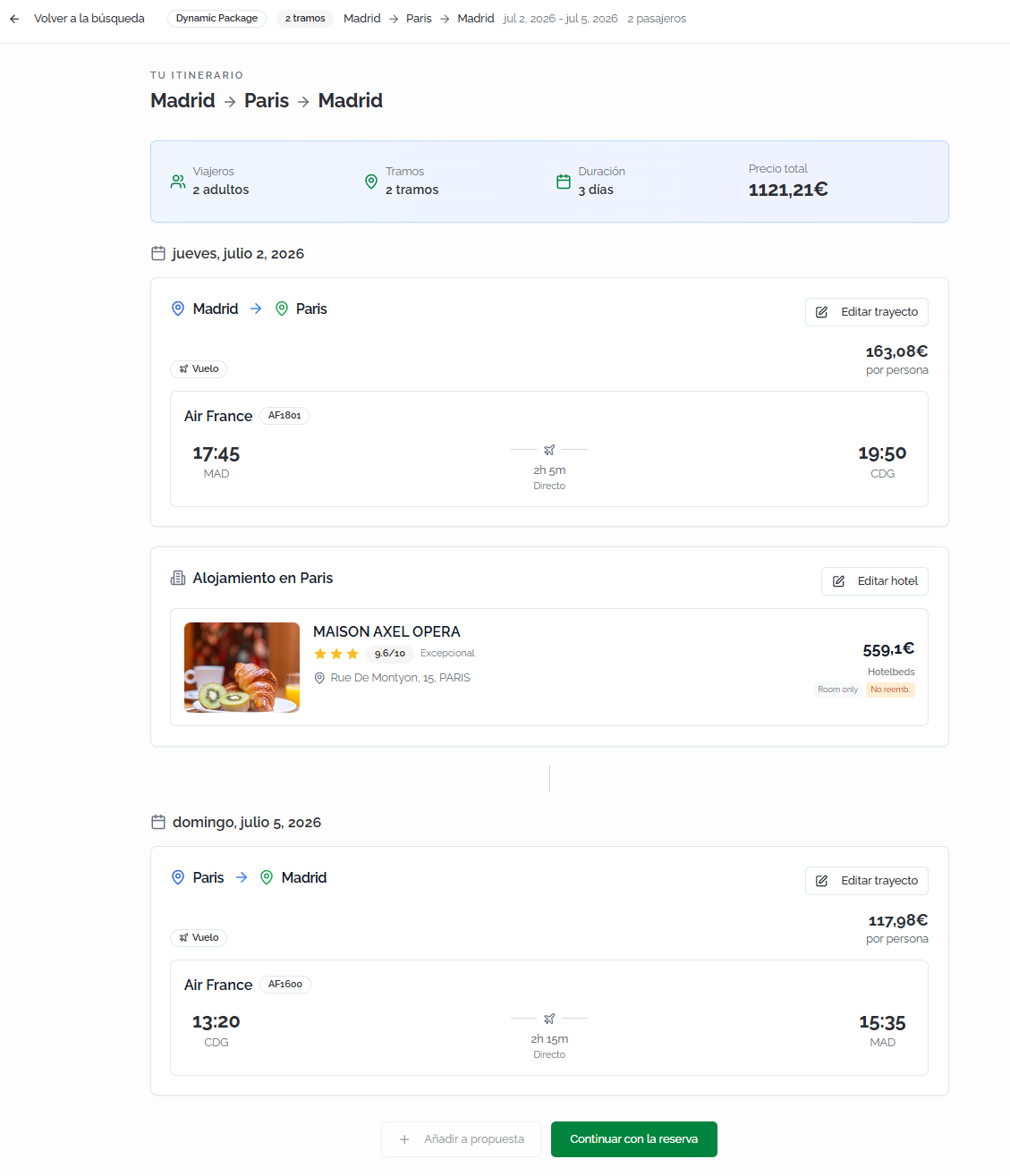
La página de resultadosThe TuYour itinerarioitinerary muestraresults elpage paqueteshows completothe encomplete formatopackage cronológico,in permitiendochronological revisarformat, transporte,letting alojamientoyou yreview preciotransportation, accommodation, and the total antesprice debefore continuarcontinuing conwith lathe reserva.booking.
ResumenItinerary del itinerariosummary
EnAt lathe partetop, superiora sequick muestrasummary unof resumenthe rápidotrip delis viaje:shown: rutafull completaroute (porfor ejemplo,example, Barcelona → London → Barcelona), númeronumber deof viajeros,travelers, númeronumber deof tramos, duraciónlegs, total yduration, precioand the package's total delprice. paquete. Haz clic enClick VolverBack ato la búsquedasearch parato regresarreturn alto formulariothe yform modificarand destino,modify fechas,the pasajerosdestination, odates, configuraciónpassengers, general.or general configuration.
TarjetasTransportation deand transporteaccommodation y alojamientocards
LosResults resultadosare seorganized organizanchronologically, cronológicamentealternating alternandotransportation tarjetasand deaccommodation transporte y alojamiento:cards:
TarjetaOutbounddeflightvuelocard:deShowsida:theMuestraoperatinglaairline,aerolíneaflightoperadora,number,númerodeparturedeandvuelo,arrivalhoratimes,deairports,salida y llegada, aeropuertos, escalas, duraciónstops, totalyduration,precioandporpricepersona.per person.TarjetaAccommodationdecard:alojamiento:ShowsMuestratheelhotelnombrename,delratinghotel,andvaloracióncategory,yaddress,categoría,contracteddirección,mealrégimenplan,contratado,cancellationpolíticapolicy,desupplier,cancelación,andproveedorpriceyofpreciothede la estancia.stay.TarjetaReturndeflightvuelocard:deSamevuelta:informationMismaasinformaciónthequeoutboundelflight,vuelofordetheidareturnpara el trayecto de regreso.leg.
CadaEach tarjetatransportation decard transporteincludes incluye un botónan EditarEdit trayectoleg parabutton modificarto elmodify vuelothe seleccionadoselected sinflight perderwithout ellosing hotelthe asociado.associated Lahotel. tarjetaThe deaccommodation alojamientocard incluyeincludes un botónan EditarEdit hotel parabutton reemplazarto elreplace alojamientothe manteniendoaccommodation loswhile vueloskeeping seleccionados.the selected flights.
💡 ConsejoTipUsaUse los botonesthe EditarEdit trayectoleg yand EditarEdit hotel parabuttons ajustarto componentesadjust individualesindividual delpackage paquetecomponents sinwithout repetirrepeating lathe búsquedafull completa.search. EstoThis permitelets compararyou opcionescompare detransport transporteor oaccommodation alojamientooptions manteniendowhile elkeeping restothe delrest itinerarioof intacto.the itinerary intact.
AccionesAvailable disponiblesactions
EnAt lathe partebottom inferiorof dethe laresults pantalla de resultados:screen:
ContinuarContinueconwithla reservabooking:avanzaproceedsalto checkoutparatoconfirmarconfirmelthepaquete.package.AñadirAdd to proposal: saves the itinerary in apropuesta: guarda el itinerario en unapropuestaproposalparatocompartirloshareconwitheltheclienteclientsinwithoutreservar.booking.
CompletarCompleting lathe reservabooking
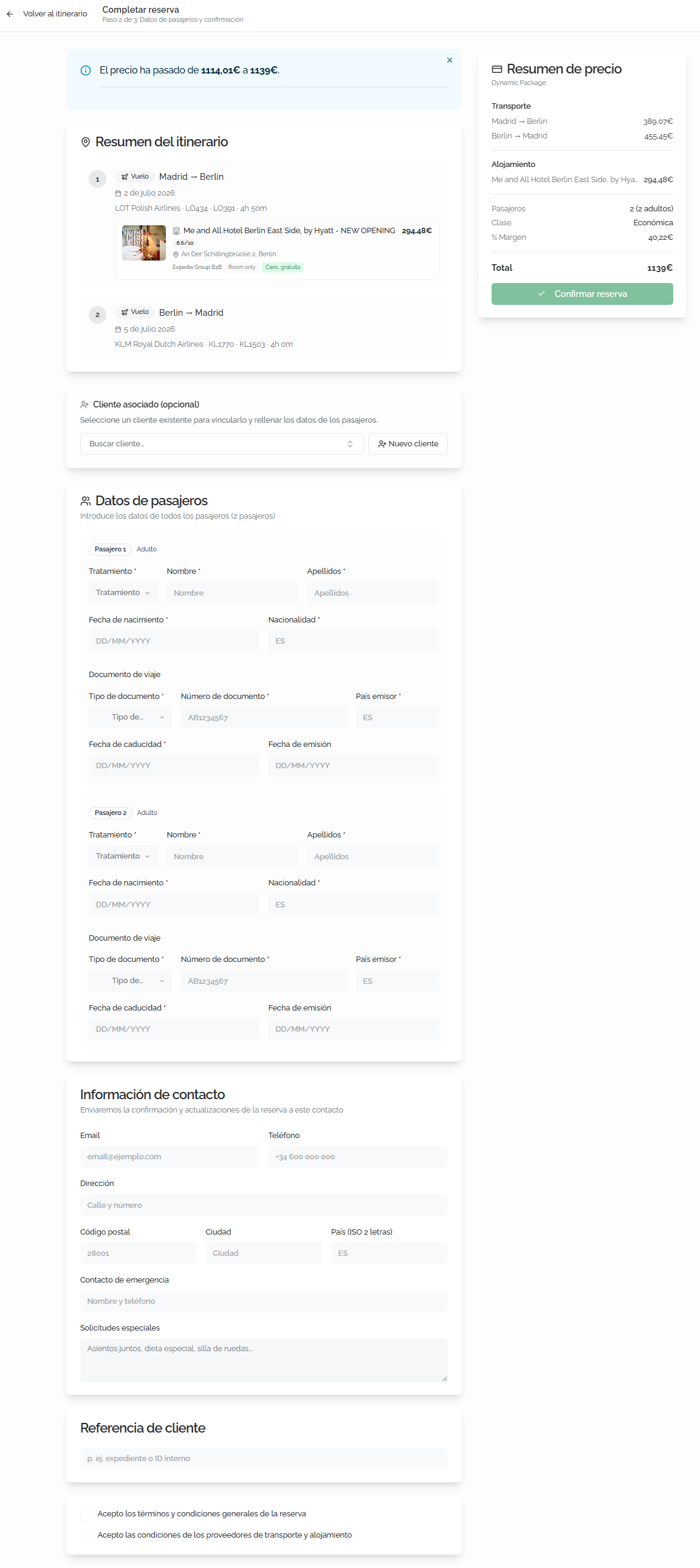
Al hacer clic enClicking ContinuarContinue conwith labooking reserva,opens se abre la página dethe checkout conpage unwith resumena delsummary itinerarioof ythe delitinerary precio.and price.
RellenaFill lain siguientethe información:following information:
ClienteAssociatedasociadoclient (opcional)optional):vinculalinklathereservabookingatounanclienteexistingexistenteclientparasoqueit'squederecordedregistradainentheirsuhistory.historial. Haz clic enClickBuscarSearchcliente.client...parabuscartoporsearchnombrebyoname or email.SiIfeltheclienteclientnodoesn'texiste,exist,haz clic enclickNuevoNewclienteclientparatocrearlocreatedirectamente.one directly.DatosPassengerpasajerosdetails:introduceenterloseachdatospassenger'sde cada pasajero:information:TratamientoTitle:seleccionaselectelthetratamientotitle (Sr.Mr.,Sra.Mrs., etc.).NombreFirst nameyandApellidosLast namedelofpasajero.the passenger.FechaDatedeofnacimientobirth.NacionalidadNationality.DocumentoTravelde viajedocument:tipodocumentdetype,documento,number,número,issuingpaíscountry,emisor,issuefechadate,deandexpediciónexpirationy fecha de caducidad.date.
InformaciónContactde contactoinformation:seusedusarátoparasendenviarbookingconfirmacionesconfirmationsyandactualizaciones de la reserva:updates:Correo electrónicoEmail.TeléfonoPhone.DirecciónAddress.
AceptaciónAcceptancedeoftérminosterms:antesbeforedeconfirming,confirmar,checkmarcathelaboxcasillaacceptingdetheaceptacióntermsdeandlosconditions,términostheycancellationcondiciones,policy,laandpolíticathedeaccommodationcancelaciónandytransportlassuppliers'condiciones del proveedor de alojamiento y transporte.conditions.
ℹ️ InformaciónInformationSiIf elthe clienteselected seleccionadoclient tienehas viajerostravelers configurados,set puedesup, autocompletaryou loscan datosauto-fill dethe lospassenger pasajerosdetails seleccionandoby elselecting viajerothe correspondiente.corresponding traveler.
⚠️ ImportanteImportant
Dynamic packages include legs that require travel document details for each passenger. Make sure the documents are valid throughout the travel dates and that the names match the official documentation exactly.Los paquetes dinámicos incluyen trayectos que requieren datos del documento de viaje de cada pasajero. Asegúrate de que los documentos estén vigentes en las fechas del viaje y de que los nombres coincidan exactamente con la documentación oficial.
VerificaCheck enthe elPrice summary side panel lateralto make sure the itinerary and financial breakdown are correct. Click ResumenConfirm de preciobooking queto elcomplete itinerariothe y el desglose económico son correctos. Haz clic en Confirmar reserva para completar la reserva.booking.
ConfirmaciónBooking de la reservaconfirmation
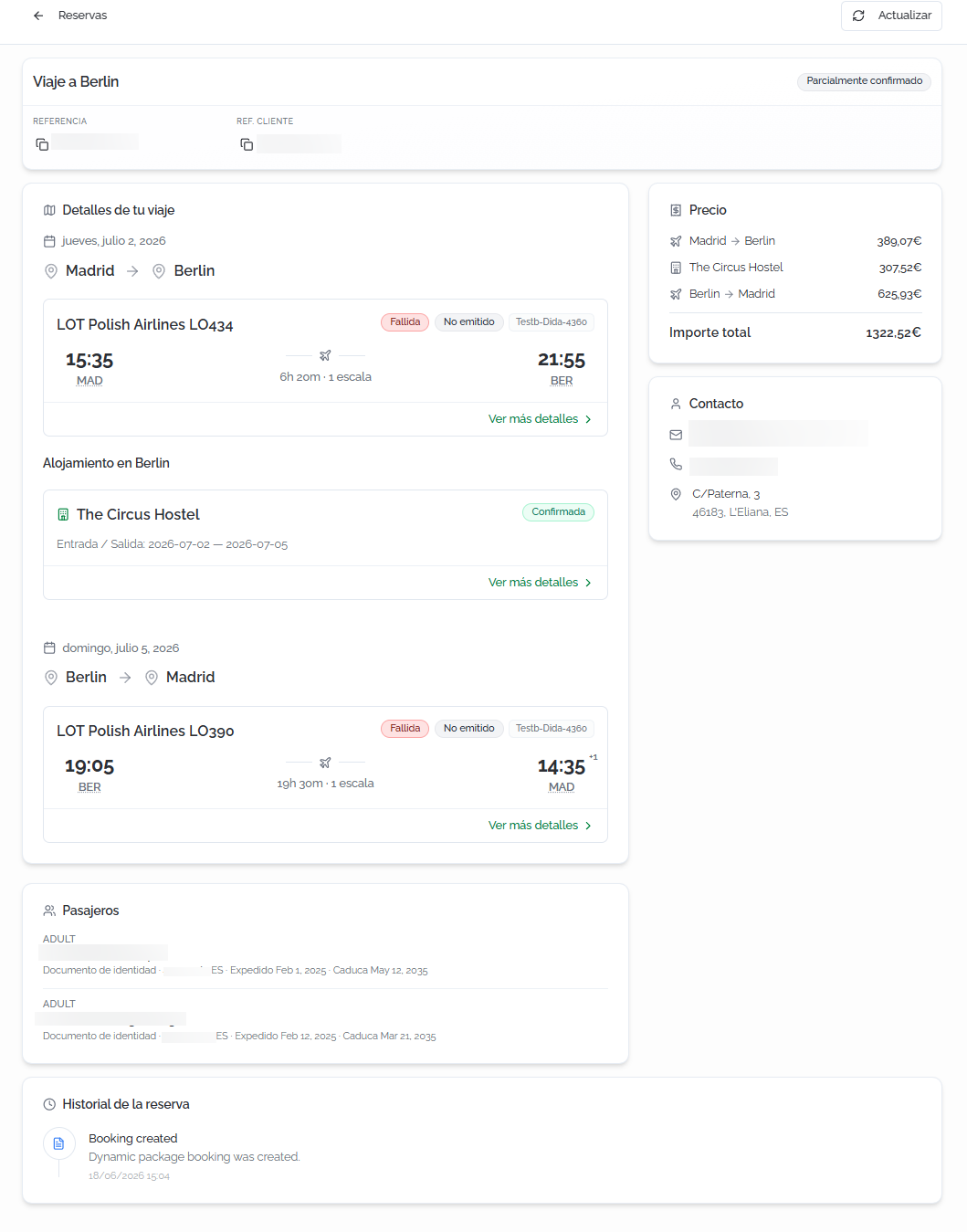
AlOnce confirmar,confirmed, sea muestrapage unais páginashown conwith el estadothe final delstatus paqueteof dinámicothe reservado:booked dynamic package:
CabeceraHeader:bannerconfirmationdebanner,confirmación,Bundleportreferenciareference,declientBundleport,reference,referenciabookingdelstatus,cliente,productestadotype,depaymentlastatus,reserva,andtipoissuancede producto, estado de pago y estado de emisión.status.DetallesTripdel viajedetails:itinerariofullcompletoitineraryorganizadoorganizedcronológicamente,chronologically,alternandoalternatingtarjetastransportationdeandtransporteaccommodationycards.alojamiento.ForParaeachcadaleg,trayectothesefollowingindica:isaerolíneashown:operadora,operatingnúmeroairline,deflightvuelo,number,aeropuertosdeparturedeandsalidaarrivalyairports,llegada,schedules,horarios,stops,escalas,totalduraciónduration,total,legestadostatus,delandtramosupplieryreference.referenciaFordeleachproveedor.accommodation:Parahotelcadaname,alojamiento:check-innombreanddelcheck-outhotel,dates,fechasanddebookingentradastatus.y salida, y estado de la reserva. Haz clic enClickVerViewmásmoredetallesdetailsparatoconsultarseelatheinformaciónexpandedampliadainformationdeforcadaeachcomponente.component.PrecioPrice (panelsidelateral)panel):desglosebreakdownporbytramoslegyandporbytiposervicede serviciotype (transportetransport + hotel)conwitheltheimportepackage's totaldel paquete.amount.ContactoContact:datoscontactdedetailscontactoassociatedasociadoswithathela reserva.booking.PasajerosPassengers:listadolistdeofpasajerospassengersconwithtratamiento,title,nombre,firstapellidos,name,tipolastdename,documento,documentnúmero,type,paísnumber,emisor,issuingfechacountry,deissueexpedicióndate,yandfechaexpirationde caducidad.date.HistorialBookingde la reservahistory:registrochronologicalcronológicologdeofeventosevents (creación,creation,cambiosstatusdechanges,estado, actualizaciones)updates),indicandoindicatinglatheacciónactionyandlathefecha.date.
ℹ️ InformaciónInformationAlAs igual que enwith Multi-destino,destination, cadaeach componentepackage del paquetecomponent (vuelo,flight, hotel) tienehas suits propioown estadoconfirmation destatus. confirmación.The Eloverall estadostatus generalreflects reflejathe lacombined situaciónsituation. conjunta. Haz clic enClick ActualizarRefresh enin lathe esquinatop superiorright derechacorner parato refrescarupdate elthe estadostatus deof todosall los componentes.components.
FAQs
¿QuéCan diferenciaI hayadd entreintermediate Paquetelegs Dinámicoto ya Multi-destino?Dynamic Package?
Click PaqueteAdd Dinámicoanother leg estáto diseñadoadd paraintermediate viajeslegs, deturning idathe ysearch vueltainto sencillosa quemulti-leg combinanitinerary transportewithin ythe alojamientosame en un destino. Multi-destino permite crear itinerarios con múltiples ciudades y varios tramos de transporte con estancias en distintos destinos.package.
¿PuedoCan añadirI tramosmodify intermediosthe aflight unor Paquetehotel Dinámico?without repeating the whole search?
HazYes. clicFrom enthe results screen, each component has an AñadirEdit otroleg tramoor Edit hotel para añadirbutton tramosthat intermedios,lets convirtiendoyou lareplace búsquedathat encomponent unwhile itinerariokeeping multi-tramothe dentrorest delof mismothe paquete.itinerary.
¿PuedoWhat modificar el vuelo o el hotel sin repetir toda la búsqueda?
Sí. Desde la pantalla de resultados, cada componente tiene un botón Editar trayecto o Editar hotel que permite reemplazar ese componente manteniendo el resto del itinerario.
¿Qué son losare "CargosCharges enat propiedad"the property"?
SonThese tasasare ofees cargosor charges (comosuch laas tasathe turística)tourist quetax) elthat huéspedthe pagaguest directamentepays endirectly elat the hotel. NoThey're senot incluyenincluded enin elthe importeamount que se cobracharged online.
¿PuedoCan buscarI alternativassearch másfor baratas para elcheaper hotel despuésalternatives deafter reservar?booking?
Sí.Yes. DesdeFrom lathe vista completa de la reserva de hotel, la plataforma permite buscar opciones alternativas con precio inferior, filtrando por ámbito (mismofull hotel obooking destino)view, the platform lets you search for cheaper alternative options, filtering by scope (same hotel or destination), régimenmeal yplan, condicionesand decancellation cancelación.conditions.
¿PuedoCan guardarI elsave paquetethe sinpackage reservar?without booking?
Sí.Yes. DesdeFrom lathe pantallaresults descreen, resultados puedes hacer clic enclick AñadirAdd to proposal to save the full itinerary in a propuestaproposal paraand guardarshare elit itinerariowith completothe en una propuesta y compartirlo con el cliente.client.
¿QuéWhat vouchers puedocan generar?I generate?
PuedesYou generarcan dosgenerate tipos:two eltypes: the agency voucher de(internal agenciaPDF with full operational data) and the end client voucher (PDF internofor conthe datospassenger operativoswith completos)the yinformation elneeded voucherfor clientethe finaltrip, (PDFcustomizable parawith ela pasajeromessage confor lathe información necesaria para el viaje, personalizable con un mensaje para el cliente)client).
¿QuéWhat significadoes el estadothe "ParcialmentePartially confirmado"?confirmed" status mean?
EnIn una paquetedynamic dinámico,package, cadaeach componentecomponent (vuelo,flight, hotel) seis confirmaconfirmed deindependently. formaIf independiente.any Sicomponent algúnis componentepending estáor pendientehas ofailed hawhile falladoothers mientrasare otrosconfirmed, estánthe confirmados,overall labooking reservais generalshown se muestra comoas ParcialmentePartially confirmadoconfirmed. Haz clic enClick ActualizarRefresh parato refrescarupdate elthe estado.status.