
Markups
ConfiguraConfigure lasyour reglasagency's demarkup márgenes de tu agenciarules
LosMarkups Márgeneslet permitenyou aplicar un recargo comercial (markup) sobre los precios netos de los proveedores. Puedes crear reglas globales que apliquenapply a todascommercial lasmarkup conexioneson detop laof agencia,suppliers' onet reglasprices. específicasYou porcan conexión,create configurandoglobal elrules tipothat deapply margen,to rangoall deof importe,the vigenciaagency's temporalconnections, yor prioridadconnection-specific derules, aplicación.configuring the margin type, amount range, validity period, and application priority.
ElThe resulting markup resultanteis sereflected reflejain eneach elbooking's desgloseprice de precio de cada reservabreakdown (líneathe Markup enline elin resumen)the ysummary) determinaand eldetermines preciothe final queprice seshown presentato althe cliente.client.
AccederAccessing a MárgenesMargins
EntraLogeninlato theplataformaBundleportde Bundleportplatform.EnInelthemenúleft-handlateralsideizquierdo,menu,seleccionaselect Agency Panelde agencia.En el apartadoUnderConfiguraciónSettingsdelinmenúthelateral,sideseleccionamenu, selectMárgenesMargins.
ListadoRules de reglaslist
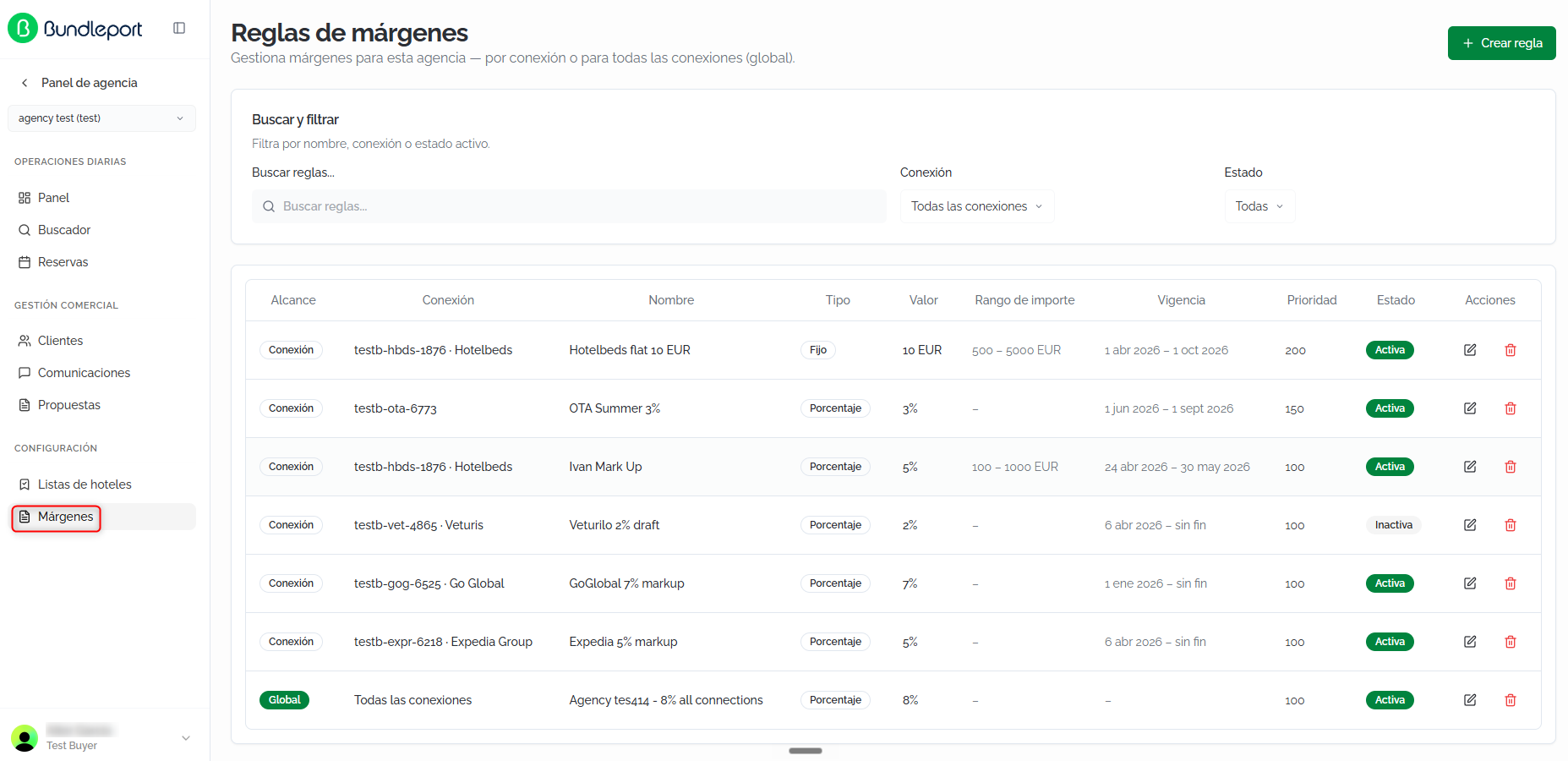
LaThe pantallamain principalscreen muestrashows todasall lasthe reglasmargin derules margenconfigured configuradasfor enyour tu agencia.agency.
BúsquedaSearch yand filtrosfilters
EnAt lathe partetop, superioryou puedescan filtrarfilter lasthe reglasrules conusing losthe siguientesfollowing controles:controls:
BuscarSearchreglasrules:búsquedafree-textpor texto libresearch (nombre,name,conexiónconnection,oorestado)status).ConexiónConnection:filtrafilterporbyunaaconexiónspecificespecíficaconnectionoormuestrashowtodas.all.EstadoStatus:filtrafilterporbyTodasAll,SoloActiveactivasonly,oorSoloInactiveinactivasonly.

TablaRules de reglastable
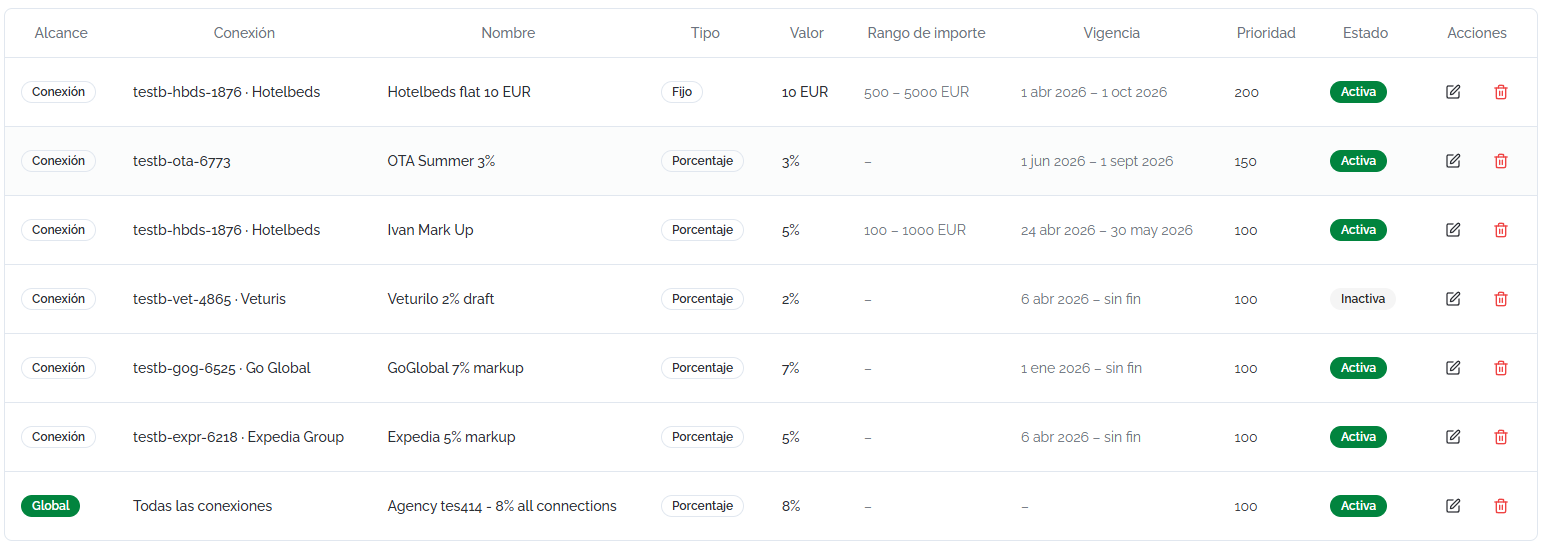
CadaEach reglarule seis muestrashown comoas unaa filarow conwith lasthe siguientesfollowing columnas:columns:
AlcanceScope:indicaindicatessiwhetherlathereglaruleaplicaapplies to aunaspecificconexiónconnectionespecíficaoro de forma global.globally.ConexiónConnection:conexióntheaconnectionlathequeruleaplicaappliesla reglato (siifelscopedalcancebyes por conexión)connection).NombreName:nombreidentifyingidentificativonamedeoflatheregla.rule.TipoType:PorcentajePercentageoorFijoFixed.ValorValue:valorthedelmarginmargenvalueaplicadoapplied (porcentajepercentageoorimportefixedfijo)amount).RangoAmountde importerange:rangothedebookingpreciopricederangelathereservarulesobreapplieselto.queIfaplicanotla regla. Si no se ha definido, aparecedefined, "–" is shown.
CrearCreating unaa reglamargin de margenrule
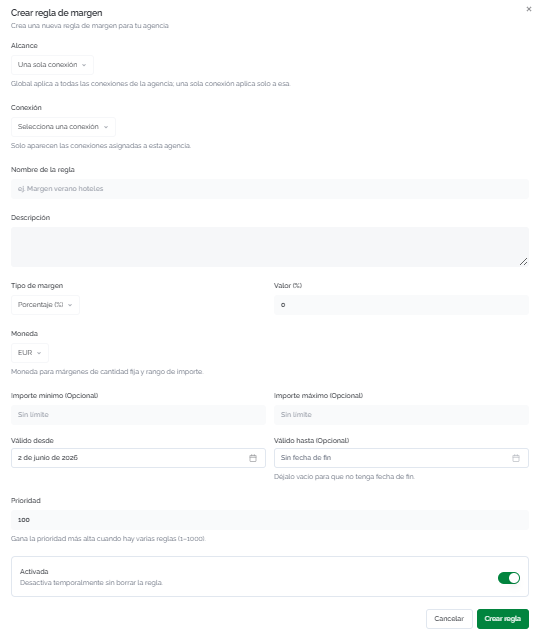
Haz clic enClick + CrearCreate reglarule enin lathe esquinatop superiorright derecha.corner. SeThe abriráform elwill formularioopen conwith losthe siguientesfollowing campos:fields:
AlcanceScope:seleccionaselectsiwhetherlathereglaruleaplicaappliesatoUnaAsolasingleconexiónconnectiono de formaorGlobalGlobally (todasalllasofconexionesthedeagency'sla agencia)connections).ConexiónConnection:siifelthealcancescopeesisporbyconexión,connection,seleccionaselectlatheconexión.connection.SoloOnlyaparecenconnectionslasassignedconexionestoasignadasyouraagencytuareagencia.shown.NombreRulede la reglaname:nombreidentifyingidentificativoname (porforejemplo,example,MargenSummerveranohotelhotelesmargin).DescripciónDescription:textooptionallibrefreeopcionaltextparatodetallardescribeelthepropósitorule'sde la regla.purpose.TipoMarginde margentype:PorcentajePercentage (%)oorCantidadFixedfijaamount.ValorValue:valorthenumériconumericdelmarginmargenvalueatoaplicar.apply.MonedaCurrency:monedathedereferencereferenciacurrency (relevanterelevantparaformárgenesfixed-amountdemarginscantidadandfijaforytheparaamountel rango de importe)range).ImporteMinimummínimoamount (opcional)optional):importethemínimominimumdebookinglaamountreservaaboveawhichpartirthedelrulecualapplies.aplicaIflaleftregla.blank,Si se deja vacío,there's nohaylowerlímite inferior.limit.ImporteMaximummáximoamount (opcional)optional):importethemáximomaximumdebookinglaamountreservauphastatoelwhichcualtheaplicarulelaapplies.regla.IfSileftseblank,deja vacío,there's nohayupperlímite superior.limit.VálidoValiddesdefrom:fechathedestartiniciodatedeoflathevigenciarule'sde la regla.validity.VálidoValidhastauntil (opcional)optional):fechathedeendfin.date.DéjaloLeavevacíoblankparaforquethelarulereglato have notengaexpirationfecha de expiración.date.PrioridadPriority:valoraentrevalue between 1yand 1000.CuandoWhenvariasseveralreglasrulescoincidenapplyentounathemismasamereserva,booking,ganathelaonedewithmayortheprioridad.highest priority wins.ActivadaEnabled:interruptoraparatoggleactivartootemporarilydesactivaractivatelaorregladeactivatetemporalmentethesinruleeliminarla.without deleting it.
Haz clic enClick CrearCreate reglarule parato guardar,save, o enor CancelarCancel parato descartar.discard.
⚠️ ImportanteImportantCuandoWhen variasseveral reglasrules coincidenapply ento unathe mismasame reservabooking (porby alcance,scope, rangoamount derange, importeand y vigencia)validity), soloonly sethe aplicarule lawith regla conthe mayorhighest prioridadpriority. Asegúrateis deapplied. queMake lassure prioridadespriorities reflejanreflect lathe jerarquíahierarchy queyou necesitas:need: porfor ejemplo,example, unaa reglarule específicaspecific parato una conexióna premium deberíaconnection tenershould mayorhave prioridada quehigher lapriority reglathan the default global por defecto.rule.
💡 ConsejoTipUsaUse elthe rangoamount derange importeto paracreate creartiered reglasrules. escalonadas.For Porexample, ejemplo, una 5% de markup parafor reservasbookings de 0–500of €, un0–500, 3% parafor reservasbookings de 500–2000of €500–2000, y unand 2% parafor reservasbookings superiores a 2000over €.2000. AsignaAssign lathe mismasame prioridadpriority ato lasall tresthree reglasrules yasince quethe losranges rangosdon't no se solapan.overlap.
EditarEditing yand eliminardeleting reglasrules
Editar:Editing: HazClick clicthe enedit el icono de ediciónicon (lápiz)pencil) enin la columnathe AccionesActions decolumn lafor reglathe querule quierasyou modificar.want Seto abrirámodify. elThe mismosame formulariocreation deform creaciónwill conopen, lospre-filled valoreswith actuales.the Realizacurrent losvalues. cambiosMake necesariosthe ynecessary guarda.changes and save.
💡 ConsejoTipSiIf necesitasyou desactivarneed unato reglatemporarily temporalmente,deactivate usaa elrule, interruptoruse the ActivadaEnabled entoggle lugarinstead deof eliminarla.deleting Asíit. podrásThis reactivarlaway enyou elcan futuroreactivate sinit tenerin quethe recrearla.future without having to recreate it.

Eliminar:Deleting: HazClick clicthe entrash elicon iconoin de papelera en la columnathe AccionesActions. Estacolumn. acciónThis eliminaaction lapermanently regladeletes dethe formarule definitivaand ycannot nobe seundone. puedeBookings deshacer.already Lasmade reservaswith yathis realizadas con elrule's markup deare estanot regla no se ven afectadas.affected.

FAQs
¿QuéWhat pasahappens siif there's no hayactive ningunamargin regla de margen activa?rule?
LasBookings reservaswill sebe procesaránprocessed conat elthe preciosupplier's delprice, proveedor,with sinno markupadditional adicional.markup. El campoThe Markup delfield desglosein dethe precioprice mostrarábreakdown will show 0.
¿QuéWhat's diferenciathe haydifference entrebetween una reglaa global yrule unaand pora conexión?connection-specific rule?
Una reglaA global aplicarule aapplies todasto lasall conexionesof dethe laagency's agencia.connections. Una reglaA por conexiónconnection-specific aplicarule soloapplies aonly lato conexiónthe seleccionada.selected Siconnection. ambasIf coinciden,both prevaleceapply, lathe queone tengawith mayorthe prioridad.higher priority prevails.
¿PuedoCan tenerI reglashave depercentage porcentajeand yfixed-amount derules cantidadactive fijaat activasthe alsame mismo tiempo?time?
Sí,Yes, puedesyou crearcan reglascreate derules ambosof tipos.both Sitypes. variasIf reglasseveral coincidenrules enapply unato mismathe reserva,same sebooking, aplicaráonly únicamentethe laone dewith mayorthe prioridad,highest independientementepriority dewill sibe esapplied, deregardless porcentajeof owhether cantidadit's fija.percentage or fixed amount.
¿ElIs margenthe semargin aplicaapplied sobreon eltop precioof delthe proveedor?supplier's price?
Sí.Yes. ElThe markup seis calculacalculated sobreon elthe preciosupplier's base delprice. proveedor.The Elresult resultadois seshown muestraas como líneathe Markup enline elin desglosethe debooking's precioprice de la reserva.breakdown.
¿PuedoCan limitarI una reglalimit a unrule rangoto dea precios?price range?
Sí.Yes. UsaUse los camposthe ImporteMinimum mínimoamount eand ImporteMaximum máximoamount parafields definirto eldefine rangothe debooking precioprice derange lathe reservarule sobreapplies elto. queIf aplicayou laleave regla.both Siblank, dejasthe ambosrule vacíos,applies lato reglaany aplica a cualquier importe.amount.
¿PuedoCan desactivarI unadeactivate reglaa sinrule eliminarla?without deleting it?
Sí.Yes. EditaEdit lathe reglarule yand desactivaturn eloff interruptorthe ActivadaEnabled. Latoggle. reglaThe dejarárule dewill aplicarsestop peroapplying sebut conservaráwill enremain elin listadothe conlist estadowith InactivaInactive parastatus poderso reactivarlayou encan elreactivate futuro.it in the future.
¿QuéWhat significadoes lapriority prioridadmean yand quéwhat valoresvalues puedocan usar?I use?
LaPriority prioridadis esa unvalue valor entrebetween 1 yand 1000 quethat determinadetermines quéwhich reglarule prevalecetakes cuandoprecedence variaswhen coinciden.several Aapply. mayorThe número,higher mayorthe prioridad.number, Sithe doshigher reglasthe coincidenpriority. enIf alcance,two rangorules ymatch vigencia,in soloscope, serange, aplicaand lavalidity, deonly mayorthe prioridad.one with the highest priority is applied.
¿DóndeWhere puedocan verI elsee the markup aplicadoapplied ento unaa reserva?booking?
EnIn elthe ResumenBooking de la reservasummary (side panel lateral durante elduring checkout oor enon lathe páginaconfirmation depage) confirmación)and yin enthe elprice desglosebreakdown deon preciosthe enresults lapage, página de resultados, la líneathe Markup muestraline elshows porcentajethe ypercentage eland importeamount delof margenthe aplicadomargin sobreapplied elon preciotop neto.of the net price.
¿LosDo cambioschanges ento lasmargin reglasrules deaffect margenbookings afectanalready a reservas ya realizadas?made?
No. LasMargin reglasrules deare margenapplied seat aplicanthe entime elof momentosearch deand labooking. búsquedaLater y la reserva. Los cambios posterioreschanges (editar,editing, desactivardeactivating, oor eliminardeleting reglas)rules) nodo modificannot elmodify the markup deof reservasbookings yathat confirmadas.have already been confirmed.