
Help
CómoHow obtenerto ayuda,get reportarhelp, problemasreport yissues, enviarand sugerenciassend suggestions
Bundleport ofreceoffers variosseveral canaleschannels parafor obtenergetting ayuda:help: emailsupport deemail, soporte,built-in preguntasFAQs, frecuentesreal-time integradas,system estadostatus, deland sistema en tiempo real y un formulario dea feedback paraform enviarfor sugerenciassending osuggestions reportaror errores.reporting Todosbugs. estosAll recursosof sonthese accesiblesresources desdeare elaccessible menúfrom dethe laplatform's plataforma.menu.
AccederAccessing a AyudaHelp
EntraLogeninlato theplataformaBundleportde Bundleportplatform.HazClickclic en tuyournombre de usuariousernameeninlatheesquinabottominferiorleftizquierdacornerdelofmenúthelateral.side menu.SeleccionaSelectAyudaHelpparatodesplegarexpandlastheopcionesavailabledisponibles.options.
LasThe opcionesoptions delin menúthe deHelp Ayudamenu son:are:
VerViewestadostatus:abreopenslathepáginasystemdestatusestadopagedeltosistemacheckparaserviceconsultaravailabilitylaanddisponibilidad de servicios e incidencias.incidents.TérminosTermsdeofservicioservice:enlacelinkatolosthetérminosplatform'sytermscondicionesanddeconditionsusoofde la plataforma.use.PolíticaPrivacyde privacidadpolicy:enlacelinkatolathepolíticaprivacyde privacidad.policy.EnviarSendcomentariosfeedback:abreopenslathepáginasupportde soporte.page.SoporteBillingde facturaciónsupport:abreopenslathepáginasupportde soporte.page.
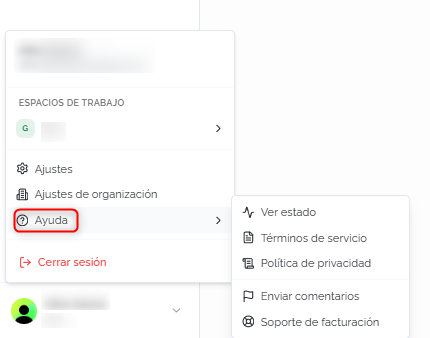
PáginaSupport de soportepage
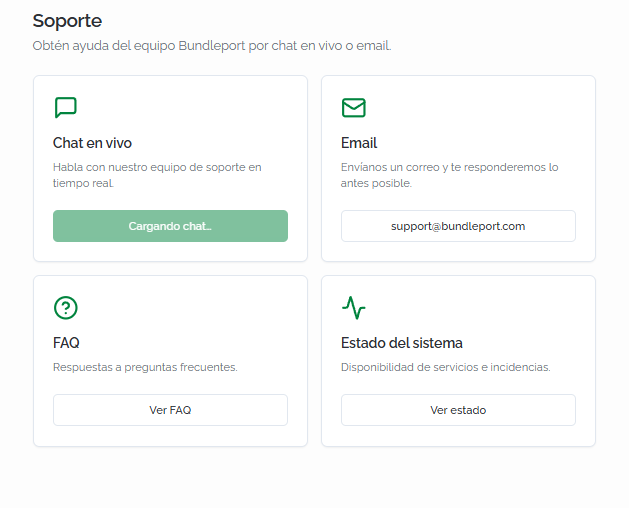
TantoBoth EnviarSend comentariosfeedback comoand SoporteBilling de facturaciónsupport enin elthe menúHelp demenu Ayudalead dirigento a la página dethe SoporteSupport, quepage, centralizawhich loscentralizes canalesthe deavailable ayudahelp disponibleschannels enin cuatrofour tarjetas:cards:
ChatLiveen vivochat:canalreal-timedesupportsoportechannelenwithtiempotherealBundleportcon el equipo de Bundleport.team.- Email:
envíasendunancorreoemailato support@bundleport.comparaforconsultasinquiriesquethatnodon'trequieranrequireatenciónimmediateinmediata.attention.ElTheequiposupportdeteamsoportewillresponderárespondloasantessoonposible.as possible. - FAQ:
accedeaccess the platform's frequently asked questions section. It includes alasearchseccióntooldeandpreguntascoversfrecuentestopicsdesuchlaasplataforma.theIncluyesupplyuncatalog,buscadorsuppliery cubre temas como catálogo de suministro, conexiones con proveedores,connections, markup,cuentasservicedeaccounts,servicio,systemestadostatus,delmonitoring,sistema,usermonitorización,roles,rolesanddecreatingusuariosupporty creación de tickets de soporte.tickets. EstadoSystemdel sistemastatus:consultachecklaservicedisponibilidadavailabilitydeandserviciosactiveeincidentsincidenciasinactivasrealen tiempo real.time.
⚠️ ImportanteImportantElLive Chat en vivochat noisn't estáavailable disponibleyet. todavía.While Mientrasit's sebeing habilita,enabled, utilizause elthe support email de soporte (support@bundleport.com) comoas canalthe principalmain parachannel consultasfor urgentes.urgent inquiries.
💡 ConsejoTipAntesBefore decontacting contactarsupport, concheck soporte, consulta lasthe FAQ on dethe lasupport páginapage deand soportethe yFAQ lassections seccionesin deeach preguntasarticle frecuentesof dethis cadaknowledge artículobase. deMost estaoperational basequestions deare conocimiento.covered Lain mayoríathe dearticles dudasfor operativaseach están cubiertas en los artículos de cada módulo.module.
EnviarSending feedback oor reportarreporting unan problemaissue
AdemásIn deaddition losto canalesthe desupport soporte,channels, Bundleport incluyeincludes una formularioform integradobuilt eninto lathe plataformaplatform parafor enviarsending sugerenciassuggestions oor reportarreporting erroresbugs directamentedirectly alto equipothe deproduct producto.team.
ParaTo acceder,access hazit, clicclick en el icono dethe ComparteShare tuyour opiniónfeedback situadoicon enon elthe lateralright-hand derechoside deof cualquierany páginapage dein lathe plataforma.platform. SeA abriráform unwill formularioopen conwith dostwo modosmodes segúndepending elon tipothe detype informe.of report.
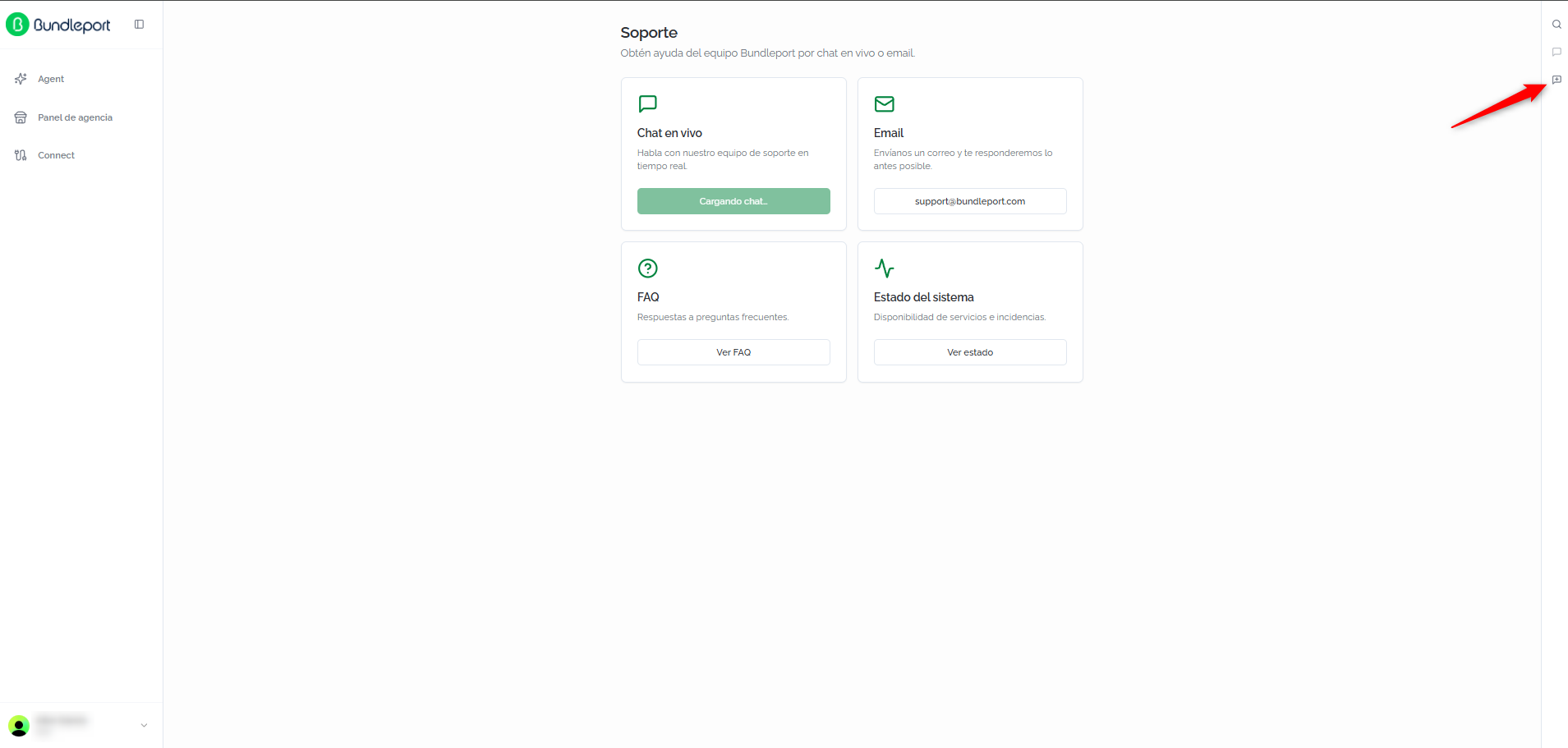
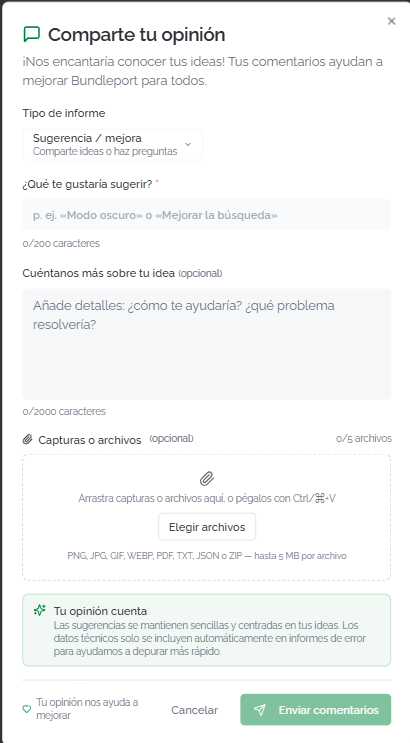
SugerenciaSuggestion oor mejoraimprovement
SeleccionaSelect el tipo de informethe SugerenciaSuggestion / mejoraimprovement parareport compartirtype to share ideas oor hacerask preguntas.questions. LosThe camposform delfields formulario son:are:
¿QuéWhattewouldgustaríayousugerir?like to suggest? (obligatorio)required):descripciónabrevebriefdedescriptionlaofsugerenciathe suggestion (máximomaximum 200caracteres)characters).CuéntanosTellmásussobremoretuabout your idea (opcional)optional):detallesadditionaladicionalesdetailssobreoncómohowteitayudaríawouldyhelpquéyouproblemaandresolveríawhat problem it would solve (máximomaximum 2000caracteres)characters).CapturasScreenshotsoorarchivosfiles (opcional)optional):adjuntaattachhastaup to 5archivosfiles (PNG, JPG, GIF, WEBP, PDF, TXT,JSONJSON,oor ZIP,máximomaximum 5 MBporperarchivo)file).
Haz clic enClick EnviarSend comentariosfeedback parato enviarsubmit lathe sugerencia.suggestion.
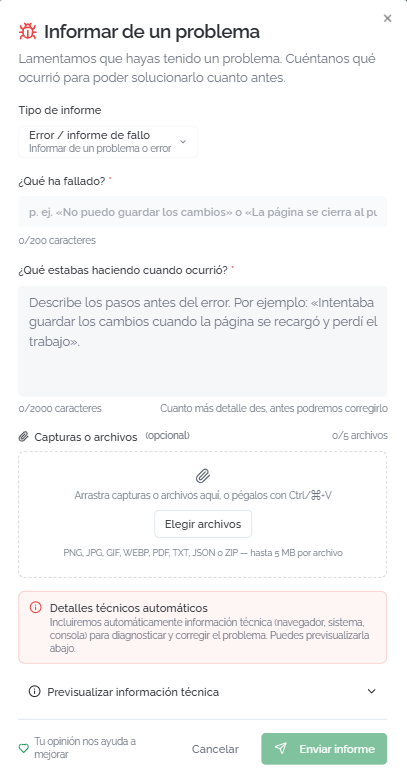
InformarReporting dea un problemaproblem
SeleccionaSelect el tipo de informethe ErrorBug / informeissue de falloreport parareport reportartype unto problemareport técnico.a Lostechnical camposproblem. delThe formularioform son:fields are:
¿QuéWhathawentfallado?wrong? (obligatorio)required):descripciónabrevebriefdeldescriptionproblemaof the problem (máximomaximum 200caracteres)characters).¿QuéWhatestabaswerehaciendoyoucuandodoingocurrió?when it happened? (opcional)optional): describelosthepasosstepspreviosleadingalup to the errorparasoquetheelteamequipocanpuedareproducereproducirloit (máximomaximum 2000caracteres)characters).CapturasScreenshotsoorarchivosfiles (opcional)optional):adjuntaattachhastaup to 5archivosfilesconwithcapturasscreenshotsdelof the erroroorinformaciónotherrelevante.relevant information.
ℹ️ InformaciónInformationAlWhen reportar un error, la plataforma incluye automáticamente información técnica (navegador, sistema operativo, consola) para ayudar al equiporeporting a diagnosticarbug, elthe problema.platform Puedesautomatically previsualizarincludes estostechnical datosinformation antes(browser, deoperating enviarsystem, haciendoconsole) clicto enhelp the team diagnose the problem. You can preview this data before sending by clicking PrevisualizarPreview informacióntechnical técnicainformation.
💡 ConsejoTipCuandoWhen reportesreporting una error,bug, incluyealways siempreinclude unaa capturascreenshot de pantalla yand describe losthe pasossteps queyou seguistefollowed antesbefore deit quehappened. ocurriera.The Cuantomore másdetail detalleyou proporciones,provide, másthe rápidofaster podráthe resolverloteam elcan equipo.resolve it.
Haz clic enClick EnviarSend informereport parato reportarreport elthe problema.problem.
FAQs
¿CuálWhat's esthe lafastest formaway másto rápidaget de obtener soporte?support?
Actualmente,Currently, elthe canalfastest máschannel rápido es elis email aat support@bundleport.com. ElLive chat enwill vivobe estaráavailable disponible próximamente.soon.
¿DóndeWhere puedocan consultarI sicheck laif plataformathe tieneplatform algunahas incidencia?any incidents?
DesdeFrom elthe menúHelp demenu, Ayuda, haz clic enclick VerView estadostatus, or access the System status ocard accedeon athe lasupport tarjetapage. EstadoThere delyou sistemacan encheck laservice páginaavailability deand soporte.active Allíincidents puedesin consultarreal la disponibilidad de servicios e incidencias activas en tiempo real.time.
¿CuálWhat's esthe ladifference diferencia entrebetween "EnviarSend comentarios"feedback" yand "ComparteShare tuyour opinión"feedback"?
EnviarSend comentariosfeedback (enin elthe menúHelp demenu) Ayuda)opens abrethe lasupport páginapage dewith soporteall conthe todosavailable los canales disponibles.channels. ComparteShare tuyour opiniónfeedback (iconoicon enon elthe lateralright-hand derecho)side) abreopens directamente el formulario dethe feedback paraform enviardirectly sugerenciasto osend reportarsuggestions erroresor alreport equipobugs deto producto.the product team.
¿PuedoCan adjuntarI archivosattach alfiles reportarwhen unreporting problema?a problem?
Sí.Yes. PuedesYou adjuntarcan hastaattach up to 5 archivosfiles (capturas,screenshots, logs, documentos)documents) deof una máximomaximum deof 5 MB cadaeach. uno.The Lossupported formatosformats admitidos son:are: PNG, JPG, GIF, WEBP, PDF, TXT, JSONJSON, yand ZIP.
¿QuéWhat informacióntechnical técnicainformation seis envíasent automáticamenteautomatically alwhen reportarreporting una error?bug?
DatosBrowser, deloperating navegador,system, sistemaand operativoconsole ydata. consola.This Estainformation informaciónhelps ayudathe alteam equiporeproduce aand reproducirdiagnose ythe diagnosticarproblem. elYou problema.can Puedespreview previsualizarlait antesbefore desubmitting enviarthe el informe.report.
¿LasDoes sugerenciasanyone queread envíothe lassuggestions leeI alguien?send?
Sí.Yes. LasSuggestions sugerenciasgo llegandirectly directamenteto al equipo de producto dethe Bundleport yproduct seteam tienenand enare cuentataken parainto laaccount hojafor dethe rutaplatform's deimprovement mejoras de la plataformaroadmap
¿DóndeWhere encuentrocan lasI FAQfind dethe laplatform's plataforma?FAQ?
EnOn lathe páginasupport depage, soporte, haz clic enclick VerView FAQ. LasThe preguntasFAQ frecuentescovers cubrengeneral temasplatform generalestopics. deIn laaddition, plataforma.each Además,article cadain artículothis de estaknowledge base deincludes conocimientoa incluyesection unaof secciónmodule-specific defrequently preguntasasked frecuentes específicas del módulo que documenta.questions.