
Communications
ConfiguraConfigure yand consultaview lasyour notificacionesagency's de tu agencianotifications
ComunicacionesCommunications esis elthe módulo delAgency Panel demodule agenciathat quemanages gestionaall todasthe lasautomatic notificaciones automáticas quenotifications Bundleport envíasends enrelated relaciónto conyour laagency's actividadactivity: debooking tuconfirmations, agencia:cancellations, confirmacionesand deproposal reserva,sends. cancelacionesFrom yhere, envíosyou decan propuestas.view Desdethe aquíhistory puedesof consultarsent elnotifications, historialcustomize dethe notificacionesemail enviadas,branding, personalizarand laconfigure identidadwhich deevents marcatrigger denotifications, losthrough emailswhich ychannels, configurarand quéto eventoswhom generanthey're notificaciones, por qué canales y a quién se envían.sent.
ElThe módulomodule seis organizaorganized eninto tresthree pestañas:tabs: NotificacionesNotifications (historialsend de envíos)history), RemitenteSender (identidadbrand deidentity), marca) yand ConfiguraciónSettings (eventosevents yand destinatarios)recipients).
AccederAccessing a ComunicacionesCommunications
EntraLogeninlato theplataformaBundleportde Bundleportplatform.EnInelthemenúleft-handlateralsideizquierdo,menu,seleccionaselect Agency Panelde agencia.SeleccionaSelectComunicacionesCommunications.
NotificacionesNotifications
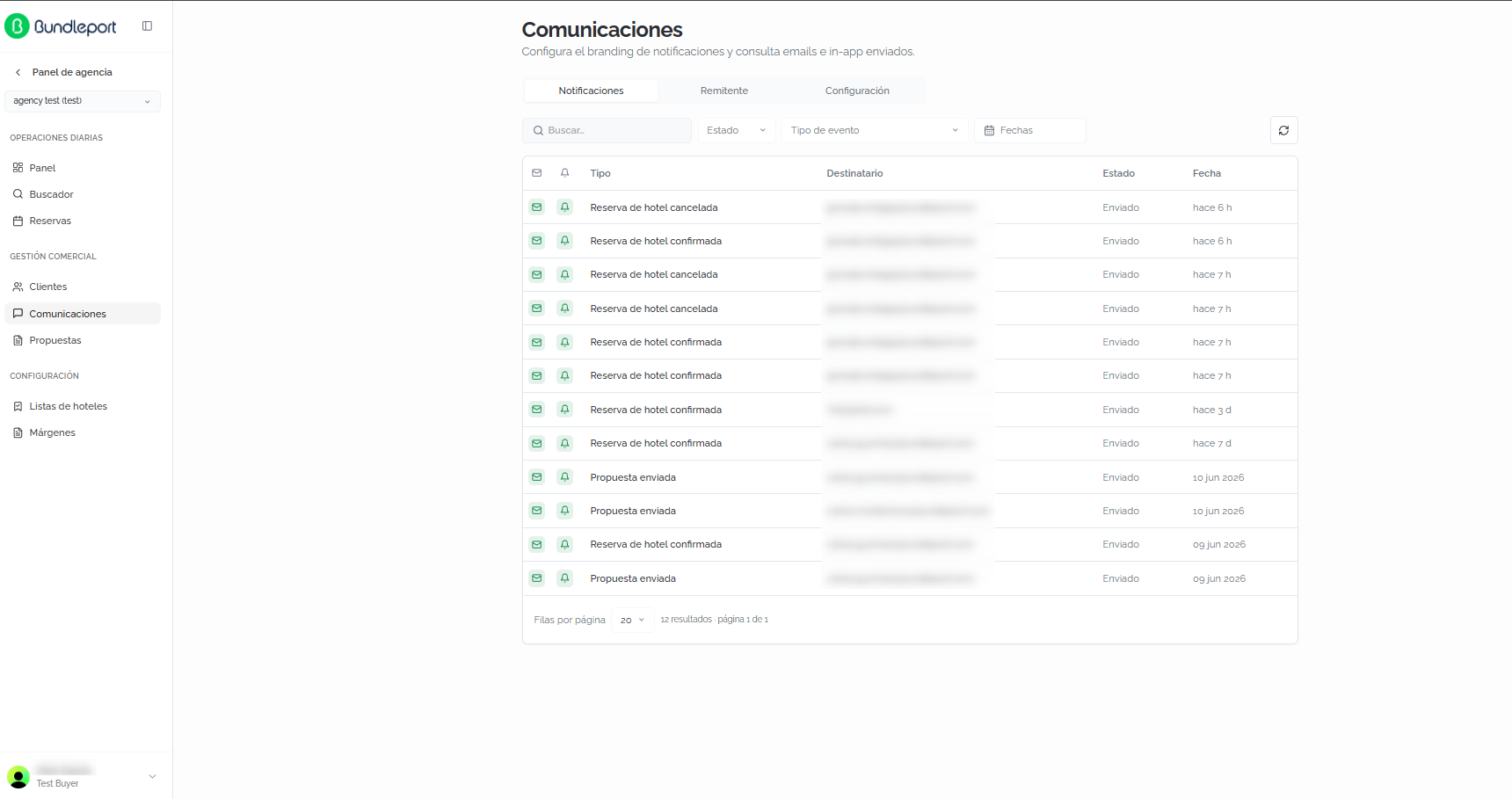
La pestañaThe NotificacionesNotifications muestratab elshows historialthe dehistory todasof lasall notificacionesnotifications enviadassent porby lathe plataforma,platform, tantoboth porby email comoand in-app.
FiltrosFilters
PuedesYou filtrarcan elfilter listadothe conlist losusing siguientesthe controles:following controls:
BuscarSearch:campofree-textdefieldtextotolibrelocatepara localizar notificaciones.notifications.EstadoStatus:filtrafilterporbyestadonotificationde la notificación:status:EnviadoSent,PendientePending,oorFallidoFailed.TipoEventde eventotype:filtrafilterporbytiponotificationde notificación:type:ReservaHoteldebookinghotel canceladacancelled,ReservaHoteldebookinghotelconfirmed,confirmadaoorPropuestaProposalenviadasent.FechasDates:filtrafilterporbyrangodatede fechas.range.
HazClick clicthe enrefresh elbutton botónin dethe actualizaciónright encorner lato esquinareload derechathe para refrescar el listado.list.

TablaCommunications de comunicacionestable
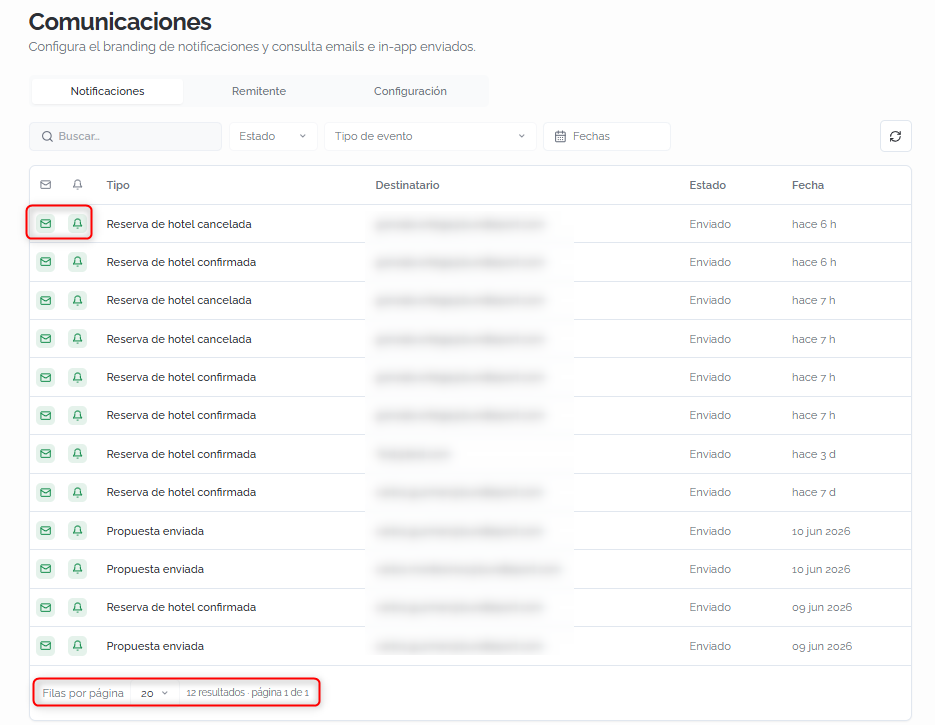
CadaEach notificaciónnotification seis muestrashown comoas unaa filarow conwith lasthe siguientesfollowing columnas:columns:
IconosChannelde canalicons:indicanindicateporwhichquéchannelscanalesthesenotificationenviówaslasentnotificación.through.ElTheiconoenvelopedeiconsobre indicaindicatesEnviadoSentporby email,yandeltheiconobelldeiconcampana indicaindicatesEnviadoSent in-app.TipoType:tipothedeeventeventotypequethatgenerótriggeredlathenotificaciónnotification (porforejemplo,example,ReservaHoteldebookinghotel confirmadaconfirmed).DestinatarioRecipient:direcciónthederecipient's emaildel destinatario.address.EstadoStatus:estadothedelsendenvíostatus (EnviadoSent,PendientePending,oorFallidoFailed).FechaDate:momentothedeltimeenvíoit was sent (porforejemplo,example,hace6hhours ago,10Junjun10, 2026).
LaThe paginaciónpagination enat lathe partebottom inferiorlets permiteyou configurarset elthe númeronumber deof filasrows porper páginapage yand navegarnavigate entrebetween páginas.pages.
DetalleCommunication de una comunicacióndetails
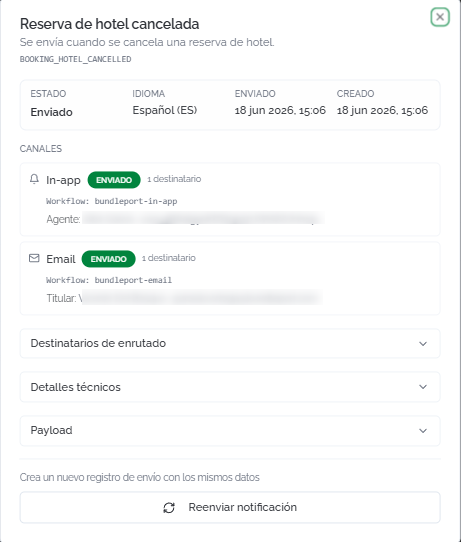
HazClick clicany enrow cualquierto filaopen parathe abrirnotification's eldetails. detalle de la notificación. ElThe modal muestra:shows:
CabeceraHeader:nombreeventdel eventoname (porforejemplo,example,ReservaHoteldebookinghotel canceladacancelled),descripcióneventdeldescription,evento,andcódigotechnicaltécnicoeventdel eventocode (porforejemplo,example, BOOKING_HOTEL_CANCELLED).InformaciónSenddel envíoinformation:estado,status,idioma,language,fechasenddedate,envíoandycreationfecha de creación.date.CanalesChannels:detalledetailsdeforcadaeachcanalchannelportheelnotificationquewassesentenvió la notificación:through:- In-app:
estadosenddelstatus,envío,numbernúmeroofde destinatarios,recipients, workflowutilizadoused,yandagenterecipientdestinatario.agent. - Email:
estadosenddelstatus,envío,numbernúmeroofde destinatarios,recipients, workflowutilizadoused,yandtitularholder (nombrename + email).
- In-app:
DestinatariosRoutingde enrutadorecipients:secciónexpandableexpandiblesectionconwithelrecipientdetalle de los destinatarios.details.DetallesTechnicaltécnicosdetails:secciónexpandableexpandiblesectionconwithinformacióntechnicaltécnicasenddel envío.information.- Payload:
secciónexpandableexpandiblesectionconwithlosthedatosdataenviadossenteninlathenotificación.notification. ReenviarResendnotificaciónnotification:creacreatesunanuevonewregistrosendderecordenvíowithconthelossamemismosdatadatosasdethelaoriginalnotificación original.notification.
💡 ConsejoTipUsaUse ReenviarResend notificaciónnotification cuandowhen una clienteclient nohasn't hayareceived recibidoa unconfirmation emailor decancellation confirmaciónemail. oA cancelación.new Sesend generais ungenerated nuevowith envíothe consame losdata mismoswithout datosaffecting sinthe afectaroriginal al registro original.record.
RemitenteSender
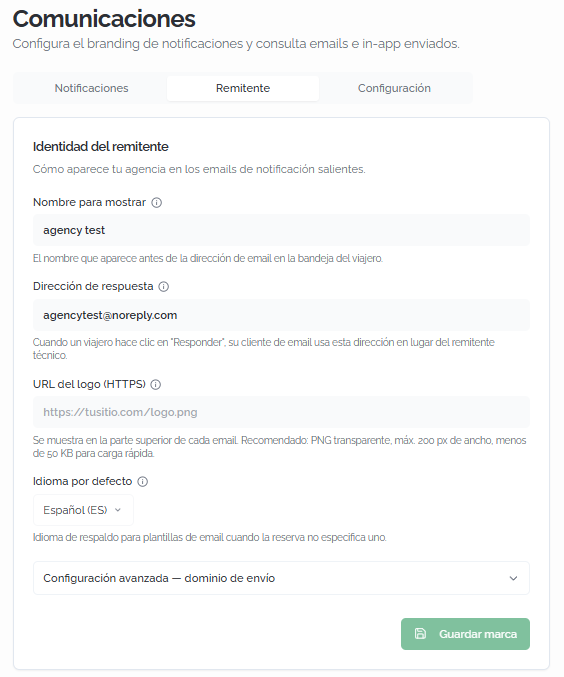
La pestañaThe RemitenteSender permitetab configurarlets cómoyou aparececonfigure tuhow agenciayour enagency losappears in the notification emails dethat notificacióntravelers queand recibenclients losreceive. viajerosThe yavailable clientes.fields Los campos disponibles son:are:
NombreDisplaypara mostrarname:elthenombrenamequethatapareceappearsantesbeforede la dirección dethe emailenaddresslainbandejathedetraveler'sentrada del viajeroinbox (porforejemplo,example,elyournombreagency'sde tu agencia)name).DirecciónReply-tode respuestaaddress:la dirección dethe emailqueaddressseusedusawhencuandotheeltravelerviajero hace clic enclicks "Responder".Reply."EstoThispermiteletsrecibiryoulasreceiverespuestasrepliesenintuyourbandejaowndemailboxcorreoinsteadenoflugarthedelplatform'sremitentetechnicaltécnicosenderde la plataforma.address.- Logo URL
del logo(HTTPS):lathe URLdeofla imagen delthe logoqueimageseshownmuestraatenthelatopparteofsuperior de cadaeach email.Recomendaciones:Recommendations:PNGtransparenttransparente,PNG,máximomaximum 200 pxdewide,ancho, menos deunder 50 KBparaforcargafastrápida.loading. IdiomaDefaultpor defectolanguage:idiomathedefallbackrespaldolanguagepara las plantillas defor emailcuandotemplateslawhenreservathenobookingespecificadoesn'tuno.specify one.ConfiguraciónAdvancedavanzadasettings —dominiosendingde envíodomain:configuraciónconfigurationdelfordominiothepersonalizadocustomparadomainelusedenvíotodesend emails.
Haz clic enClick GuardarSave marcabranding parato aplicarapply losthe cambios.changes.
⚠️ ImportanteImportantConfiguraSet elup the NombreDisplay para mostrarname y laand DirecciónReply-to de respuestaaddress antesbefore deyou empezarstart aoperating. operar.The Losconfirmation and cancellation emails deyour confirmaciónclients yreceive cancelaciónwill queshow recibanthis tusidentity. clientesIf mostraránnot esta identidad. Si no se configura, losconfigured, emails llegaránwill conarrive lawith identidadthe porplatform's defectodefault de la plataforma.identity.
ConfiguraciónSettings
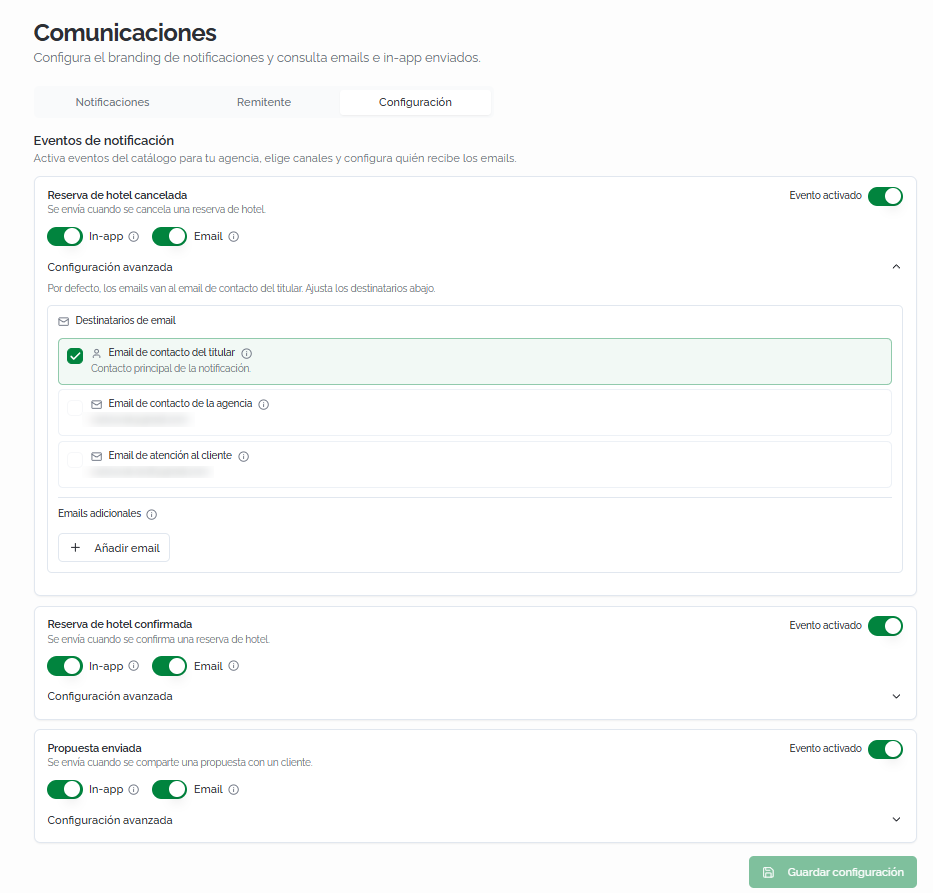
La pestañaThe ConfiguraciónSettings permitetab activarlets oyou desactivarenable eventosor dedisable notificación,notification elegirevents, loschoose canalesthe desend envíochannels, yand configurarconfigure quiénwho recibereceives losthe emails.
EventosNotification de notificaciónevents
CadaEach tipoevent detype eventois seshown muestraas comoa unacard tarjetawith conthe losfollowing siguientes controles:controls:
EventoEventactivadoenabled:interruptorageneralmasterquetoggleactivathatoenablesdesactivaorlasdisablesnotificacionesnotificationsparaforesethatevento.event.- In-app:
interruptoraquetogglecontrolathatsicontrolselwhethereventothegeneraeventunageneratesnotificaciónandentroin-platformde la plataforma.notification. - Email:
interruptoraquetogglecontrolathatsicontrolselwhethereventothegeneraeventungenerates an email.
LosThe eventosavailable disponiblesevents son:are:
ReservaHoteldebooking cancelled: sent when a hotelcancelada:bookingseisenvía cuando se cancela una reserva de hotel.cancelled.ReservaHoteldebooking confirmed: sent when a hotelconfirmada:bookingseisenvía cuando se confirma una reserva de hotel.confirmed.PropuestaProposalenviadasent:sesentenvíawhencuandoaseproposalcomparteisunasharedpropuestawithconaun cliente.client.
DestinatariosEmail de emailrecipients
DentroWithin de lathe ConfiguraciónAdvanced avanzadasettings deof cadaeach eventoevent, puedesyou definircan quiéndefine recibewho losreceives the emails. PorBy defecto, losdefault, emails seare envíansent alto emailthe debooking contactoholder's delcontact titular de la reserva.email.
LosThe destinatariosconfigurable configurablesrecipients son:are:
EmailHolder'sdecontactcontacto del titularemail:contactotheprincipalnotification'sdemainla notificacióncontact (elthe emailasociadoassociatedawithlathereservabookingoorpropuesta)proposal).EmailAgencydecontactcontacto de la agenciaemail:direcciónthedeagency's general emailgeneral de la agencia.address.EmailCustomerdeserviceatención al clienteemail:dirección dethe emaildeladdressequipoofdethesoporteagency'sdesupportla agencia.team.EmailsAdditionaladicionalesemails:haz clic enclick +AñadirAdd emailparatoincluirincludedirecciones deadditional emailadicionalesaddressescomoasdestinatarios.recipients.
ActivaEnable oor desactivadisable cadaeach destinatariorecipient segúnaccording lasto necesidadeseach deevent's cadaneeds. evento.For Porexample, ejemplo,you puedescan configurarset quecancellations lasto cancelacionesbe sesent envíento tantoboth althe titularholder comoand athe laagency, agencia,while peroconfirmations queonly lasreach confirmacionesthe solo lleguen al titular.holder.
Haz clic enClick GuardarSave configuraciónsettings parato aplicarapply losthe cambios.changes.
💡 ConsejoTipConfiguraSet lathe agenciaagency comoas destinatarioan adicionaladditional enrecipient losfor eventoscancellation de cancelaciónevents (ReservaHotel debooking hotel canceladacancelled) paraso quethe elteam equipois estéalways siempreinformed informadoof decancellations laswithout cancelacionesneeding sinto necesidadcheck dethe consultar la plataforma.platform.
FAQs
¿QuéWhat canalesnotification dechannels notificaciónare están disponibles?available?
DosTwo canales:channels: Email (envíosends dean correoemail electrónicoto althe destinatario)recipient) eand In-app (notificacióna dentronotification dewithin lathe plataformaBundleport de Bundleport)platform). PuedesYou activarcan oenable desactivaror cadadisable canaleach dechannel formaindependently independienteper por evento.event.
¿PuedoCan reenviarI unaresend notificacióna quenotification yathat's sealready envió?been sent?
Sí.Yes. AbreOpen elthe detallenotification's dedetails laand notificación y haz clic enclick ReenviarResend notificaciónnotification. SeA creanew unsend nuevorecord registrois decreated envíowith conthe lossame mismosdata, datoswithout sinmodifying modificarthe eloriginal registro original.record.
¿QuéWhat pasahappens siif unaa notificaciónnotification tiene estadohas "Fallido"?Failed" status?
SignificaIt quemeans elthe envíosend nodidn't secomplete completósuccessfully. correctamente.Open Abrethe elnotification's detalledetails deto lacheck notificaciónthe paraaffected consultarchannels losand canalesthe afectadostechnical yerror losdetails. detallesYou técnicoscan deltry error.resending Puedesit intentarwith reenviarla con el botónthe ReenviarResend notificaciónnotification. button.
¿AWho quiénare se envían losnotification emails desent notificaciónto porby defecto?default?
PorBy defecto,default, alto the contact email deof contactothe delbooking titularor deproposal laholder. reservaYou ocan propuesta.add Puedesadditional añadir destinatarios adicionalesrecipients (agencia,agency, atencióncustomer alservice, cliente,custom emailsemails) personalizados)from desde la pestañathe ConfiguraciónSettings entab, lain configuracióneach avanzadaevent's deadvanced cada evento.settings.
¿CómoHow personalizodo laI aparienciacustomize dethe losappearance of the emails quemy recibenclients mis clientes?receive?
DesdeFrom la pestañathe RemitenteSender: configuratab: elconfigure nombreyour deagency's tuname, agencia,the lareply-to direcciónaddress, deand respuesta y elthe logo quethat apareceráwill enappear losin the emails.
¿QuéWhat formatoformat debeshould tenerthe elemail logo de los emails?be?
PNGTransparent transparente,PNG, máximomaximum 200 px dewide, anchoand y menos deunder 50 KB parafor cargafast rápida.loading. LaThe URL debemust usaruse HTTPS.
¿PuedoCan desactivarI lasdisable notificacionesnotifications defor una tipospecific deevent evento concreto?type?
Sí.Yes. EnIn la pestañathe ConfiguraciónSettings, desactivatab, elturn interruptoroff the EventoEvent activadoenabled detoggle laon tarjetathe correspondiente.corresponding Tambiéncard. puedesYou desactivarcan soloalso undisable canaljust one channel (porfor ejemplo,example, desactivardisabling email perowhile mantenerkeeping in-app).
¿LasAre notificacionesflight deand vuelosground ytransportation transportenotifications terrestrealso tambiénconfigured se configuran aquí?here?
LosThe eventosvisible visiblesevents dependendepend deon losthe tiposbooking detypes reservayour queagency tuhandles. agenciaAs gestiona.new Aevent medidatypes queare seadded añadanto nuevosthe tiposcatalog, dethey'll eventoautomatically alappear catálogo,in apareceránthe automáticamenteSettings en la pestaña Configuración.tab.
¿QuéWhat esis lathe "DirecciónReply-to deaddress" respuesta"in enthe laSender pestaña Remitente?tab?
EsIt's la dirección dethe email queaddress elthe clienteclient veráwill cuandosee hagawhen clicthey enclick "Responder"Reply" desdefrom sutheir bandejainbox. deSet correo.it Configúralato conyour laagency's direcciónaddress deso tuclient agenciareplies parareach queyour lasown respuestasmailbox deinstead losof clientesthe lleguenplatform's atechnical tu buzón y no al remitente técnico de la plataforma.sender.