
Booking Tool: Flights
Busca,Search, comparacompare, yand reservabook vuelosflights
ElThe BuscadorSearch esEngine elis motorthe desearch búsquedaand ybooking reservasengine integradobuilt eninto elthe PanelAgency dePanel. agencia.From Desde la pestañathe VuelosFlights puedestab, buscaryou disponibilidadcan entresearch múltiplesavailability proveedores,across compararmultiple combinacionessuppliers, decompare vueloflight porcombinations precio,by duraciónprice, yduration, escalas,and ystops, completarand reservascomplete directamentebookings desdedirectly lafrom plataforma.the platform.
EsteThis artículoarticle cubrecovers elthe flujofull completoflow parafor vuelos:flights: desdefrom lasearch búsquedato hastabooking laconfirmation. confirmaciónThe deflight lasearch reserva.engine Elsupports buscadorround-trip deor vuelosone-way admitesearches, búsquedaswith decabin idaclass yselection vueltaand opassenger soloconfiguration. ida,If conyou selecciónneed deto clasecreate demulti-leg cabinaitineraries, ysee configuración de pasajeros. Si necesitas crear itinerarios de varios tramos, consulta el artículo dethe Multi-destinodestination. article.
AccederAccessing althe BuscadorSearch Engine
EntraLogeninlato theplataformaBundleportde Bundleportplatform.EnInelthemenúleft-handlateralsideizquierdo,menu,seleccionaselect Agency Panelde agencia.SeleccionaSelectBuscadorSearch.
LaThe pantallamain principalscreen muestrashows pestañastabs parafor cadaeach tipoproduct detype: producto:Hotels, Hoteles,Flights, Vuelos,Ground, Terrestre,Dynamic PaquetePackage, Dinámico yand Multi-destino.destination.
BuscarSearching vuelosfor flights
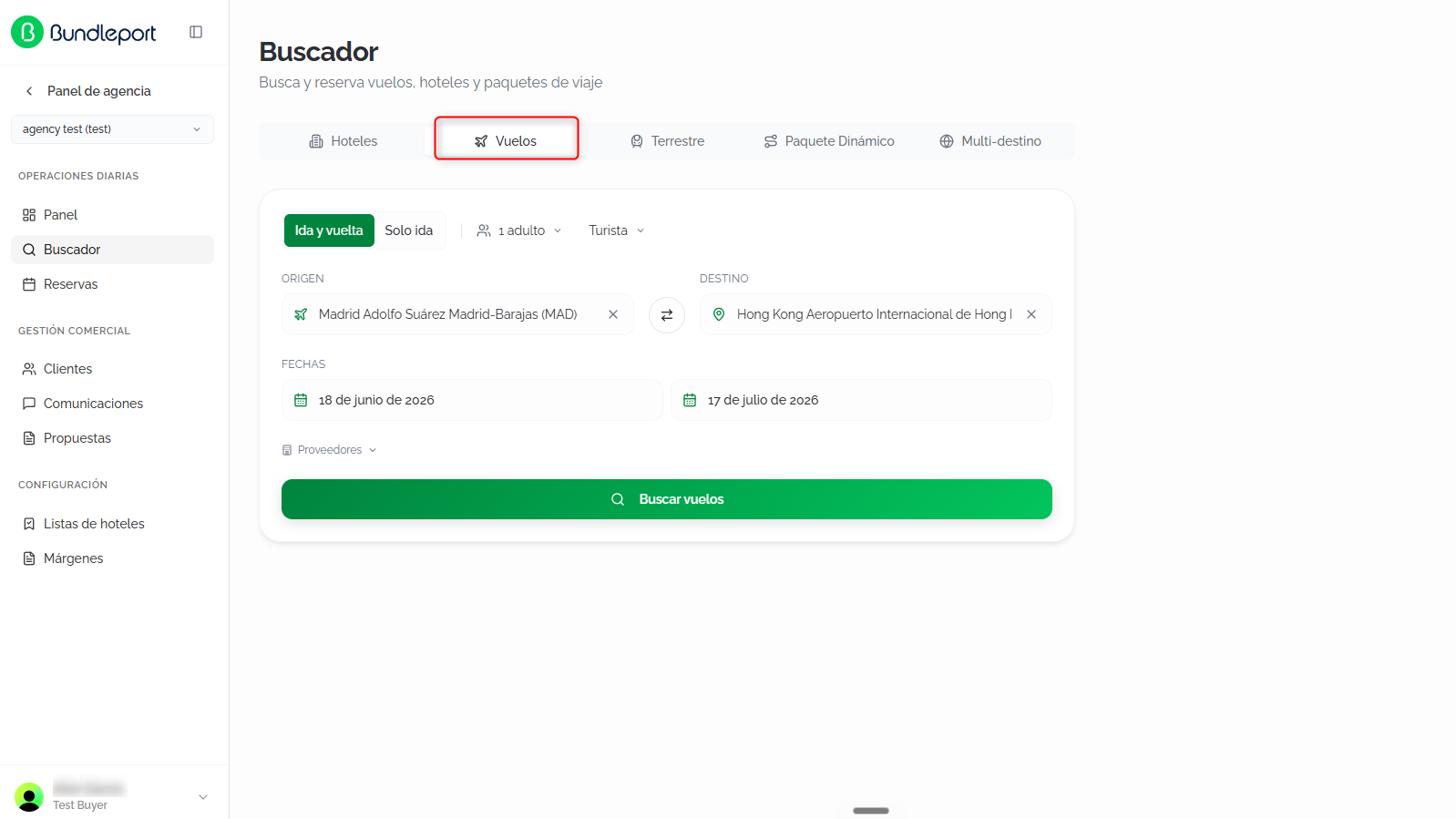
SeleccionaSelect la pestañathe VuelosFlights ytab rellenaand losfill siguientesin campos:the following fields:
TipoTripde viajetype:seleccionaselectelthetipotripdetypetrayectoatenthelatopparteofsuperiorthedel formulario:form:IdaRoundy vueltatrip (por defecto)default):búsquedasearchdeforvuelosround-tripde ida y vuelta.flights.SoloOneidaway:búsquedasearchdeforvuelosone-wayen un solo sentido.flights.
PasajerosPassengers:hazclickclictheen elpassenger selectordetopasajerosconfigureparatheconfigurarnumberelandnúmerotypeyoftipo de pasajeros.passengers.ClaseCabinde cabinaclass:seleccionaselectlathecabinadesireddeseada:cabin:TuristaEconomy (por defecto)default)TuristaPremiumpremiumeconomy- Business
PrimeraFirstclaseclass
OrigenOrigin:escribetypeelthenombrenamedeoflatheciudadcityooraeropuertoairportyandseleccionaselectunaanopciónoptiondelfromautocompletado.theSeautocompletemuestrasuggestions.elThecódigoairport's IATAdelcodeaeropuertois shown (porforejemplo,example, HAN).DestinoDestination:escribetypeelthedestinodestinationyandseleccionaselectdelfromautocompletado.theEsautocompleteposiblesuggestions.seleccionarYoutodoscanlosselectaeropuertosalldeairportsunainciudada city (porforejemplo,example, Shanghai (All airports)).HazClickclictheenswapel icono de intercambioicon ⇄entrebetweenlosthecamposorigindeandorigendestinationyfieldsdestinotoparareverseinvertirthela ruta.route.FechaDeparturede salidadate:seleccionaselectlathefechaoutboundde ida.date.FechaReturnde vueltadate (soloround-tripenmodemodo ida y vuelta)only):seleccionaselectlathefechareturnde regreso.date.ProveedoresSuppliers:haz clic enclickProveedoresSuppliersparatodesplegarexpandelthelistadolistdeofproveedoresavailabledeflightvuelossuppliersdisponiblesandyselectseleccionarorodeselectdeseleccionarthelosonesdeseados.youPuedeswant.usarYou can useDeseleccionarDeselecttodosallparatolimpiarclearlatheselecciónselection,oorSoloOnlyestethis onejuntonext to aunsupplierproveedortoparasearchbuscarloexclusivelyexclusivamente.with them.
Haz clic enClick BuscarSearch vuelosflights parato iniciarstart lathe búsqueda.search.
ResultadosSearch de búsquedaresults
LaThe plataformaplatform consultaqueries laavailability disponibilidadacross enall todosselected lossuppliers proveedoresand seleccionadosdisplays yresults muestraprogressively losas resultadoseach desupplier forma progresiva a medida que cada proveedor responde.responds.
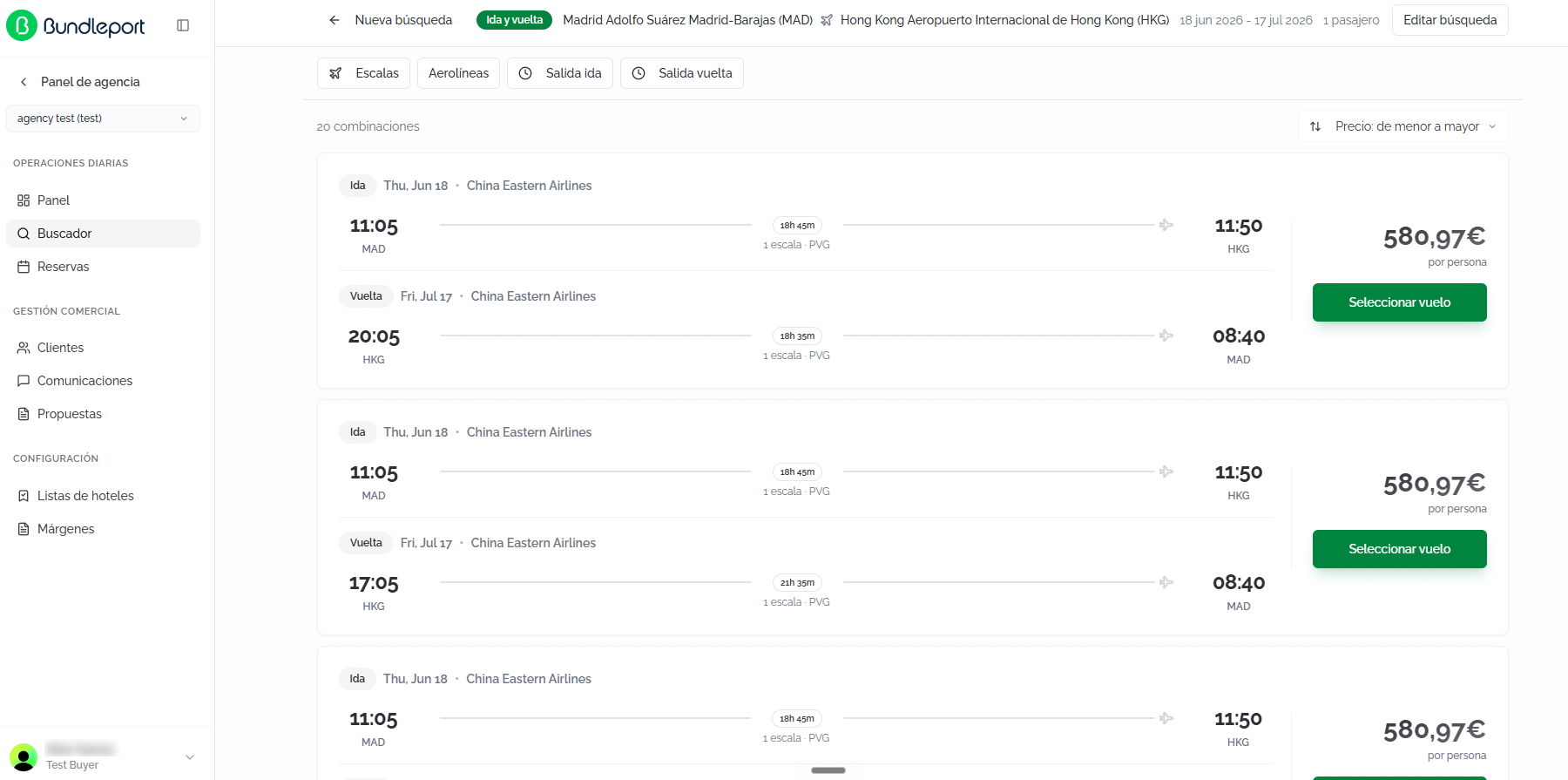
EnA lasummary parteof superiorthe sesearch mantieneremains visible unat resumenthe detop: latrip búsqueda:type, tiporoute, dedates, viaje,and ruta,number fechasof ypassengers. número de pasajeros. Haz clic enClick EditarEdit búsquedasearch parato modificarmodify losthe criterioscriteria, o enor NuevaNew búsquedasearch parato volverreturn alto formulariothe inicial.initial form.
TarjetasFlight de vuelocards
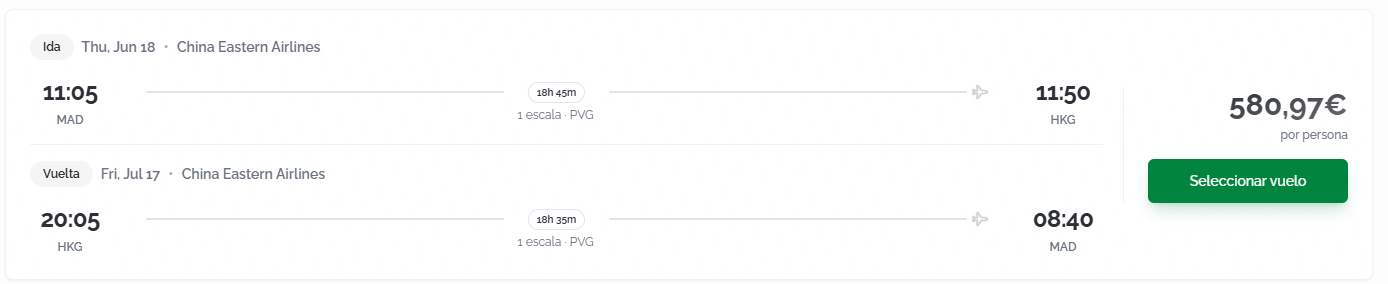
CadaEach combinaciónflight decombination vuelois seshown muestraas comoa unacard tarjetathat queincludes incluyethe losoutbound trayectosand dereturn ida y vueltalegs (enfor búsquedasround-trip de ida y vuelta)searches). ParaFor cadaeach trayectoleg, sethe muestra:following is shown:
EtiquetaLegdel trayectolabel (IdaOutboundoorVueltaReturn).FechaFlightdeldatevueloandyoperatingaerolínea operadora.airline.HoraDeparturedetimesalidaandyoriginaeropuerto de origenairport (códigoIATAIATA)code).DuraciónTotaltotallegdel trayecto.duration.NúmeroNumberdeofescalasstopsyandaeropuertoconnectingde conexiónairport (códigoIATAIATA)code).HoraArrivaldetimellegadaandydestinationaeropuerto de destinoairport (códigoIATAIATA)code).
EnOn elthe lateralright derechoside deof lathe tarjetacard, sethe muestraprice elper precioperson poris personashown yalong elwith botónthe SeleccionarSelect vueloflight parabutton iniciarto elstart procesothe debooking reserva.process.
OrdenarSorting resultadosresults
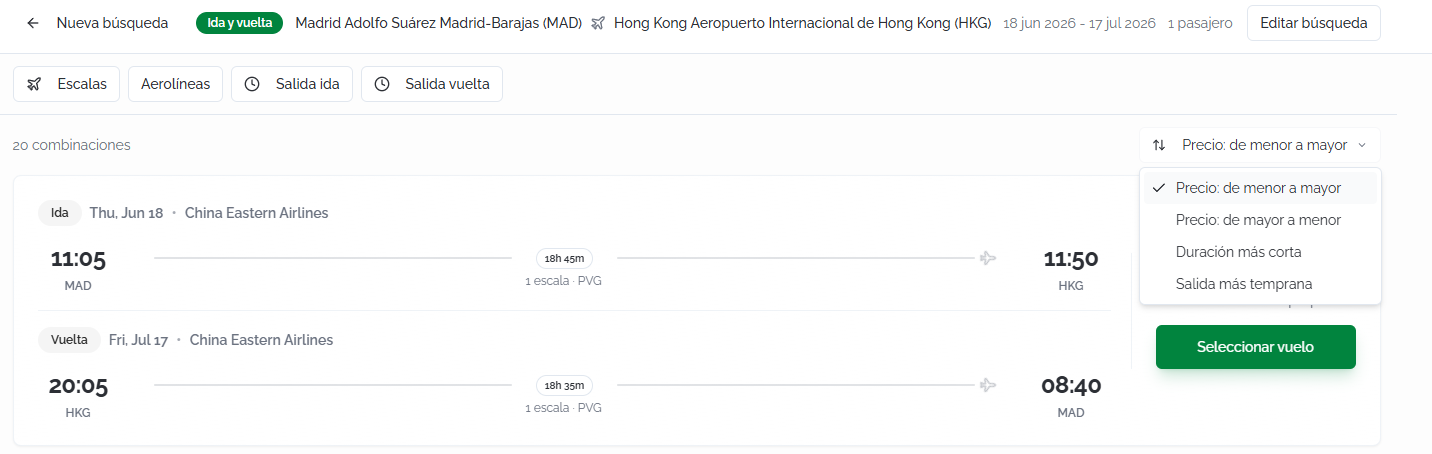
Se muestra el númeroThe total denumber combinacionesof encontradascombinations found is shown (porfor ejemplo,example, 20 combinacionescombinations). LosThe criteriosavailable desorting ordenacióncriteria disponibles son:are:
Precio:Price:delowmenortoa mayorhigh (por defecto)default).Precio:Price:dehighmayortoa menorlow.DuraciónShortestmás cortaduration.SalidaEarliestmás tempranadeparture.
FiltrosFilters
PuedesYou filtrarcan losfilter resultadosthe medianteresults lasusing siguientesthe opciones:following options:
EscalasStops:filtrarfilterporbynúmeronumberdeofescalasstops (directo,direct, 1escala,stop, 2+escalas)stops).AerolíneasAirlines:seleccionarselectunaoneoorvariasmoreaerolíneasspecificespecíficas.airlines.SalidaOutboundidadeparture:filtrarfilterporbyrangothehorariooutbounddeflight'ssalidadeparturedeltimevuelorangedeusingidaamediante un control deslizante.slider.SalidaReturnvueltadeparture:filtrarfilterporbyrangothehorarioreturndeflight'ssalidadeparturedeltimevuelo de vuelta.range.

ℹ️ InformaciónInformationCuandoWhen hayfilters filtrosare activos,active, se muestra el botónthe BorrarClear todoall conbutton elis númeroshown dealong filtroswith aplicados.the number of filters applied.
ConfigurarConfiguring elthe vueloflight
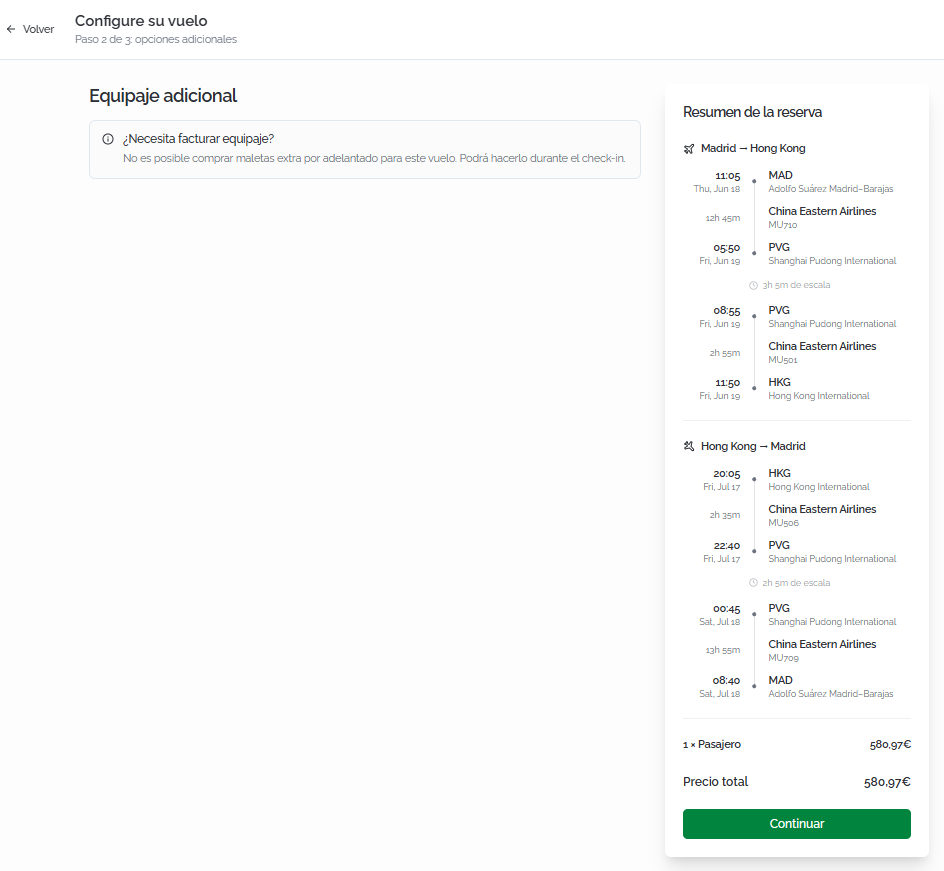
ParaTo avanzarproceed conwith lathe reserva,booking, haz clic enclick SeleccionarSelect vueloflight enon lathe tarjetacard defor lathe combinacióncombination deseada.you want.
SeA abrirápage unawill páginaopen conwith lasthe opcionesavailable deconfiguration configuraciónoptions, disponibles,such comoas equipajeadditional adicional,baggage, dondewhere podrásyou personalizarcan loscustomize serviciosthe incluidosincluded antesservices debefore continuarcontinuing conwith lathe reserva.booking.
EnThe lasame mismapage páginashows sethe muestraBooking elsummary panel Resumenwith dethe lafull reservaitinerary confor eleach itinerario completo de cada trayecto:leg:
HoraDeparturedetime,salida,date,fechaandyoriginaeropuerto de origenairport (nombrefullcompleto)name).DuraciónFlightdelsegmentsegmento de vuelo.duration.AerolíneaAirlineyandnúmeroflightde vuelo.number.HoraArrivaldetime,llegada,date,fechaandydestinationaeropuerto de destino.airport.TiempoLayoverde escalatime (siifaplica)applicable)yandsegmentosconnectingdesegmentsconexiónwithconthelasamemisma información.information.
EnAt lathe partebottom inferiorof delthe resumensummary, sethe muestrabreakdown elby desglose por pasajerospassenger (númeronumber deof pasajerospassengers yand precioprice porper persona)person) yand elthe preciobooking's total deprice laare reserva.shown.
💡 ConsejoTipRevisaReview elthe resumenitinerary delsummary itinerariobefore antescontinuing: decheck continuar:that compruebathe quelayover lostimes tiemposare desufficient escalaand sonthat suficientesthe yconnecting queairports losare aeropuertoscorrect, deespecially conexiónin soncities correctos,with especialmentemultiple en ciudades con varios aeropuertos.airports.
Haz clic enClick ContinuarContinue parato accederaccess athe lacheckout página de checkout.page.
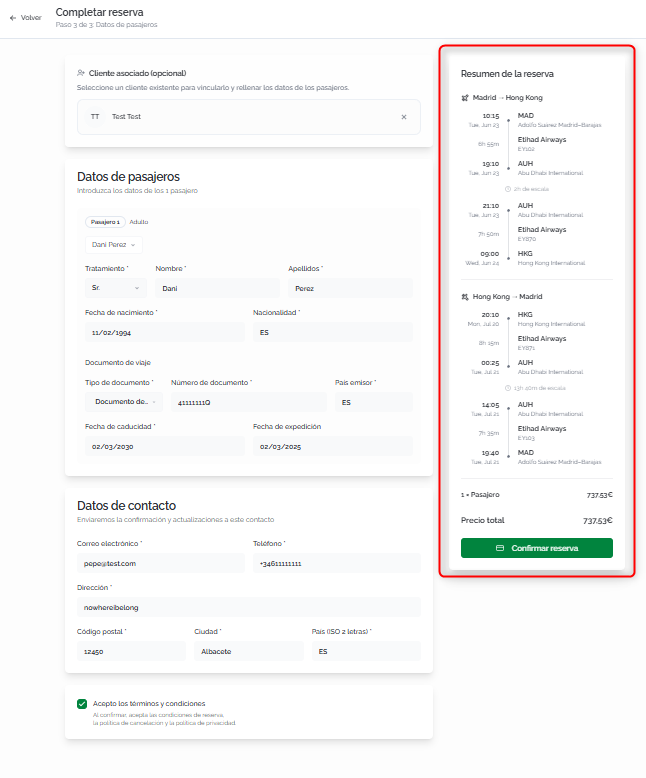
CompletarCompleting lathe reservabooking
- Fill
information:Rellenainlathesiguientefollowinginformación:ClienteAssociatedasociadoclient (opcional)optional):vinculalinklathereservabookingatounanclienteexistingexistenteclientparasoqueit'squederecordedregistradainentheirsuhistory.historial. Haz clic enClickBuscarSearchcliente.client...paratobuscarsearchporbynombrenameoor email.SiIfeltheclienteclientnodoesn'texiste,exist,haz clic enclickNuevoNewclienteclientparatocrearlocreatedirectamente.one directly.DatosPassengerpasajerosdetails:introduceenterloseachdatospassenger'sde cada pasajero:information:TratamientoTitle:seleccionaselectelthetratamientotitle (Sr.Mr.,Sra.Mrs., etc.).NombreFirst nameyandApellidosLast namedelofpasajero.the passenger.FechaDatedeofnacimientobirth.NacionalidadNationality.DocumentoTravelde viajedocument:tipodocumentdetype,documento,number,número,issuingpaíscountry,emisor,issuefechadate,deandexpediciónexpirationy fecha de caducidad.date.
DatosContactde contactodetails:seusedusarántoparasendenviarbookingconfirmacionesconfirmationsyandactualizaciones de la reserva.updates.Correo electrónicoEmail.TeléfonoPhone.DirecciónAddress.CódigoPostalpostalcode.CiudadCity.PaísCountry.
AceptaciónAcceptancedeoftérminosterms:antesbeforedeconfirming,confirmar,checkmarcathelaboxcasillaacceptingdetheaceptacióntermsdeandlosconditions,términostheycancellationcondiciones,policy,laandpolíticathedepaymentcancelación y las condiciones de pago.conditions.
ℹ️ InformaciónSiIf elthe clienteselected seleccionadoclient tienehas viajerostravelers configurados,set puedesup, autocompletaryou loscan datosauto-fill delthe pasajeropassenger seleccionandodetails elby selecting the viajerocorresponding correspondientetraveler.
⚠️ ImportanteImportantLasFlight reservasbookings derequire vuelostravel requierendocument datos del documento de viajedetails (pasaporte,passport, DNI,national ID, etc.) defor cadaeach pasajero.passenger. AsegúrateMake desure quethe losdocuments documentosare esténvalid vigentesthroughout enthe lastravel fechasdates delto viajeavoid paraissues evitarat incidencias en el embarque.boarding.
AntesBefore deconfirming, confirmar,check verificathe enBooking elsummary side panel lateralto Resumenmake desure laall reservathe queinformation todais lacorrect: informaciónlegs, esstops, correcta:airline, trayectos,schedules, escalas,and compañía,price horarios y desglose de preciobreakdown (basenet neto,base, markup, subtotal, descuentodiscount siif aplicaapplicable, eand importefinal final)amount).
Haz clic enClick ConfirmarConfirm reservabooking parato completarcomplete lathe reserva.booking.
ConfirmaciónBooking de la reservaconfirmation
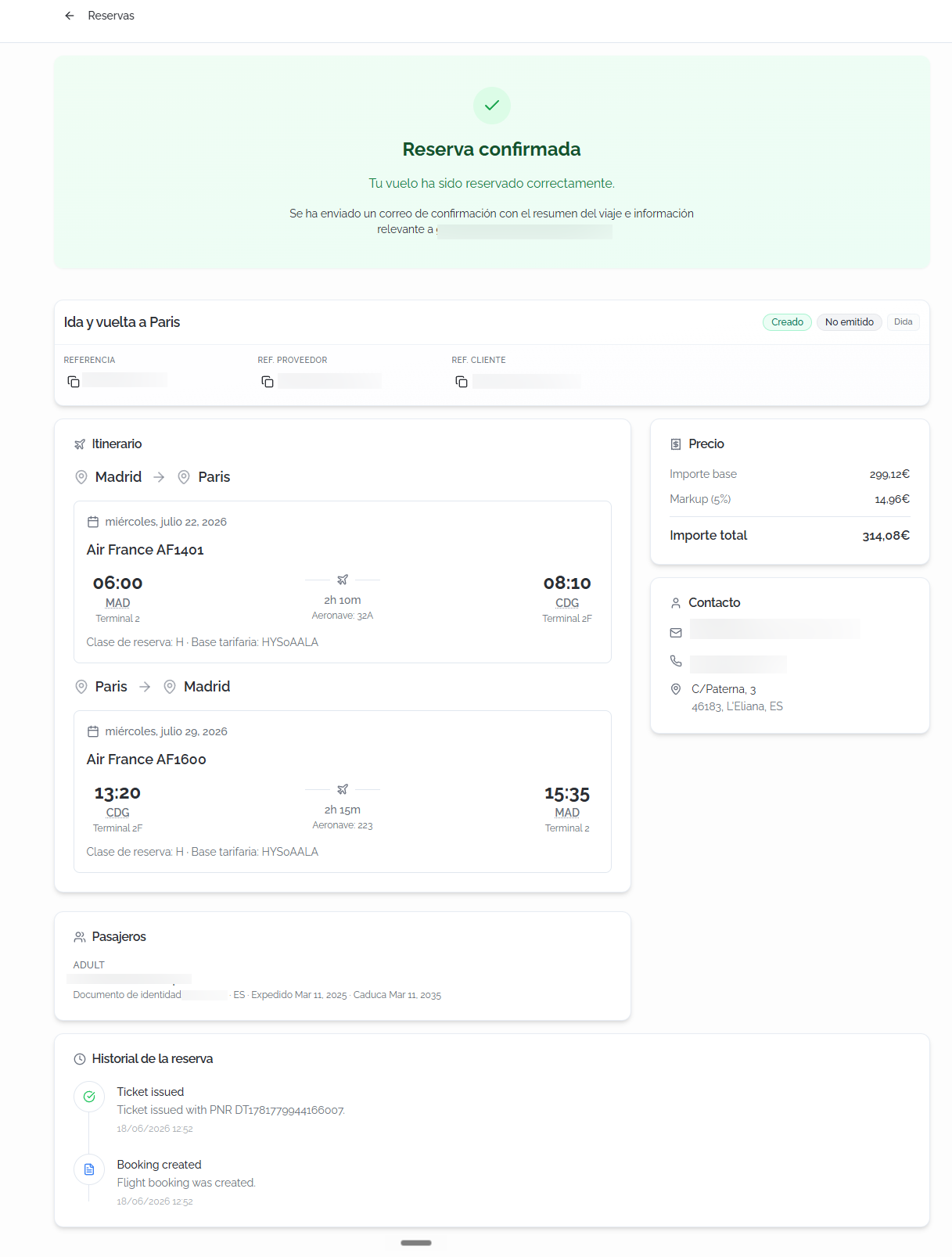
AlOnce confirmar,confirmed, sea muestrapage unais páginashown conwith elthe detallefull completodetails delof vuelothe reservado:booked flight:
CabeceraHeader: a confirmation bannerdeindicatingconfirmacióntheindicandoflightquehaselbeenvuelosuccessfullyhabookedsidoandreservadothatcorrectamenteayconfirmationqueemailsehashabeenenviadosent.unBelowcorreoit,detheconfirmación.BundleportDebajoreference,aparecenstatus,lasupplier,referenciaclientdereference,Bundleport,andelsupplierestado,referenceelareproveedor, la referencia del cliente y la referencia del proveedor.shown.ItinerarioItinerary:detallefullcompletodetailsdeofcadaeachtrayectoleg (idaoutboundyandvuelta)return).ParaForcadaeachsegmentoflightdesegment,vuelothesefollowingindica:is shown:FechaFlightdel vuelo.date.AerolíneaOperatingoperadoraairlineyandnúmeroflightde vuelo.number.HoraDeparturede salida, códigotime, IATAycode,nombreanddelnameaeropuertoofdetheorigen.origin airport.DuraciónSegmentdel segmento.duration.HoraArrivalde llegada, códigotime, IATAycode,nombreanddelnameaeropuertoofdethedestino.destination airport.ClaseCabindeclasscabinaandy tarifa.fare.TiempoLayoverdetimeescalabetweenentre segmentossegments (siifaplica)applicable).DuraciónTotaltotallegdel trayecto.duration.
- Price Summary:
desglosefinancialeconómicobreakdowndeoflathereserva:booking:preciopriceporperpasajero,passenger, markupaplicadoapplied,yandpreciototaltotal.price. - Contact:
datoscontactdedetailscontactoassociatedasociadoswithathelabooking:reserva:email,correophone,electrónico,andteléfono y dirección.address. - Passengers:
listadolistdeofpasajerospassengersconwitheleachtratamiento,one'snombretitle,yfirstapellidosname,deandcadalastuno.name. - Booking history:
registro cronológico de los eventos asociadosalachronologicalreserva,logindicandooflatheaccióneventsrealizadaassociatedywithlathefecha.booking, indicating the action taken and the date.
ℹ️ InformaciónInformationElThe estadobooking destatus lamay reservainitially puedeshow mostrarse inicialmente comoas Not ticketed. EstoThis indicameans quethe labooking reservahas habeen sidocreated creadain enthe elsupplier's sistemasystem, delbut proveedorthe peroticket elhas billetenot aúnyet nobeen haissued. sidoThe emitido.status Elwill estadoupdate seautomatically actualizaráonce automáticamentethe unaticketing vezprocess completadois el proceso de ticketing.complete.
FAQs
¿QuéWhat's diferenciathe haydifference entrebetween "Turista"Economy" yand "TuristaPremium premium"economy"?
TuristaEconomy esis lathe clasestandard económicaeconomy estándar.class. TuristaPremium premiumeconomy ofreceoffers asientosmore másspacious amplios,seats, mayorgreater reclinación,recline, mejorbetter servicioonboard service, and generally a bordohigher y,baggage enallowance. general,Exact unaavailability franquiciaand defeatures equipajedepend superior.on Laeach disponibilidad y las características exactas dependen de cada aerolínea.airline.
¿PorWhy quéare setravel pidendocument losdetails datosrequested delwhen documentobooking de viaje al reservar vuelos?flights?
LasAirlines aerolíneasand ydistribution lossystems sistemasrequire deeach distribuciónpassenger's requierenID losor datospassport deldetails documentoto deissue identidadthe oticket. pasaporteMake desure cadathe pasajerodocuments paraare emitirvalid elthroughout billete.the Asegúratetravel de que los documentos estén vigentes en las fechas del viaje.dates.
¿QuéWhat significadoes el estadothe "Not ticketed"? status mean?
IndicaIt quemeans lathe reservabooking hahas sidobeen creadasuccessfully correctamentecreated perobut elthe billeteticket aúnhas nonot hayet sidobeen emitidoissued porby elthe proveedor.supplier. ElThe estadostatus seupdates actualizaautomatically automáticamenteonce unathe vezticketing completadoprocess elis proceso de ticketing.complete.
¿PuedoCan buscarI vuelossearch confor variosflights destinos?with multiple destinations?
ElThe buscadorflight desearch vuelosengine permitelets buscaryou idasearch yround-trip vueltaor oone-way solobetween idatwo entrepoints. dosFor puntos.multi-leg Paraitineraries, itinerariosuse de varios tramos, utiliza el modothe Multi-destinoDynamic Package delmode Buscador.of the Search Engine.
¿LosDo preciosthe mostradosdisplayed incluyenprices tasasinclude deairport aeropuerto?taxes?
Sí.Yes. LosThe preciosprices queshown seon muestranthe enresults lascards tarjetasinclude deairport resultadostaxes. incluyenThe lasfull tasas de aeropuerto. El desglose completobreakdown (base, tasastaxes, yand markup) secan puedebe consultarviewed enin elthe resumenbooking desummary labefore reserva antes de confirmar.confirming.
¿PuedoCan reservarI unbook vueloa sinflight asociarwithout unlinking cliente?a client?
Sí.Yes. AsociarLinking una clienteclient esis opcional,optional, perobut recomendablerecommended parato mantenerkeep unan historialorganized debooking reservas organizado.history.
¿QuéWhat pasahappens siif seleccionoI select "All airports" enfor elthe destino?destination?
LaThe búsquedasearch incluiráwill vuelosinclude aflights todosto losall aeropuertosairports dein esathat ciudad.city. EsThis útilis enuseful ciudadesin concities varioswith aeropuertosmultiple airports (comosuch Londres,as ParísLondon, oParis, Shanghái)or paraShanghai) compararto todascompare lasall opcionesavailable disponiblesoptions sinwithout tenerhaving queto hacerrun búsquedasseparate separadas.searches.