
Proposals
CreaCreate yand envíasend cotizacionescommercial comercialesquotes to your clients
Proposals is the Agency Panel module that lets you create commercial quotes for your clients, add services (hotels, flights, ground transportation, and others), send them by email, and track their status through to booking.
The typical flow is: create a tusproposal clienteslinked
Propuestas es el módulo del Panel de agencia que permite crear cotizaciones comerciales para tus clientes, añadir servicios (hoteles, vuelos, transporte terrestre y otros), enviarlas por email y hacer seguimiento de su estado hasta la reserva.
El flujo habitual es: crear una propuesta vinculadato a unclient, cliente,add añadirservices serviciosto althe itinerarioitinerary desdefrom elthe BuscadorSearch oEngine manualmente,or enviarlamanually, alsend clienteit yto gestionarthe suclient, estadoand hastamanage laits confirmación.status through to confirmation.
AccederAccessing a PropuestasProposals
EntraLogeninlato theplataformaBundleportde Bundleportplatform.EnInelthemenúleft-handlateralsideizquierdo,menu,seleccionaselect Agency Panelde agencia.SeleccionaSelectPropuestasProposals.
ListadoProposals de propuestaslist
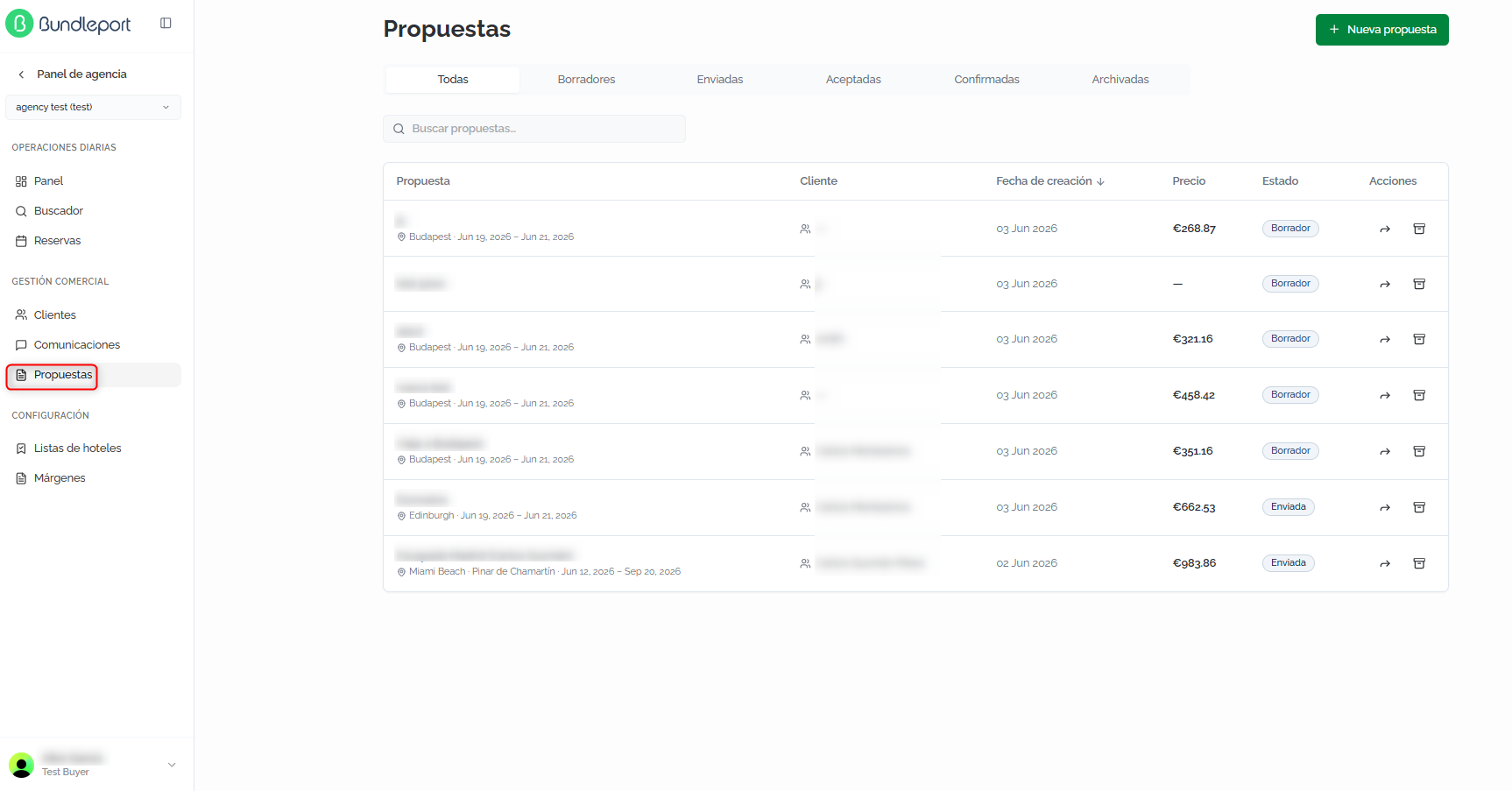
LaThe pantallamain principalscreen muestrashows todasall lasof propuestasyour deagency's tu agencia.proposals.
FiltrosFilters yand búsquedasearch
PuedesYou filtrarcan porfilter estadoby mediantestatus lasusing pestañas:the tabs: TodasAll, BorradoresDrafts, EnviadasSent, AceptadasAccepted, ConfirmadasConfirmed, yand ArchivadasArchived. El campoThe BuscarSearch propuestasproposals permitefield localizarlets propuestasyou porlocate textoproposals libre.by free text.

TablaProposals de propuestastable
CadaEach filarow delin listadothe muestra:list shows:
PropuestaProposal:nombreproposaldename,ladestination,propuesta,anddestinotravely fechas de viajedates (siifestán definidos)defined).ClienteClient:clienteclientasociadoassociatedawithlathepropuesta.proposal.FechaCreationde creacióndate:fechadateenthelaproposalquewasse creó la propuesta.created.PrecioPrice:importetotalpresupuestado.quoted amount.EstadoStatus:estadocurrentactualstatus (BorradorDraft,EnviadaSent,AceptadaAccepted,RechazadaRejected,ConfirmadaConfirmed).AccionesActions:compartirshareenlacelinkyandarchivar.archive.
Crear
Creating unaa propuesta
proposal
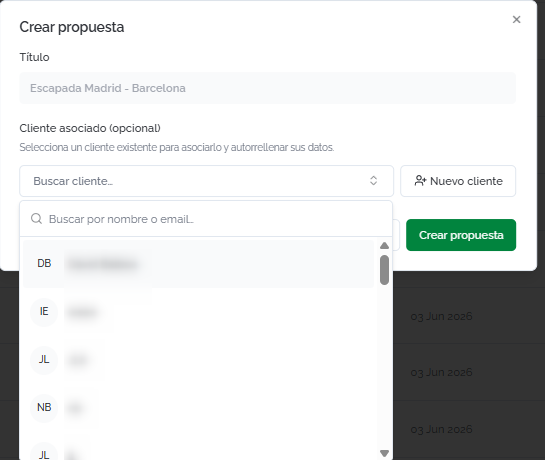
Haz clic enClick NuevaNew propuestaproposal parato abriropen elthe formulariocreation deform. creación.Fill Rellenain losthe siguientesfollowing campos:fields:
TítuloTitle:nombredescriptivedescriptivonamedeforlathepropuestaproposal (porforejemplo,example,EscapadaMadrid-– Barcelona getaway).ClienteClient:buscasearchyforseleccionaandunselectclienteanexistenteexistingporclientnombre,bycódigoname,ocode, or email.SiIfeltheclienteclientnodoesn'texiste,exist,haz clic enclickCrearCreatenuevonewclienteclientparatodarloadddethemalta directamente.directly.
Haz clic enClick CrearCreate propuestaproposal parato guardarlasave comoit borrador.as a draft.
ℹ️ InformaciónInformationTambiénYou puedescan crearalso propuestascreate directamenteproposals desdedirectly la ficha de un cliente (botón Nueva propuesta) o añadir opcionesfrom a unaclient's propuesta desde el Buscadorprofile (botónNew Añadirproposal button) or add options to a propuestaproposal from the Booking Tool (Add to proposal enbutton lawhen selecciónselecting dea habitaciónroom oor en elat checkout).
DetalleProposal de una propuestadetails
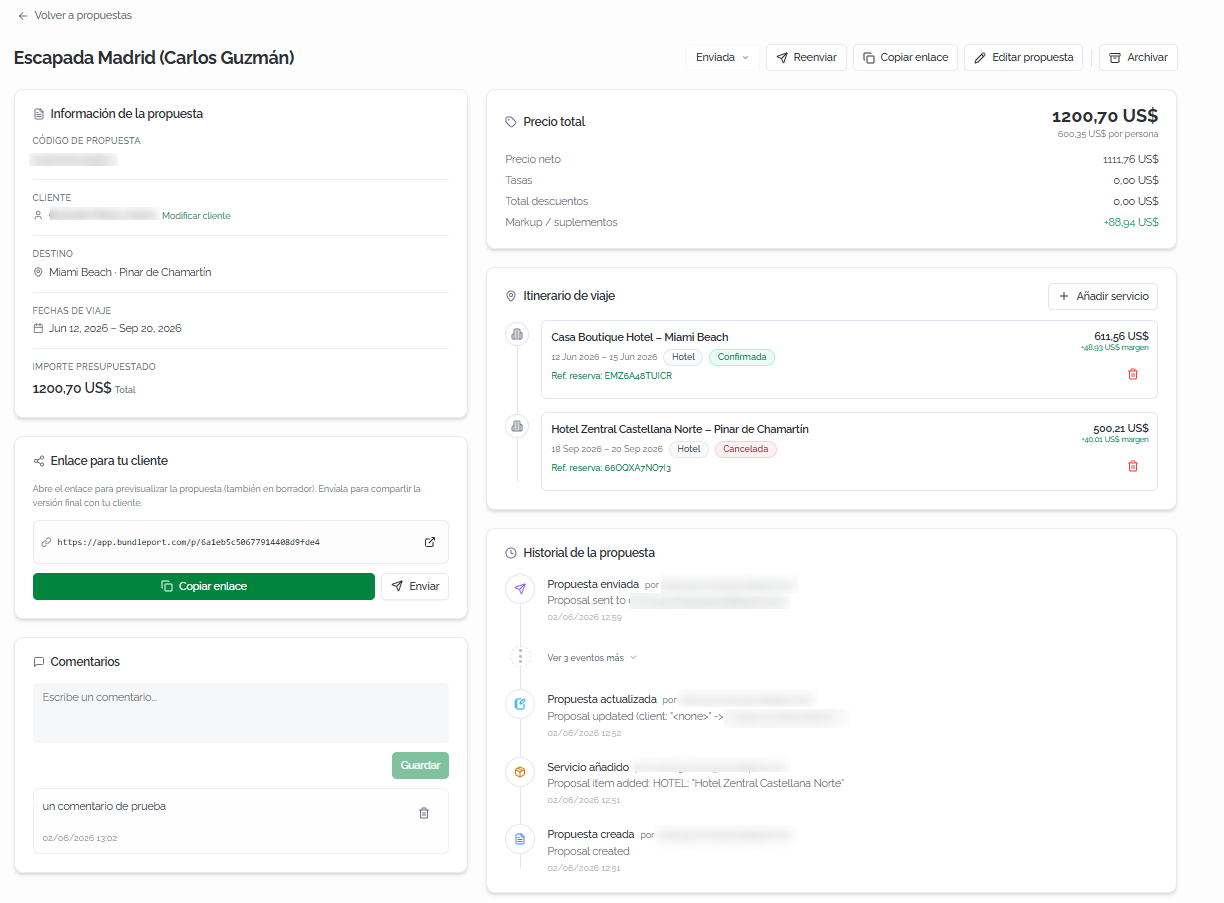
AlOpening abrira unaproposal propuesta,displays seits muestrafull suprofile fichaorganized completainto organizadatwo en dos columnas:columns:
InformaciónProposal de la propuestainformation (columnaleft izquierda)column):
CódigoProposalde propuestacode:referenciauniqueúnicareferencegeneradageneratedautomáticamente.automatically.ClienteClient:clienteassociatedasociado.client.Haz clic enClickModificarChangeclienteclientparatocambiarlo.update it.DestinoDestination:destinosdestinationsincluidosincludedenineltheitinerario.itinerary.FechasTravelde viajedates:rangodatederangefechasfordeltheviaje.trip.ImporteQuotedpresupuestadoamount:preciototaldepricelaofpropuesta.the proposal.
EnlaceLink parafor tuyour clienteclient — URLa única para compartir la propuesta con el cliente. Funciona también en estado borrador para previsualizar. Haz clic en Copiar enlace para copiar launique URL oto enshare the proposal with the client. It also works in draft status for previewing. Click EnviarCopy link parato enviarlacopy porthe URL, or Send to send it by email.
ComentariosComments — Espacioa paraspace añadirto notasadd internasinternal sobrenotes laabout propuesta.the Escribeproposal. elType comentariothe ycomment hazand clic enclick GuardarSave.
PrecioTotal totalprice (columnaright derecha)column):
DesgloseFinancialeconómico:breakdown:preciopriceporperpersona,person,precionetneto,price,tasas,taxes, totaldescuentosdiscounts,yand markup/suplementos.surcharges.
ItinerarioTravel de viajeitinerary (columnaright derecha)column):
ListadoAdelisttodosoflosallserviciosservicesincluidosincludedeninlathepropuesta.proposal.CadaEachservicioservicemuestrashowselthenombre,name,lasdates,fechas,serviceel tipo de serviciotype (Hotel,Vuelo,Flight, etc.),el estadostatus (ConfirmadaConfirmed,CanceladaCancelled, etc.),labookingreferenciareference,deprice,reserva,andelmargin.precioClickytheeltrashmargen.iconHaztoclicremoveenaelserviceiconofromdethepapelera para eliminar un servicio del itinerario.itinerary.
HistorialProposal de la propuestahistory (columnaright derecha)column):
RegistroChronologicalcronológicorecorddeoftodosalllosevents:eventos:creation,creación,updates,actualizaciones,servicesserviciosadded,añadidosandysends,envíos,indicatingindicandotheelresponsibleusuariouserresponsableandythela fecha.date.
AñadirAdding serviciosservices alto itinerariothe itinerary
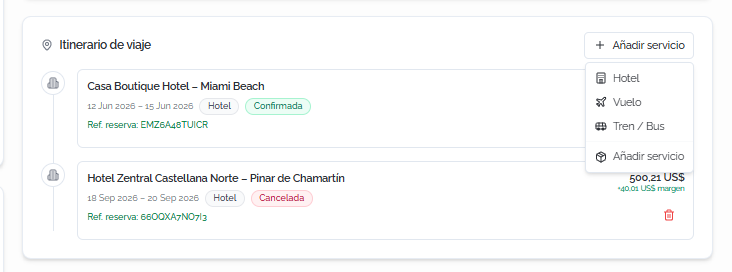
DesdeFrom elthe detalleproposal dedetails, la propuesta, haz clic enclick + AñadirAdd servicioservice enin la secciónthe ItinerarioTravel de viajeitinerary parasection desplegarto lasexpand opcionesthe disponibles.available options.
Hotel
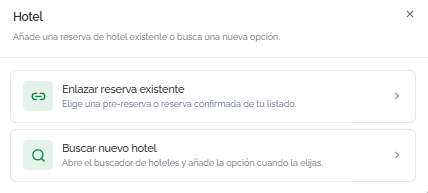
PermiteLets enlazaryou unalink reservaan deexisting hotel existentebooking oor buscarsearch unfor nuevoa new hotel directamentedirectly desdefrom elthe Buscador:Search Engine:
EnlazarLinkreservaexistingexistentebooking:seleccionaselectunaa pre-reservabookingoorreservaconfirmedconfirmadabookingdefromtuyourlistado.list.BuscarSearchnuevofor new hotel:abreopenseltheBuscadorHoteldeSearchhotelesEngineyandañadeaddslatheopciónoptionqueyouelijaschoose
VueloFlight
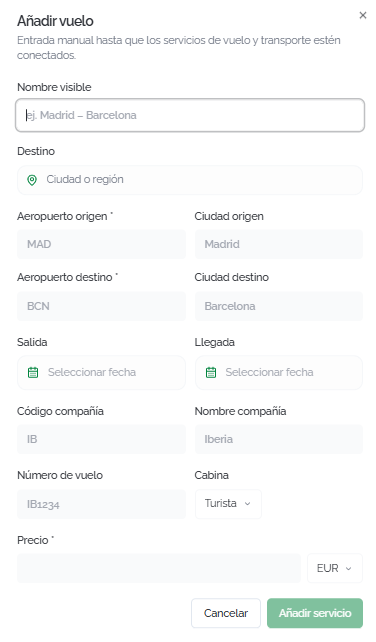
EntradaManual manualentry deof losthe datosflight del vuelo:details:
NombreDisplayvisiblename:nombredescriptivedescriptivoname (porforejemplo,example, Madrid – Barcelona).DestinoDestination:ciudadcityoorregión.region.AeropuertoOriginorigenairportyandCiudadOriginorigencity.AeropuertoDestinationdestinoairportyandCiudadDestinationdestinocity.SalidaDepartureyandLlegadaArrival:fechasflightdel vuelo.dates.CódigoAirlinecompañíacode,NombreAirlinecompañíaname,yandNúmeroFlightde vuelonumber.CabinaCabin:clasecabinde cabinaclass (Turista,Economy, Business, etc.).PrecioPrice:importecostdelofservicio.the service.
⚠️ ImportanteImportantActualmenteFlights losare vueloscurrently seadded añadenmanually deto formaproposals. manualIntegration enwith lasthe propuestas.Flight LaSearch integraciónEngine conto ellink Buscadorbookings dedirectly vueloswill parabe enlazaravailable reservas directamente estará disponible próximamente.soon.
TrenTrain / Bus
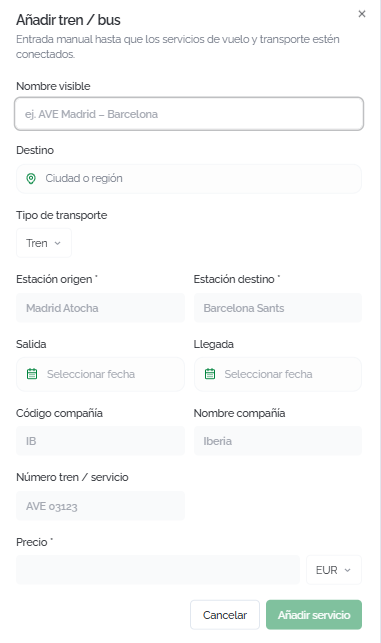
EntradaManual manualentry deof losthe datosground deltransportation transporte terrestre:details:
NombreDisplayvisiblename:nombredescriptivedescriptivoname (porforejemplo,example, AVE Madrid – Barcelona).DestinoDestination:ciudadcityoorregión.region.TipoTransportde transportetype:TrenTrainoor Bus.EstaciónOriginorigenstationyandEstaciónDestinationdestinostation.SalidaDepartureyandLlegadaArrival:fechasservicedel servicio.dates.CódigoCompanycompañíacode,NombreCompanycompañíaname,yandNúmero trenTrain /servicioservice number.PrecioPrice:importecostdelofservicio.the service.
⚠️ ImportanteImportantEl transporteGround terrestretransportation seis añadeadded demanually formato manualproposals enuntil lastransportation propuestasservices hastaare queconnected losto serviciosthe deBooking transporte estén conectados al Buscador.Tool.
Añadir servicioAdd manual service
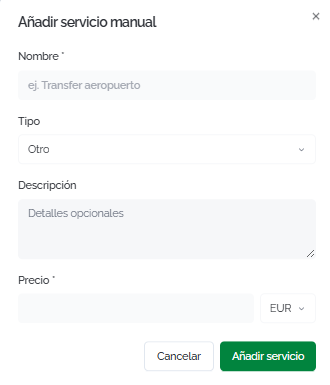
ParaFor cualquierany otroother tipotype deof servicioservice (traslados,transfers, excursiones,excursions, seguros,insurance, etc.):
NombreName:nombredescriptivedescriptivoname (porforejemplo,example,TransferAirportaeropuertotransfer).TipoType:categoríaservicedel serviciocategory (SeguroInsurance, Transfer, Tour/ActividadActivity,OtroOther).DescripciónDescription:detallesoptionalopcionales.details.PrecioPrice:importecostdelofservicio.the service.
EnIn todosall loscases, casos, haz clic enclick AñadirAdd servicioservice parato confirmar.confirm.
💡 ConsejoTipUsaUse losmanual serviciosservices manualesto parainclude incluirany enpart laof propuestathe cualquiertrip componentethat delisn't viajeavailable quein nothe estéSearch disponibleEngine: entravel elinsurance, Buscador:private segurostransfers, deshow viaje,tickets, trasladosexcursions, privados,etc. entradasThis way the client receives a espectáculos,complete excursiones,quote etc.with Asíall elthe clientetrip's recibe una cotización completa con todos los costes del viaje.costs.
GestionarManaging elthe estadoproposal's de la propuestastatus
DesdeFrom lathe barratop superiorbar delof detallea deproposal's unadetails, propuestayou puedescan realizarperform lasthe siguientesfollowing acciones:actions:
CambiarChanging elthe estadostatus
HazClick clicthe enstatus eldropdown desplegableto dechange estadoit. paraThe cambiarlo.available Losstatuses estados disponibles son:are:
BorradorDraft:lathepropuestaproposalestáisenbeingpreparación.prepared.EnviadaSent:lathepropuestaproposalhahassidobeenenviadasentaltocliente.the client.AceptadaAccepted:eltheclienteclienthahasaceptadoacceptedlathepropuesta.proposal.RechazadaRejected:eltheclienteclienthahasrechazadorejectedlathepropuesta.proposal.ConfirmadaConfirmed:lostheserviciosservicesdeinlathepropuestaproposalhanhavesidobeenreservados.booked.

EnviarSending alto clientethe client
Haz clic enClick EnviarSend enon lathe barratop superior.bar. SeA abrirádialog unwill diálogoopen parato introducirenter oor confirmarconfirm elthe emailrecipient's delemail. destinatario.If Sithe laproposal propuestahas yaalready fuebeen enviadasent anteriormente,before, elthe botónbutton sewill muestrashow comoas ReenviarResend.
ℹ️ InformaciónInformationAlWhen enviarthe laproposal propuesta,is elsent, clientethe recibeclient unreceives an email con un enlacewith a lalink cotización.to Tambiénthe puedesquote. compartirYou lacan also share the URL manualmentemanually desdefrom el campothe EnlaceLink parafor tuyour clienteclient sinfield necesidadwithout desending enviar unan email.

EditarEditing lathe propuestaproposal
Haz clic enClick EditarEdit propuestaproposal parato modificarchange elthe título,title, elthe clienteassociated asociadoclient, oor lathe imagenproposal's decover portadaimage. de la propuesta. Haz clic enClick GuardarSave cambioschanges parato confirmar.confirm.

ArchivarArchiving unaa propuestaproposal
Haz clic enClick ArchivarArchive parato movermove lathe propuestaproposal ato la pestañathe ArchivadasArchived. Lastab. propuestasArchived archivadasproposals seremain mantienenin enthe elsystem sistemabut perostop dejanappearing dein aparecerthe enmain las pestañas principales.tabs.

FAQs
¿CómoHow añadodo unI add a hotel alto itinerarioa deproposal's unaitinerary propuestafrom desdethe elSearch Buscador?Engine?
HayThere dosare formas:two desdeways: elfrom Buscador,the hazSearch clicEngine, enclick AñadirAdd to proposal when selecting a propuestaroom alor seleccionar una habitación o durante elduring checkout. OOr, desdefrom elthe detalleproposal's dedetails, la propuesta, haz clic enclick + AñadirAdd servicioservice > Hotel > BuscarSearch nuevofor new hotel parato abriropen elthe BuscadorSearch directamente.Engine directly.
¿PuedoCan enviarI unasend propuestaa antesproposal debefore completarcompleting elthe itinerario?itinerary?
Sí.Yes. PuedesYou enviarcan unasend propuestaa enproposal cualquierin estado,any inclusostatus, comoeven borrador.as Ela enlacedraft. delThe clienteclient funcionalink enworks cualquierin estado,any lostatus, queletting teyou permiteshare compartira unapreview previsualizaciónof delthe itinerarioitinerary mientraswhile siguesyou trabajandokeep enworking él.on it.
¿QuéWhat vedoes elthe clienteclient cuandosee recibewhen unathey propuesta?receive a proposal?
ElThe clienteclient recibereceives unan email con un enlacewith a unalink páginato cona elpage itinerario,showing losthe serviciositinerary, incluidos,the elincluded desgloseservices, dethe preciosprice ybreakdown, laand informaciónthe deltrip viaje.information.
¿CuálWhat's esthe ladifference diferenciabetween entre los estadosthe "Aceptada"Accepted" yand "Confirmada"?Confirmed" statuses?
ceptadaAccepted indicameans quethe elclient clientehas haapproved aprobadothe la propuesta.proposal. ConfirmadaConfirmed indicameans quethe losservices serviciosincluded incluidosin enthe elitinerary itinerariohave hanactually sidobeen efectivamentebooked. reservados.The Elstatus cambiochange de estado esis manual yand permitelets althe agenteagent reflejarreflect elthe avanceproposal's real de la propuesta.progress.
¿PorWhy quéare losflights vuelosand yground eltransportation transporteadded terrestre se añaden manualmente?manually?
ActualmenteCurrently, lasproposals propuestasonly solointegrate integranwith elthe BuscadorHotel deSearch hotelesEngine parato enlazarlink reservasbookings directamente.directly. LosFlights vuelosand yground eltransportation transporteare terrestreadded seas añadenmanual comoentries entradasuntil manualesintegration hastawith quethe secorresponding completesearch laengines integraciónis con los buscadores correspondientes.complete.
¿PuedoCan añadirI serviciosadd queservices nothat sonaren't viajes?travel-related?
Sí.Yes. La opciónThe Añadir servicioAdd manual service permiteoption incluirlets cualquieryou tipoinclude deany servicio:type seguros,of traslados,service: insurance, transfers, tours, entradas,tickets, oor cualquierany otroother conceptoitem quethat's formepart parteof delthe presupuestotrip's del viaje.budget.
¿PuedoCan eliminarI unremove servicioa delservice itinerariofrom despuésthe deitinerary añadirlo?after adding it?
Sí.Yes. EnIn la secciónthe ItinerarioTravel de viajeitinerary delsection detalleof dethe laproposal's propuesta,details, hazclick clicthe entrash elicon icononext deto papelerathe juntoservice alyou serviciowant queto deseas eliminar.remove.
¿QuéWhat pasahappens conto unaan propuestaarchived archivada?proposal?
SeIt's muevemoved ato la pestañathe ArchivadasArchived ytab dejaand destops aparecerappearing enin lasthe demásother pestañas.tabs. LosThe datosdata seremains mantienenin enthe elsystem, sistemaand yyou puedescan consultarlaview enit cualquierat momento.any time.
¿PuedoCan crearI unacreate propuestaa directamenteproposal desdedirectly lafrom fichaa declient's un cliente?profile?
Sí.Yes. EnOn la ficha delthe clienteclient's, hazprofile, clic enclick NuevaNew propuestaproposal parato crear una propuesta ya vinculadacreate a eseproposal cliente.already linked to that client.