
Organization Settings
AdministraManage elyour perfil,organization's losprofile, usuariosusers, yand las agencias de tu organizaciónagencies
La secciónThe AjustesOrganization de organizaciónSettings permitesection administrarlets elyou perfil,manage losyour usuarios,organization's lasprofile, agencias,users, lasagencies, cuentasservice deaccounts, servicioand yaudit ellog. registroIt's de auditoría de tu organización. Es la sección de administraciónBundleport's central deadministration Bundleport,section, accesibleaccessible parato usuariosusers conwith rolan deorganization organización.role.
ElThe módulomodule seis organizaorganized eninto cuatrofour secciones:sections: PerfilOrganization de organizaciónProfile, UsuariosUsers, AgenciasAgencies, yand CuentasService de servicioAccounts.
AccederAccessing aOrganization Ajustes de organizaciónSettings
EntraLogeninlato theplataformaBundleportde Bundleportplatform.EnAtlathepartebottominferiorofdelthemenúleft-handlateralsideizquierdo,menu,hazclickclic en tuyournombre de usuariousername.SeleccionaSelectAjustesOrganizationde organizaciónSettings.
PerfilOrganization de organizaciónProfile
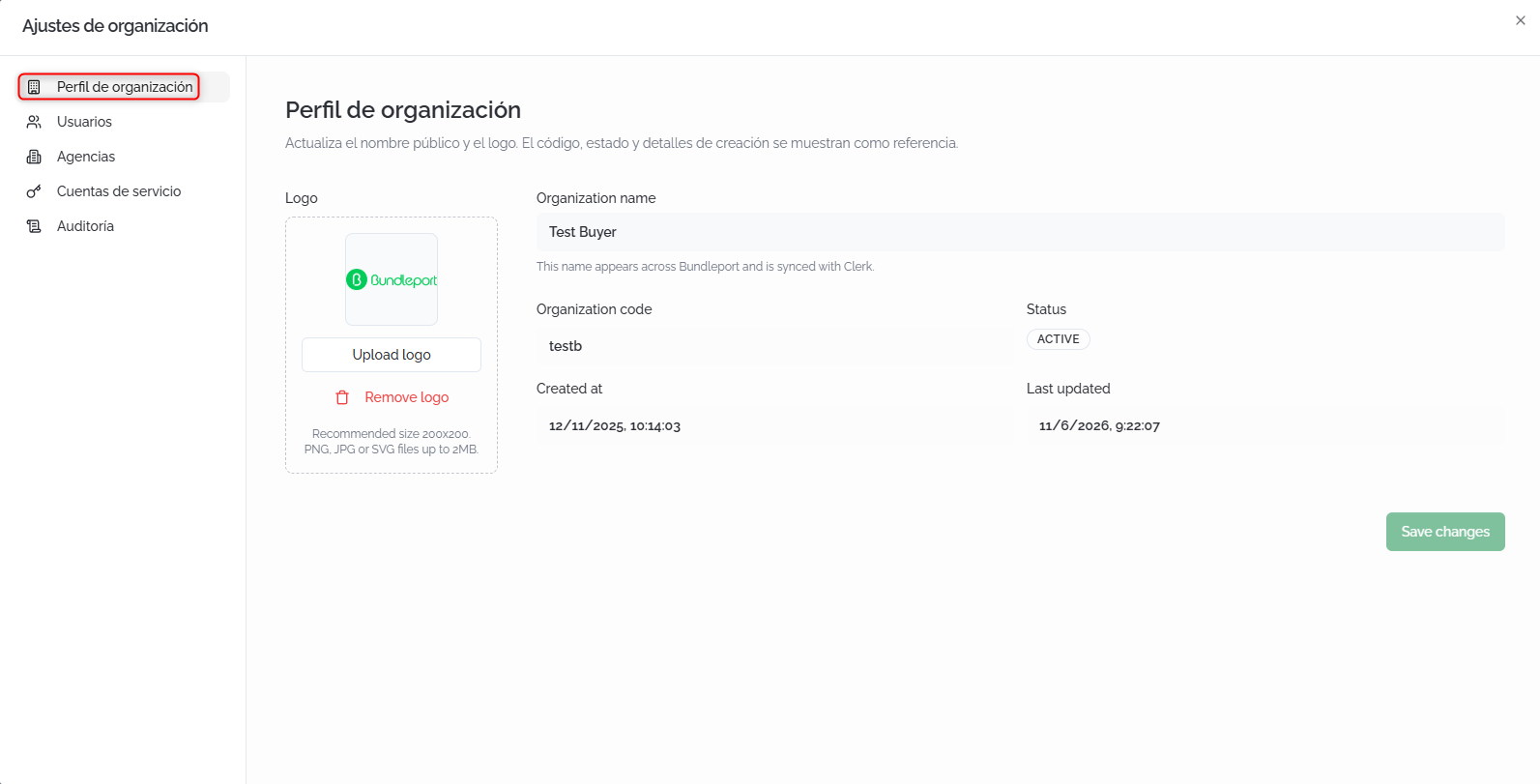
DesdeFrom PerfilOrganization deProfile, organizaciónyou puedescan actualizarupdate elyour nombreorganization's públicopublic yname eland logotipo de tu organización.logo.
CamposEditable editables:fields:
- Logo:
haz clic enclick Upload logoparatosubiruploadlayourimagenorganization'sdeimage.tuRecommendedorganización. Tamaño recomendado:size: 200×200 px.FormatosSupportedadmitidos:formats: PNG,JPGJPG,oor SVG,hastaup to 2 MB. - Organization name:
nombreyourpúblicoorganization'sdepublictuname.organización.ItApareceappearsenthroughouttodathelaplatformplataformaandyissesyncedsincronizawithcontheelauthenticationsistema de autenticación.system.
CamposReference de referenciafields (solo lectura)read-only):
- Organization code:
códigotheidentificativoorganization'sdeidentifyingla organización.code. - Status:
estadocurrentactualstatus (porforejemplo,example, Active). - Created at:
fechacreationydatehoraandde creación.time. - Last updated:
fechadateyandhoratimedeoflatheúltimalastmodificación.change.
Haz clic enClick Save changes parato guardarsave losthe cambios.changes.
UsuariosUsers
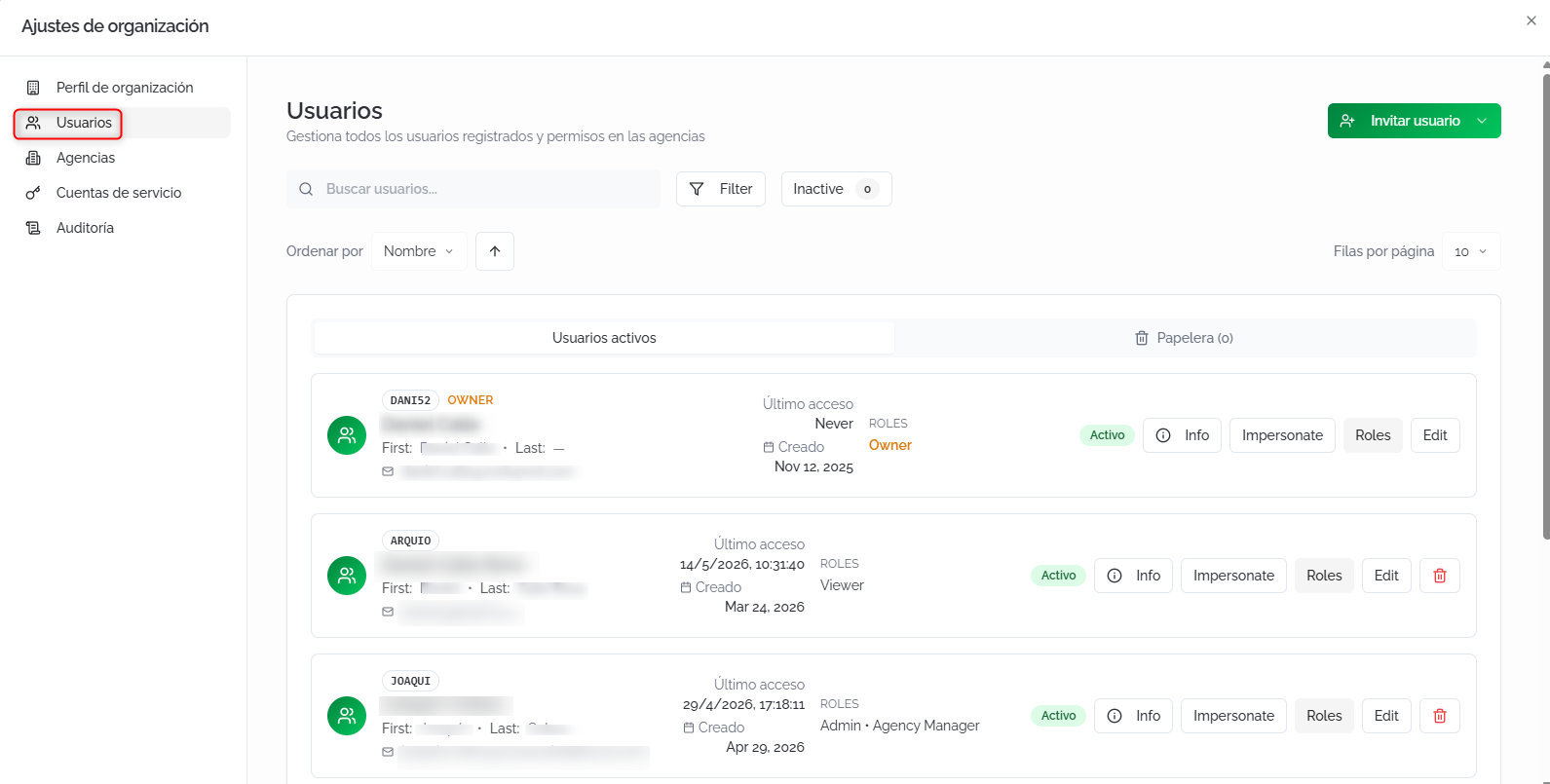
DesdeFrom UsuariosUsers, puedesyou gestionarcan todosmanage losall usuariosthe registradosusers enregistered tuin organización:your consultarorganization: suview información,their asignarinformation, assign roles, invitarinvite nuevosnew miembrosmembers, yand modificarchange sutheir estadoaccess de acceso.status.
BuscarSearch yand filtrarfilter usuariosusers
BuscarSearchusuariosusers:búsquedafree-textpor texto libre.search.- Filter:
filtrosfilterporbyestadostatus (Active, Inactive)yandporbyrolrole (Owner, Admin, Viewer, Agency Manager, Agency Agent). - Inactive:
accesoquickrápidoaccess to inactive users, with alos usuarios inactivos, con contador.counter. OrdenarSortporby:ordenasortselthelistadolistporby Name, Email, Created,oor Status,eninordenascendingascendenteorodescendingdescendente.order.
ElThe listadolist seis dividesplit eninto dostwo pestañas:tabs: UsuariosActive activosUsers yand PapeleraTrash, coneach unwith contadora deuser usuarios en cada una.counter.
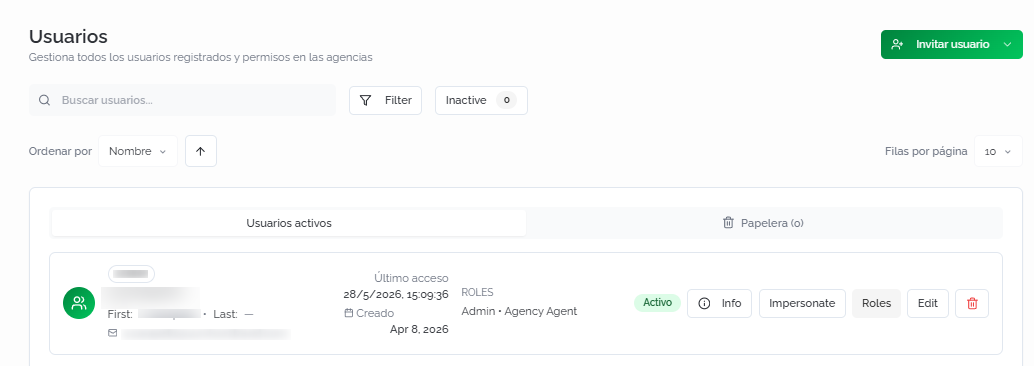
CadaEach filarow muestra:shows: códigoidentifying identificativo,code, nombrefull completo,name, email, últimolast acceso,access, fechacreation dedate, creación,assigned rolesroles, asignadosand y estado.status.
AccionesPer-user por usuarioactions
- Info:
abreopenselthedetalleuser'scompletofulldel usuariodetails (nombre,firstapellidos,name, last name, email,tipo,type, roles,fechasdates,yandmetadatostechnicaltécnicos)metadata). - Impersonate:
iniciasignssesiónincomoasesethatusuariouserparatoverviewlatheplataformaplatformdesdefromsutheirperspectiva.perspective. - Roles:
abreopenselthepaneluser'sderolegestiónmanagementde roles del usuario.panel. - Edit:
cambiaswitcheseltheestadouser'sdelstatususuario entrebetween Activeeand Inactive. EliminarDelete (iconotrashde papelera)icon):disponibleavailableparafortodosalllosusersusuariosexceptexceptotheel propietario (Owner).Owner.
⚠️ ImportanteImportantMarcarMarking una usuariouser comoas Inactive revocarevokes sutheir pertenenciamembership ain lathe organizaciónorganization yand bloqueablocks sutheir acceso.access. NoThey podráwon't iniciarbe sesiónable hastato quelog sein reactive.until Usareactivated. estaUse opciónthis enoption lugarinstead deof eliminardeleting siif quieresyou conservarwant elto historialkeep delthe usuario.user's history.
GestionarManaging roles
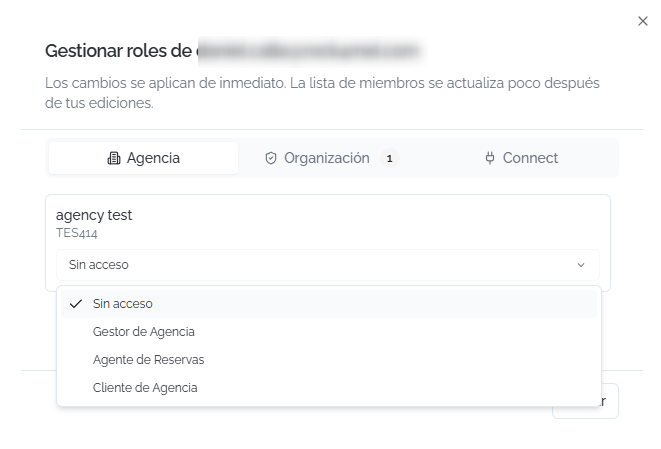
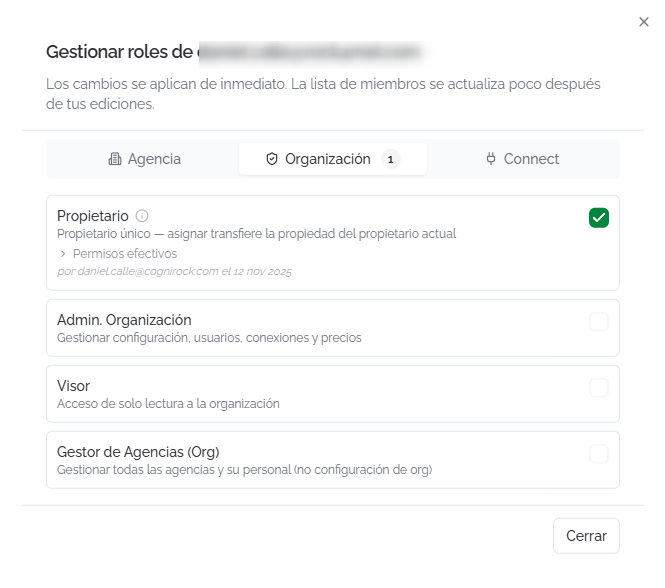
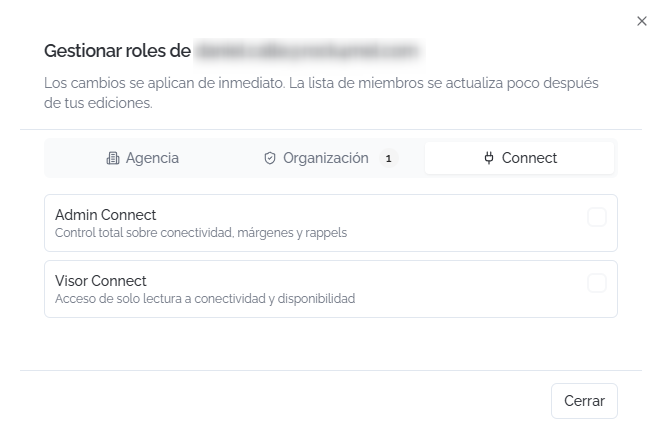
Al hacer clic enClicking Roles, seopens abre una panel conwith tresthree pestañastabs quecovering cubrenthe losdifferent distintospermission niveleslevels. deChanges permisos.take Loseffect cambios se aplican de inmediato.immediately.
RolesAgency deroles: agencia:a Serole asignais unassigned rolfor poreach cadaagency agenciain dethe la organización:organization:
SinNoaccesoaccess:eltheusuariouser has notieneaccessaccesotoathatesa agencia.agency.GestorAgencyde AgenciaManager:gestiónfullcompletamanagementdeoflatheagencia.agency.AgenteBookingde ReservasAgent:búsquedasearchyandreservabookde servicios.services.ClienteAgencyde AgenciaClient:accesolimitedlimitadoaccesscomoascliente.a client.
RolesOrganization de organización:roles:
PropietarioOwner:propietariotheúnicoorganization'sdesolela organización.owner.Admin.Org.OrganizaciónAdmin:gestionamanagesconfiguración,settings,usuarios,users,conexionesconnections,yandprecios.pricing.VisorViewer:accesoread-onlydeaccesssolotolecturathea la organización.organization.GestorAgenciesde AgenciasManager (Org):gestionamanagestodasalllasagenciesagenciasandytheirsustaff,personal,withsinnoaccesoaccessatolaorganizationconfiguración de la organización.settings.
RolesConnect de Connect:roles:
- Connect Admin
Connect: full controltotaloversobreconnectivity,conectividad,margins,márgenesandy rappels.rebates. VisorConnectConnectViewer:accesoread-onlydeaccesssolotolecturaconnectivityaandconectividad y disponibilidad.availability.
⚠️ ImportanteImportantAsignarAssigning el rol dethe PropietarioOwner role to another user automatically transfers ownership of the organization. This action cannot be undone from the interface. There should only be one owner at a otro usuario transfiere la propiedad de la organización automáticamente. Esta acción es irreversible desde la interfaz. Solo debe haber un propietario a la vez.time.
InvitarInviting usuariosusers
Haz clic enClick InvitarInvite UsuarioUser parato desplegarexpand lasthe opcionesinvitation de invitación:options:
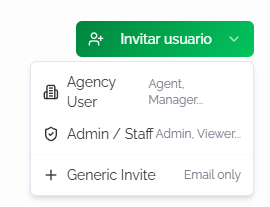
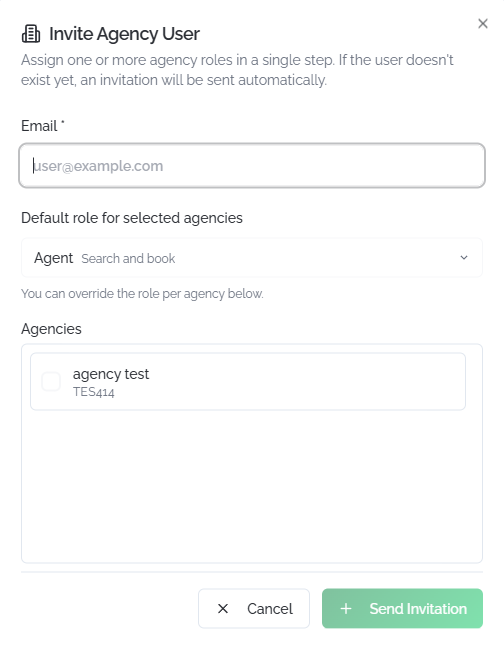
Agency User: Invitainvites a unuser usuarioand yassigns asígnalethem unan rolagency derole agenciain ena unsingle solostep. paso.If Sithe eluser usuariodoesn't noalready existeexist enon lathe plataforma,platform, sean leinvitation enviaráis unasent invitación automáticamente.automatically.
- Email:
direcciónthedeuser'scorreoemaildel usuario.address. - Default role for selected agencies:
rolthepordefaultdefectoroleparaforlastheagenciasselectedseleccionadasagencies (porforejemplo,example, Agent — Search and book).PuedesYoupersonalizarcanelcustomizeroltheporroleagencia.per agency. - Agencies:
seleccionaselectlastheagenciasagenciesathey'lllashavequeaccesstendrá acceso.to.
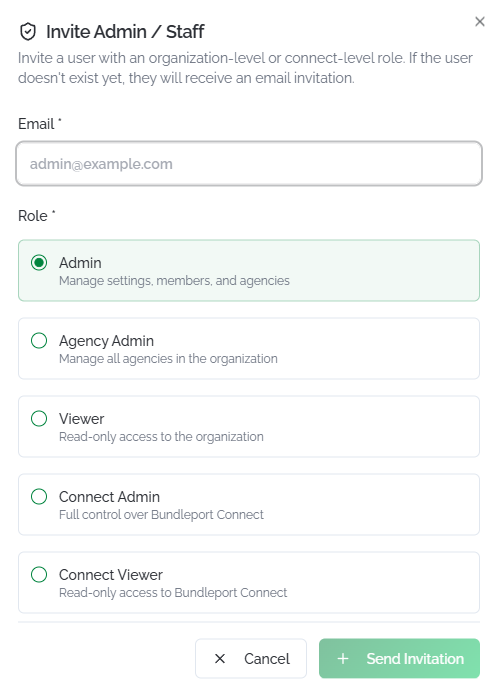
Admin / Staff: Invitainvites a unuser usuariowith conan unorganization-level rolor aConnect-level nivel de organización o de Connect.role.
- Email:
direcciónthedeuser'scorreoemaildel usuario.address. - Role: Admin, Agency Admin, Viewer, Connect Admin,
oor Connect Viewer.
Generic Invite: Envíasends unaa invitaciónbasic básicainvitation (soloemail email)only). ElThe códigouser decode usuariois segenerated generaautomatically. automáticamente.Roles Losare rolesassigned seafterward asignanfrom despuésthe desderole elmanagement panel de gestión de roles.panel.
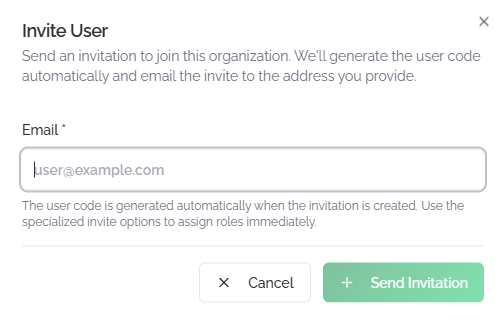
EnIn losall tresthree casos,cases, haz clic enclick + Send Invitation parato enviar,send oit, enor Cancel parato descartar.discard it.
💡 ConsejoTipUsaUse Agency User cuandowhen necesitesyou darneed accesoto rápidoquickly give access to a unbooking agenteagent: deselect reservas:the seleccionasagencies, lasthe agencias,role, eland rolsend. y envías. UsaUse Generic Invite cuandowhen aúnyou're nonot tengasyet clarosure quéwhat permisospermissions necesitaráthe eluser usuario:will primeroneed: legive dasthem accesoaccess yfirst, luegothen ajustasadjust sustheir roles.roles later.
AgenciasAgencies
DesdeFrom Agencies, puedesyou gestionarcan lasmanage agenciasyour deorganization's tuagencies: organización:create crearnew nuevas,ones, editaredit sutheir configuración,configuration, asignarassign conexionesconnections, yand eliminarlas.delete them.
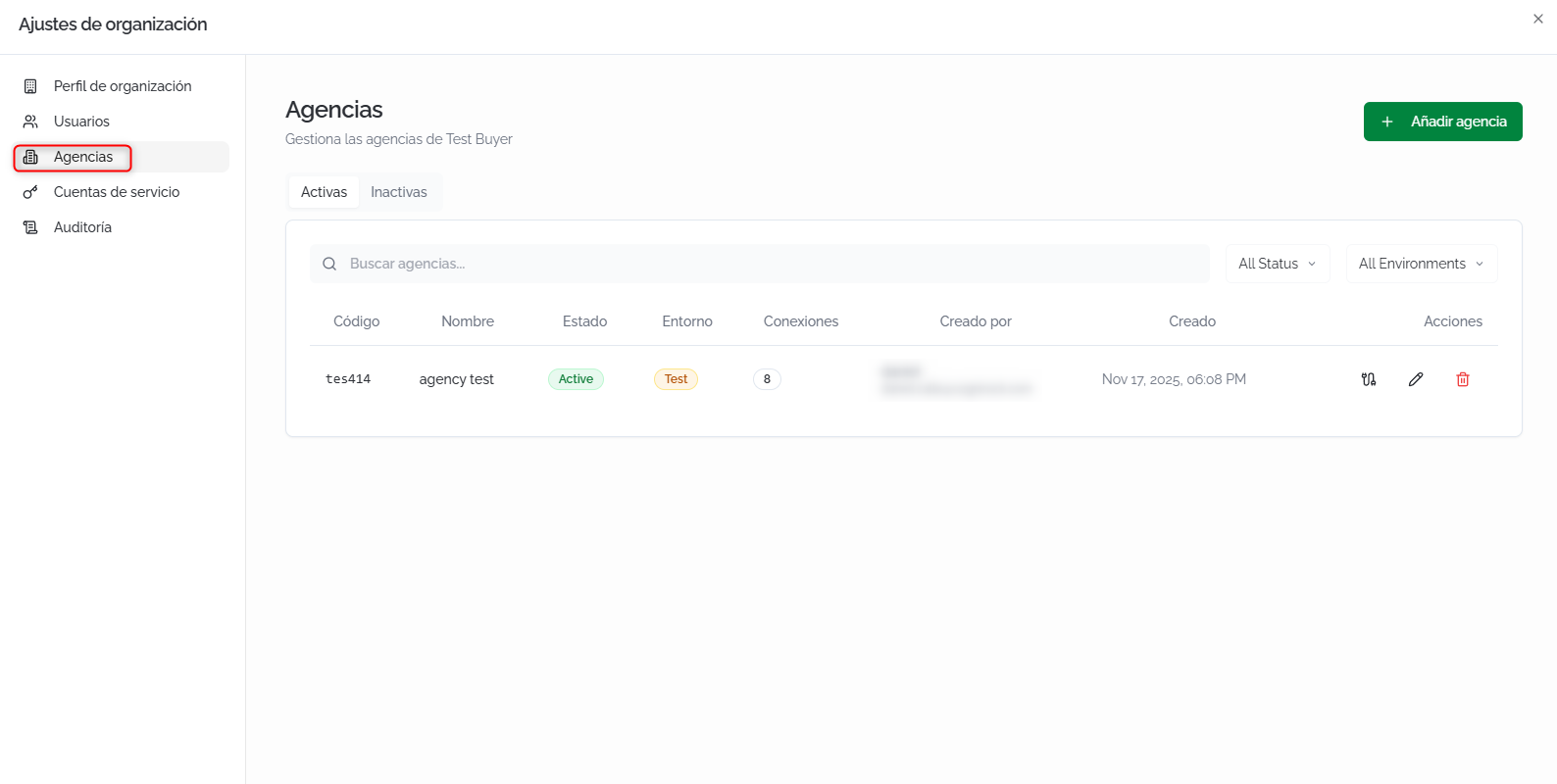
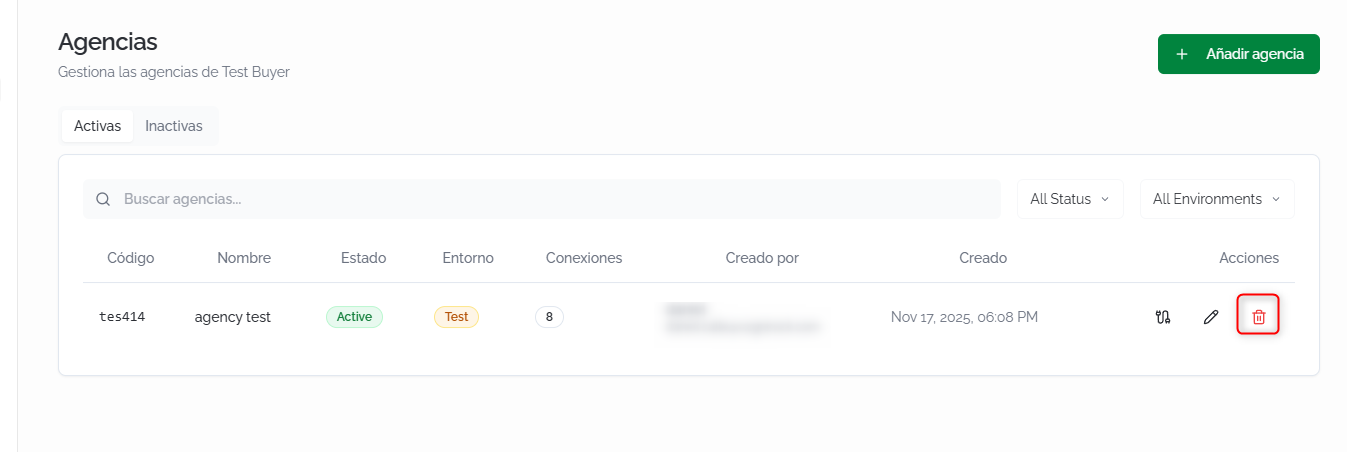
ListadoAgencies de agenciaslist
LaThe pantallascreen seis dividesplit eninto dostwo pestañas:tabs: Active eand Inactive. PuedesYou filtrarcan porfilter textoby libre,free estadotext, ystatus, entorno.and environment.
CadaEach filarow muestra:shows:
- Code:
códigoidentifyingidentificativocode (generadogeneratedautomáticamente)automatically). - Name:
nombrethedeagency'sla agencia.name. - Status: Active
oor Inactive. - Environment: Test
oor Production. - Connections:
númeronumberdeofconexionesassignedasignadas.connections. - Created By:
usuariothequeusercreówholacreatedagencia.the agency. - Created:
fechacreationde creación.date. - Actions:
asignarassignconexiones,connections,editaredit,ooreliminar.delete.
CrearCreating unaan agenciaagency
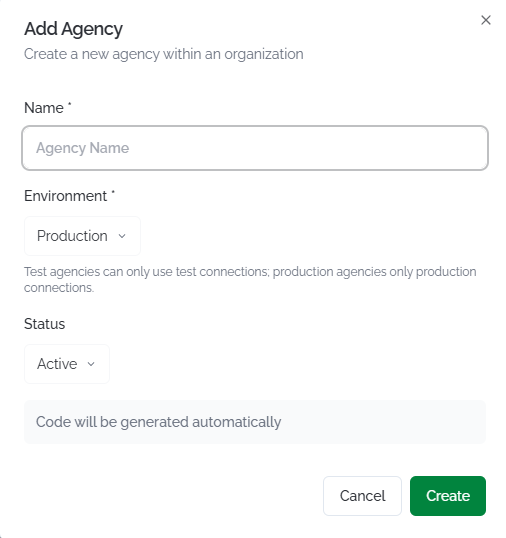
Haz clic enClick AñadirAdd agenciaAgency. ElThe formularioform solicita:asks for:
- Name:
nombrethedeagency'sla agencia.name. - Environment: Test
oor Production. - Status: Active
porbydefecto.default.
ElThe códigocode seis generagenerated automáticamente.automatically. Haz clic enClick Create parato confirmar.confirm.
⚠️ ImportanteImportantEl entornoThe determinaenvironment quédetermines conexioneswhich puedeconnections usarthe laagency agencia:can las agencias deuse: Test soloagencies admitenonly conexionessupport deTest Test,connections, y las deand Production soloagencies conexionesonly desupport Production.Production Paraconnections. cambiarTo elchange entornoan deexisting unaagency's agenciaenvironment, existente,it debemust have no tenerconnections conexionesassigned, asignadasor oall todasof susits conexionesconnections debenmust serbelong delto entornothe destino.target environment.
EditarEditing unaan agenciaagency
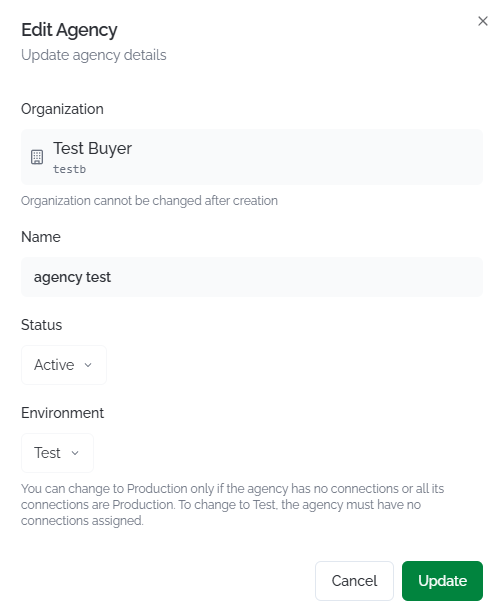
HazClick clicthe enedit elicon iconoin de edición en la columnathe Actions column. You can modify the name, status, and environment (subject to the restrictions above). PuedesThe modificarorganization elthe nombre,agency elbelongs estadoto ycannot elbe entornochanged (cononce las restricciones indicadas arriba). La organización a la que pertenece la agencia no se puede modificar una vez creada.created.
AsignarAssigning conexionesconnections
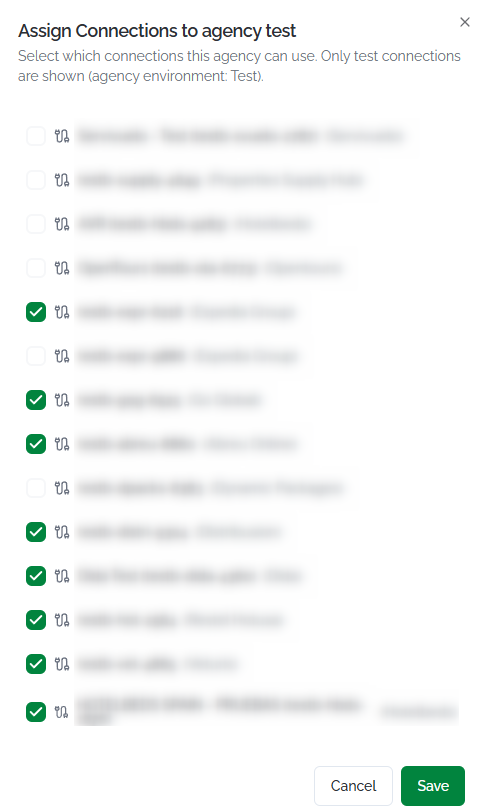
HazClick clicthe enconnections elicon iconoin de conexiones en la columnathe Actions. Secolumn. abrirá unA panel conwill todasopen laswith conexionesall disponiblesavailable delconnections mismoin entornothe quesame laenvironment agencia.as Marcathe lasagency. conexionesCheck quethe quierasconnections asignaryou ywant hazto clicassign enand click Save.
EliminarDeleting unaan agenciaagency
HazClick clicthe entrash elicon iconoin de papelera en la columnathe Actions. Estacolumn. acciónThis eliminaaction lapermanently agenciadeletes dethe forma definitiva.agency.
Cuentas
Service de servicio
Accounts
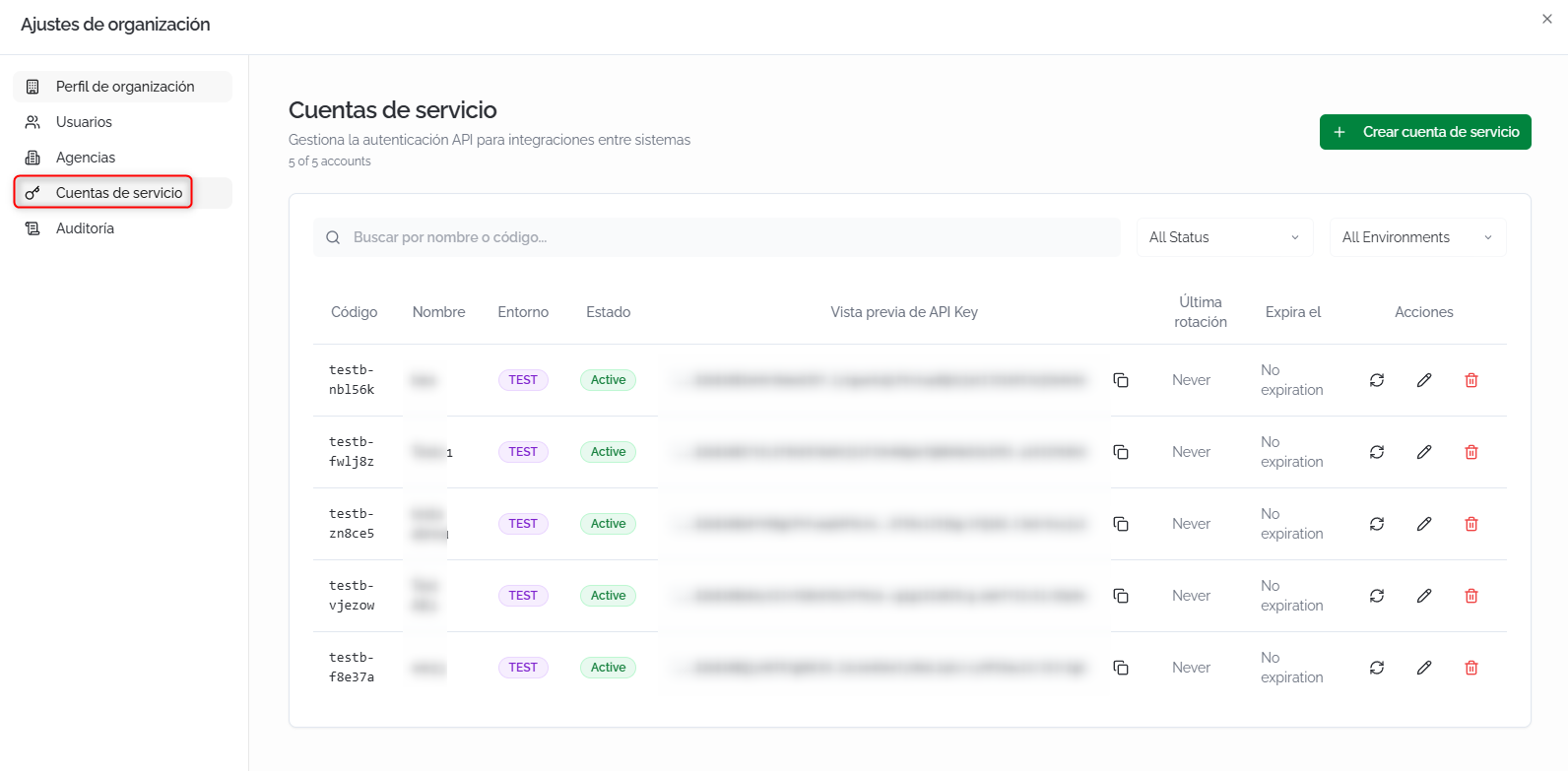
DesdeFrom CuentasService deAccounts, servicioyou puedescan gestionarmanage lasthe cuentasservice deaccounts servicioused utilizadasfor para la autenticación de integraciones sistema a sistemasystem-to-system (API). Cadaauthentication. cuentaEach generaaccount unagenerates an API Key vinculadatied to a unspecific entorno específico.environment.
BuscarSearch yand filtrarfilter
BuscarSearchporbynombrenameoorcódigocode:búsquedafree-textpor texto libre.search.- All Status:
filtrafilterporby Active, Inactive,oor Expired. - All Environments:
filtrafilterporby Production, Staging,oor Test.
ListadoAccounts de cuentaslist
CadaEach cuentaaccount muestra:shows:
CódigoCode:códigoidentifyingidentificativocode (formatoformatorg.code-XXXXXX).Nombre: nombre descriptivo de la cuenta.
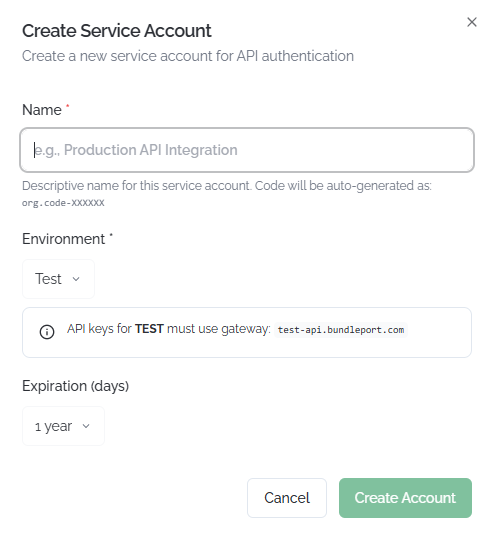
Crear una cuenta de servicio
Haz clic en Crear cuenta de servicio. El formulario solicita:
Creating a service account
Click Create Service Account. The form asks for:
Haz clic enClick Create Account parato confirmar.confirm.
ℹ️ InformaciónInformationLas API Keys dein entornothe Test debenenvironment usarmust eluse gatewaythe test-api.bundleport.com. Las degateway. Production usankeys eluse gatewaythe principal.main gateway.
Rotar,Rotating, editarediting, yand eliminardeleting cuentasaccounts
RotarRotating clave:a key:Haz clicclick enthe elrotation iconoicon dein rotación en la columnathe Actions paracolumn generarto unagenerate nuevaa new API Key. LaThe claveprevious anteriorkey dejaráwill destop funcionarworking de forma inmediata.immediately.
⚠️ ImportanteImportantRotarRotating unaan API Key invalidainvalidates lathe claveprevious anteriorkey alinstantly. instante.All Todasintegrations lasusing integracionesthe queprevious usenkey lawill clavestop anteriorworking dejaránuntil dethey're funcionarupdated hastawith quethe senew actualicenkey. conCoordinate lathe nuevarotation clave.with Coordinayour latechnical rotación con tu equipo técnico.team.

Editar:Editing: Hazclick clicthe enedit elicon iconoto demodify ediciónthe paraaccount's modificarname, elstatus, nombre,or el estado o la expiración de la cuenta.expiration.

Eliminar:Deleting: Hazclick clicthe entrash elicon iconoto depermanently papeleradelete parathe eliminaraccount. laThe cuenta de forma definitiva. Laassociated API Key asociadawill dejarástop de funcionar.working.

FAQs
¿QuéWhat roles estánare disponiblesavailable yand quéwhat permitedoes cadaeach uno?one allow?
HayThere tresare nivelesthree derole roles:levels: AgenciaAgency (SinNo acceso,access, GestorAgency deManager, Agencia,Booking AgenteAgent, deAgency Reservas, Cliente de Agencia)Client), OrganizaciónOrganization (Propietario,Owner, Admin, Visor,Viewer, GestorAgencies deManager), Agencias) yand Connect (AdminConnect Connect,Admin, VisorConnect Connect)Viewer). UnA usuariouser puedecan tenerhold roles enat losall tresthree niveleslevels simultáneamente.simultaneously.
¿PuedoCan transferirI latransfer propiedadownership deof lathe organizaciónorganization ato otroanother usuario?user?
Sí.Yes. AsignaAssign el rolthe PropietarioOwner alrole nuevoto usuariothe desdenew eluser panelfrom dethe roles.roles Lapanel. propiedadOwnership seis transfieretransferred automáticamenteautomatically, yand tuyour rolowner derole propietariois se revoca.revoked.
¿QuéWhat's diferenciathe haydifference entrebetween desactivardeactivating yand eliminardeleting una usuario?user?
DesactivarDeactivating una usuariouser (Inactive) bloqueablocks sutheir accesoaccess perobut conservakeeps sutheir historialhistory yand configuración.configuration. Eliminar un usuario lo envíaDeleting a lauser sends them to the PapeleraTrash depermanently. formaWe definitiva.recommend Recomendamosdeactivating desactivarinstead enof lugardeleting dewhenever eliminar siempre que sea posible.possible.
¿QuéWhat's diferenciathe haydifference entrebetween una agencia dea Test yagency unaand dea Production?Production agency?
Las agencias de Test soloagencies puedencan usaronly conexiones deuse Test connections (entornoa detesting pruebas)environment). Las de Production usanagencies conexionesuse realesreal consupplier proveedores.connections. UsaUse Test parafor pruebastesting yand formación,training, and Production parafor operativareal real.operations.
¿PuedoCan cambiarI unachange agenciaan deagency from Test ato Production?
Sí,Yes, siif lathe agenciaagency has no tieneconnections conexionesassigned, asignadasor oif todasall susof conexionesits sonconnections delbelong entornoto destino.the Primerotarget desvinculaenvironment. lasFirst conexionesunlink dethe Test yconnections, luegothen cambiachange elthe entornoenvironment ato Production.
¿QuéWhat esis "Impersonate" yand cuándowhen usarlo?should I use it?
PermiteIt iniciarlets sesiónyou comosign otroin usuarioas paraanother veruser lato plataformaview desdethe suplatform perspectiva.from Estheir útilperspective. paraIt's diagnosticaruseful problemasfor dediagnosing permisospermission oissues verificaror queverifying unthat usuarioa veuser losees quewhat deberíathey ver.should see.
¿CuándoWhen deboshould rotarI unarotate an API Key?
RotaRotate lathe clavekey siif sospechasyou quesuspect hait's sidobeen comprometida,compromised, cuando un miembro del equipo con accesowhen a lateam clavemember dejawith laaccess organización,to othe comokey parteleaves dethe tuorganization, políticaor deas rotaciónpart periódicaof deyour credenciales.periodic credential rotation policy.
¿QuéWhat pasahappens siif unaan API Key expira?expires?
LaThe cuentaservice deaccount serviciomoves pasa a estadoto Expired ystatus laand clavethe dejakey destops funcionar.working. CreaCreate unaa nuevanew cuentaservice deaccount servicioor oedit editathe laexisting expiraciónone's deexpiration lato existenterestore para restaurar el acceso.access.
¿PuedoCan asignarI un usuarioassign a variasuser agenciasto conmultiple agencies with different roles?
Yes. From the roles diferentes?panel,
Sí. Desde el panel de roles, la pestañathe AgenciaAgency permitetab asignarlets unyou rolassign distintoa pordifferent cadarole agenciafor deeach laagency organización.in Unthe usuarioorganization. puedeA seruser Gestorcan enbe unaa agenciaManager yin Agenteone deagency Reservasand ena otra.Booking Agent in another.