
Dashboard
CómoHow consultarto elview resumenyour deagency's actividadactivity desummary tuon agenciathe en el PanelDashboard
ElThe PanelDashboard esis lathe pantallahome descreen inicioof delthe PanelAgency dePanel. agencia.It Ofreceoffers unaa vistaconsolidated consolidadaview deof tuyour actividadbusiness comercial:activity: indicadoreskey claveperformance deindicators, rendimiento,booking tendenciastrends, detop reservas,destinations, destinosand másrecent demandadosbookings, yall reservason recientes,a todosingle en una sola pantalla.screen.
ÚsaloUse comoit puntoas deyour partidadaily delstarting díapoint parato detectarspot tendencias,trends, identificaridentify oportunidadesopportunities, yand hacerkeep seguimientotrack deof laoperations operativawithout sinhaving necesidadto demanually cruzarcross-reference datos manualmente.data.
AccederAccessing althe PanelDashboard
EntraLogeninlato theplataformaBundleportde Bundleportplatform.EnInelthemenúleft-handlateralsideizquierdo,menu,seleccionaselect Agency Panelde agencia.
LaThe páginapage quethat seopens abreshows muestra elthe PanelDashboard porby defecto.default.
PeriodoAnalysis de análisisperiod
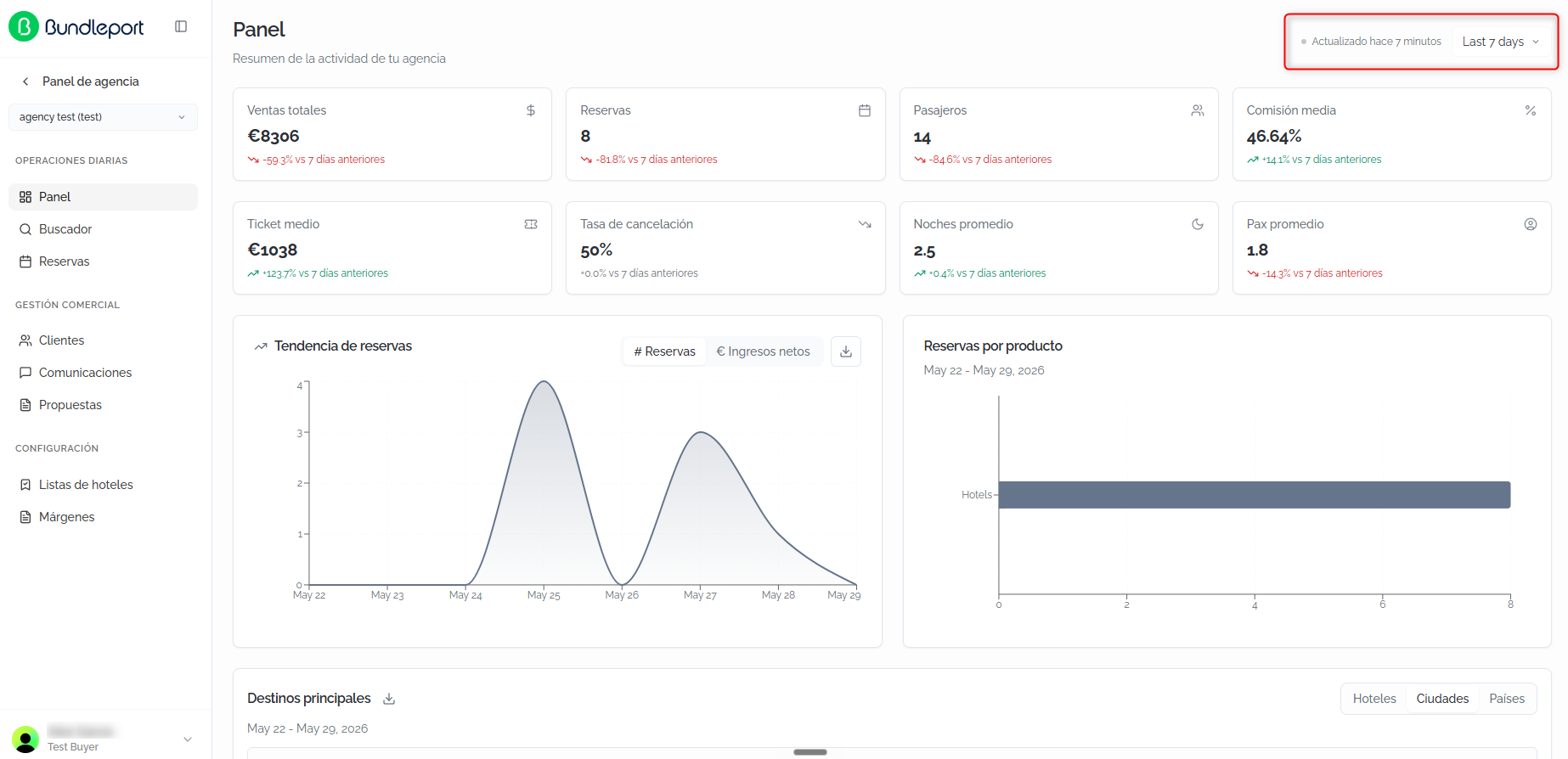
EnIn lathe esquinatop superiorright derechacorner, encontrarásyou'll elfind selectorthe detime periodoperiod temporal.selector. AlWhen cambiarlo,you todoschange losit, indicadores,all gráficosindicators, ycharts, tablasand setables actualizanupdate automáticamente.automatically.
LasThe opcionesavailable disponiblesoptions son:are:
- Today:
datosdatadelfordíatheencurrentcurso.day. - Yesterday:
datosdatadelfordíatheanterior.previous day. - Last 7 days:
últimoslast 7díasdays (opcióndefaultpor defecto)option). - Last 30 days:
últimoslast 30días.days. - Last 3 months:
últimoslast 3meses.months. - Last 12 months:
últimoslast 12meses.months. - Custom:
rangocustomdedatefechas personalizado.range.
JuntoNext alto selectorthe seselector, muestrayou'll lasee horathe detime laof últimathe actualizaciónlast dedata los datos.update.
💡 ConsejoTipUsaUse el rangothe Custom range parato analizaranalyze periodosspecific concretosperiods, comosuch unaas campañaa promocional,promotional uncampaign, puentea festivolong oweekend, unaor temporadaa específica.particular season
IndicadoresKey claveperformance de rendimientoindicators (KPIs)
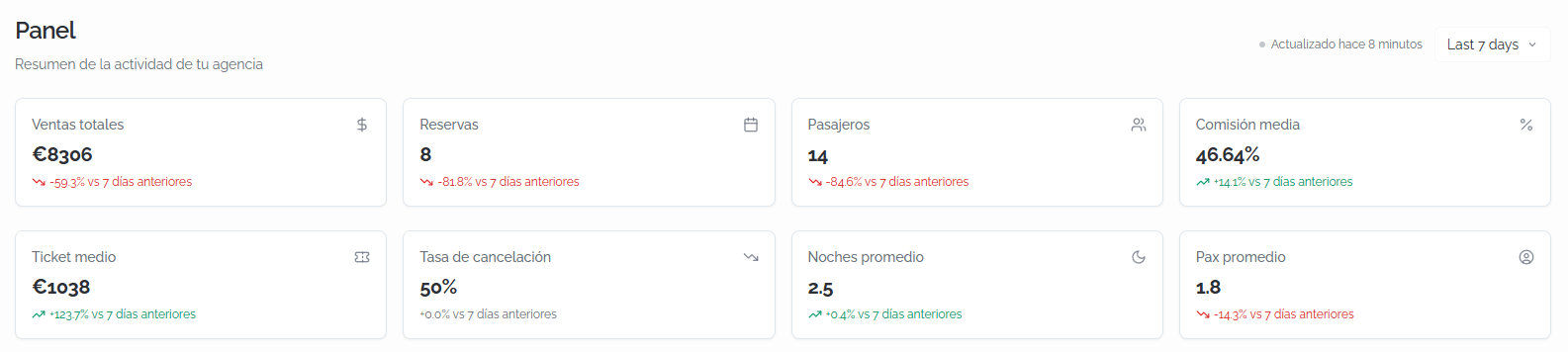
LaThe partetop superiorsection delof Panelthe muestraDashboard ochodisplays tarjetaseight concards loswith indicadoresthe principalesagency's demain laindicators. agencia.Each Cadacard tarjetaincludes incluyethe elcurrent valorvalue actualand ythe lapercentage variaciónchange porcentualcompared respectoto althe periodoequivalent anteriorprevious equivalente.period.
VentasTotaltotalessales:importetotaldesalesventasamountenin euros.ReservasBookings:númerototaldenumberreservasofrealizadas.bookings made.PasajerosPassengers:númerototaldenumberpasajerosofenpassengerslasacrossreservasbookingsdelinperiodo.the period.ComisiónAveragemediacommission:porcentajeaveragemediocommissiondepercentagecomisión obtenida.earned.TicketAveragemedioticket:importeaveragemedioamountporperreserva.booking.TasaCancellationde cancelaciónrate:porcentajepercentagedeofreservascancelledcanceladasbookingssobreoutelof the total.NochesAveragepromedionights:mediaaveragedenumbernochesofpornightsreserva.per booking.PaxAveragepromediopax:mediaaveragedenumberpasajerosofporpassengersreserva.per booking.
LasPositive variacioneschanges positivasare seshown muestranin engreen verdewith conan flechaupward ascendentearrow, yand lasnegative negativaschanges enin rojored conwith flechaa descendente,downward siemprearrow, referenciadasalways alrelative periodoto anteriorthe equivalente.equivalent previous period.
ℹ️ InformaciónInformationLaThe variaciónpercentage porcentualchange comparacompares elthe periodoselected seleccionadoperiod conwith elthe periodoimmediately inmediatamentepreceding anteriorperiod deof lathe mismasame duración.length. PorFor ejemplo,example, siif seleccionasyou select Last 7 days, lathe variaciónchange seis calculacalculated respectoagainst athe losprevious 7 días previos.days.
GráficosCharts
DebajoBelow dethe losKPIs, KPIsyou'll encontrarásfind dostwo gráficos:charts:
TendenciaBookingde reservastrend:muestrashowslahowevoluciónbookingsdeevolvedlasduringreservastheduranteselectedelperiod.periodoYouseleccionado.canPuedesswitchalternarbetweenentretwodosmetricsmétricasusingusandothelastabspestañasabovesuperiores:the chart:ReservasBookings (númeronumberdeofreservasbookingsporperdía)day)eandIngresosNetnetosrevenue (importenetnetoamountporperdía)day).ReservasBookingsporbyproductoproduct:desglosabreakseldownnúmerothedenumberreservasofporbookingstipobydeproductproductotype (por ejemplo,e.g., Hotels).
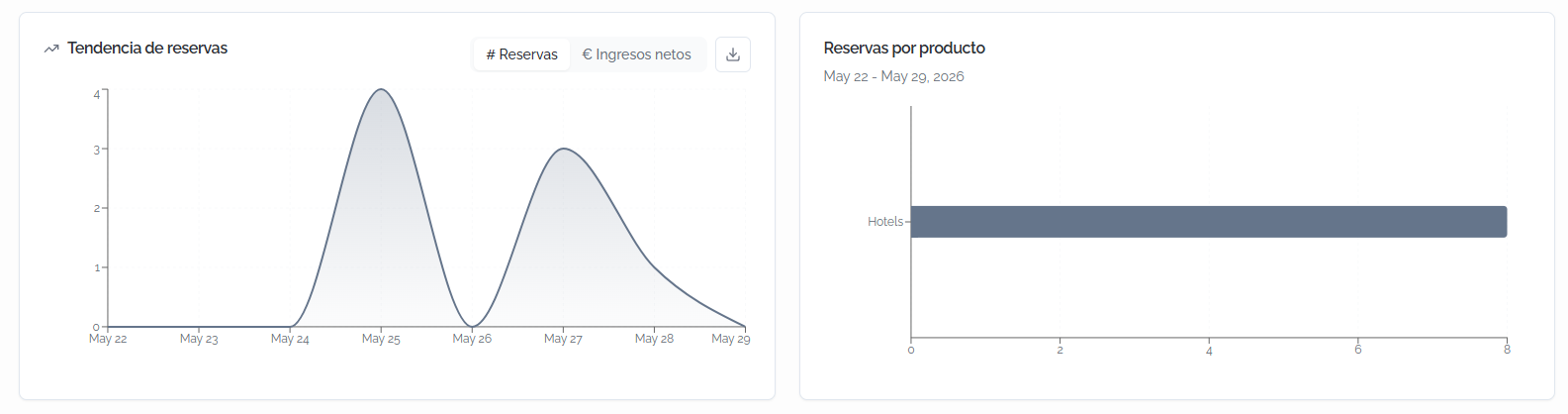
ℹ️ InformaciónInformationLosThe datosdata delin gráficothe debooking tendenciatrend dechart reservascan sonbe exportablesexported haciendoby clicclicking enthe eldownload botónbutton dein descargathe entop laright esquinacorner superiorof derechathe del gráfico.chart.
Destinos
Top principales
destinations
La secciónThe DestinosTop principalesdestinations presentasection unapresents tablaa contable elwith rendimientothe deperformance losof destinosthe másmost relevantesrelevant durantedestinations elduring periodothe seleccionado.selected Puedesperiod. visualizarYou loscan datosview enthe tresdata dimensionesacross mediantethree lasdimensions pestañasusing the HotelesHotels, CiudadesCities, and Countries y Países.tabs.
LasThe columnasavailable disponiblescolumns (coneach ordenaciónsortable) en cada una) son:are:
- #:
posiciónrankingen el ranking.position. CiudadCity / Hotel /PaísCountry:nombredestinationdelnamedestinoaccordingsegúntolathepestañaselectedseleccionada.tab.IngresosNetnetosrevenue:importenetnetorevenuedeamountingresos generados.generated.ReservasBookings:númeronumberdeofreservas.bookings.BúsquedasSearches:númeronumberdeofbúsquedassearchesrealizadasperformedparaforesethatdestino.destination.ValorAveragemediovalue:importeaveragemedioamountporperreserva.booking.NochesAveragepromedionights:mediaaveragedenumbernochesofpornightsreserva.per booking.- Conv %:
tasaconversionde conversiónrate (porcentajepercentagedeofbúsquedassearchesquethatseconvertconviertenintoenareserva)booking). PaxAveragepromediopax:mediaaveragedenumberpasajerosofporpassengersreserva.per booking.- Cancel %:
porcentajecancellationde cancelaciones.percentage. HotelesHotelsreservadosbooked:númeronumberdeofhotelesdistinctdistintoshotelsreservados.booked.
LosThe datosdata soncan exportablesbe haciendoexported clicby enclicking elthe iconodownload de descarga.icon.

💡 ConsejoTipOrdenaSort porby Conv % parato identificaridentify losthe destinosdestinations quethat mejorconvert convierten,best, oor porby Cancel % parato detectarspot destinosdestinations conwith tasasunusually dehigh cancelacióncancellation inusualmenterates altasthat quemay puedanneed requerir atención.attention.
Reservas
Recent recientes
bookings
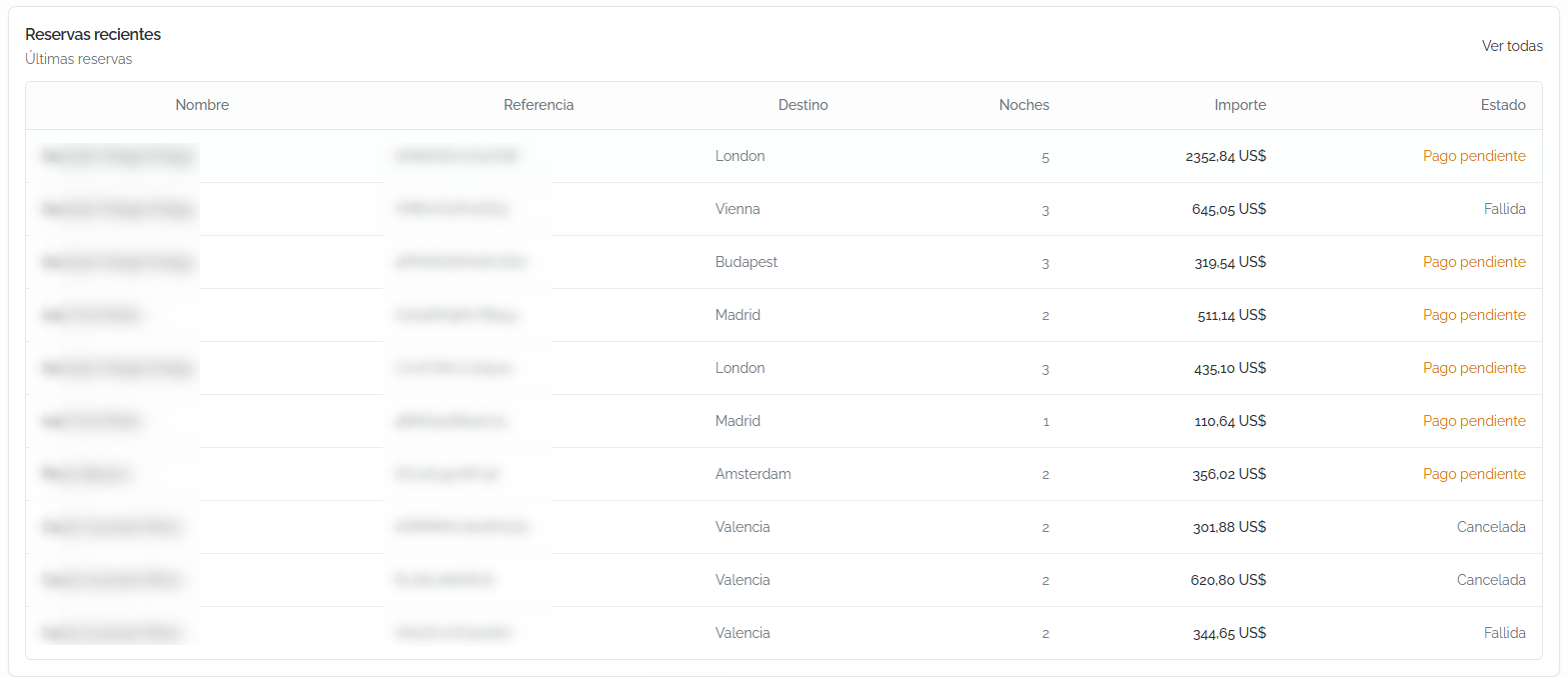
La secciónThe ReservasRecent recientesbookings muestrasection unshows listadoa conlist lasof últimasthe reservasagency's demost larecent agencia.bookings. CadaEach reservabooking incluyeincludes lathe siguientefollowing información:information:
NombreName:titularbookingde la reserva.holder.ReferenciaReference:códigoBundleportdereferencereferencia de Bundleport.code.DestinoDestination:direcciónaddressoornombrenamedelofalojamiento.the accommodation.NochesNights:númeronumberdeofnochesnightsdeofestancia.stay.ImporteAmount:preciototalenprice in euros.EstadoStatus:estadocurrentactualbookingde la reservastatus (por ejemplo,e.g.,ConfirmadaConfirmed,CanceladaCancelled,FallidaFailed,PagoPaymentpendientepending).
Haz clic enClick VerView todasall enin lathe esquinatop superiorright derechacorner parato accederaccess althe listadofull completolist deof reservasbookings.
FAQs
¿ConHow quéoften frecuenciais sethe actualizanDashboard losdata datos del Panel?updated?
LosThe datosdata seis actualizanupdated cadaevery veztime queyou accedesaccess athe lapage. página.Next Juntoto althe selectorperiod deselector, periodoyou'll sesee muestrathe latime horaof dethe lalast últimaupdate actualizaciónso parayou queknow puedashow saberrecent cuánthe recientesdata sonyou're losviewing datosis. queIf estásyou consultando.want Sito quieresrefresh actualizarthe losdata, datos,you puedescan refrescarreload lathe página.page.
¿QuéWhat periodoanalysis deperiod análisisis seshown muestraby por defecto?default?
lThe PanelDashboard cargaloads pordata defectofor losthe datos de los últimoslast 7 díasdays (Last 7 days). Puedesby cambiarlodefault. enYou cualquiercan momentochange conit elat any time using the period selector dein periodothe entop laright esquina superior derecha.corner.
¿PuedoCan exportarI losexport datosthe delDashboard Panel?data?
Sí.Yes. ElThe gráficobooking detrend tendenciachart deand reservasthe ytop ladestinations tablatable deinclude destinosa principalesdownload incluyenbutton unto botónexport dethe descargadata. paraYou exportarcan losalso datos.download Tambiénthe puedesbookings descargarlist elfrom listado de reservas desde la página dethe ReservasBookings. page.
¿PorWhy quédon't I see data for a certain indicator?
If an indicator shows a value of zero or doesn't appear, it means there's no veorecorded datosactivity enfor algúnthe indicador?agency
Sifor unthat indicadoritem muestraduring valorthe ceroselected operiod. noTry aparece,widening significathe quedate no hay actividad registrada en la agencia para ese concepto durante el periodo seleccionado. Prueba a ampliar el rango de fechas.range.
¿QuéWhat significadoes lathe variaciónpercentage porcentualchange enin losthe KPIs?KPIs mean?
ComparaIt elcompares valorthe delvalue periodofor seleccionadothe conselected elperiod periodowith anteriorthe deprevious laperiod mismaof duración.the Unasame variaciónlength. verdeA congreen flechachange ascendentewith indicaan mejora,upward yarrow unaindicates rojaimprovement, conand flechaa descendentered indicachange descenso.with a downward arrow indicates a decline.
¿ParaWhat quéis sirve la columnathe Conv % encolumn Destinosfor principales?in Top destinations?
LaThe tasaconversion derate conversiónmeasures midethe elpercentage porcentajeof desearches búsquedasthat queconvert se convierten en reserva para cada destino. Te permite identificar qué destinos generan más negocio en proporcióninto a lasbooking búsquedasfor realizadas.each destination. It lets you identify which destinations generate the most business relative to the number of searches performed.