
Booking Tool: Hotels
Search,Busca, compare,compara andy bookreserva hotelshoteles
The Search Engine is the search and booking engine builtintegrated into the Agency Panel. It connects to all your suppliers at once, letsallowing you to compare prices and conditions on a single screen,screen and complete bookings without leaving the platform.
This article covers the fullcomplete flowhotel forbooking hotels:workflow, from searchsearching to booking confirmation.
Accessing
Access the Search Engine
- Log in to
thethe.Bundleport platform. InFrom the left-handsidemenu, select Agency Panel.- Select Search Engine.
The main screen showsdisplays tabs for each product type: Hotels,Hotels, Flights,Flights, Ground Transportation,Services, Dynamic Package,Package, and Multi-destination.destination.
Searching
Search for hotels
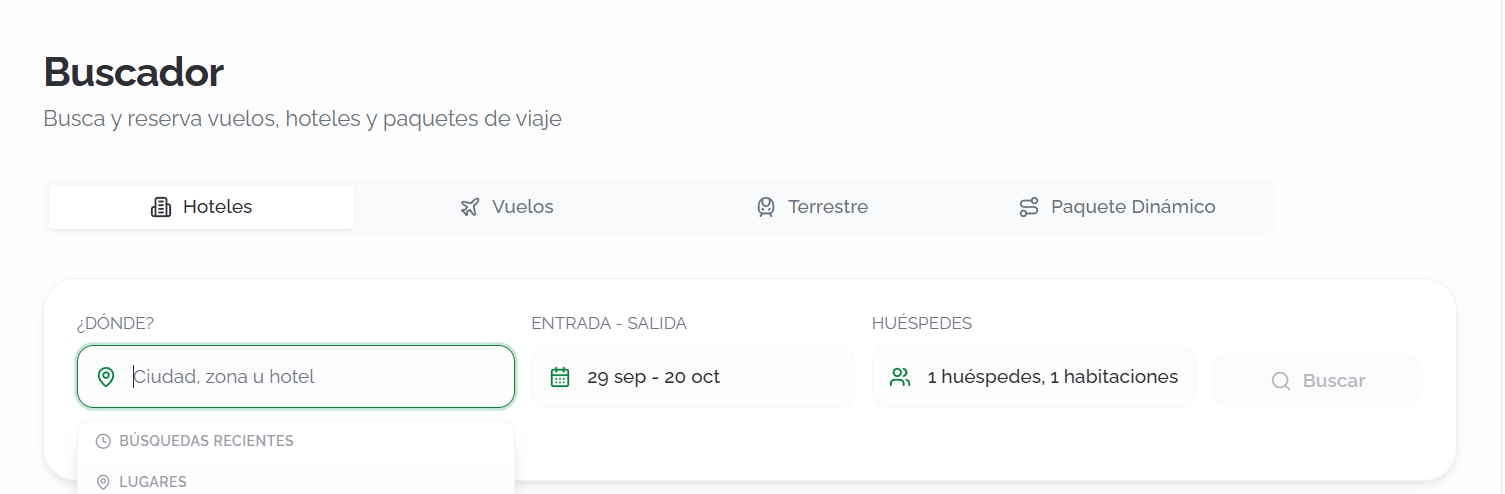
Select the Hotels tab and fill incomplete the following fields:
DestinationDestination::typeEntertheyournamesearchof the city or destinationcriteria and select an option from the autocompletesuggestions.list. The search engine supports three destination types:- Hotel: Search directly for a specific property by name.
As you type, the autocomplete groups results by type (Hotel, City, or POI) to make selection easier.
- Check-in
-– Check-outout::selectSelecttheyour check-in and check-out dates. GuestsGuests::setSpecify the number of guests and rooms.SuppliersSuppliers::clickClick Suppliers toexpanddisplay the list of availablesupplierssuppliers,andthencheckselect oruncheckclear the ones you want to include. You can use Deselect all to start from scratch, or Only thisonenext to a supplier torestrictlimit the search exclusively tothem.that supplier.
Click Search to run the query.search.
💡 Tip
If you already know which hotel you want to book, search for it directly by name to access its rates more quickly. If you haven't decided on a hotel yet, you can search by city or by a point of interest to find hotels in the area that best suits your needs.
ℹ️Información Information
Below the search form, you'llthe find Recent searches,Searches whichsection letlets you repeat a previous search with a single click. Each card showsdisplays the destination, dates, and number of guestsguests, and rooms. Click Clear recentRecent searchesSearches to remove theyour search history.
Search
Resultados de búsqueda
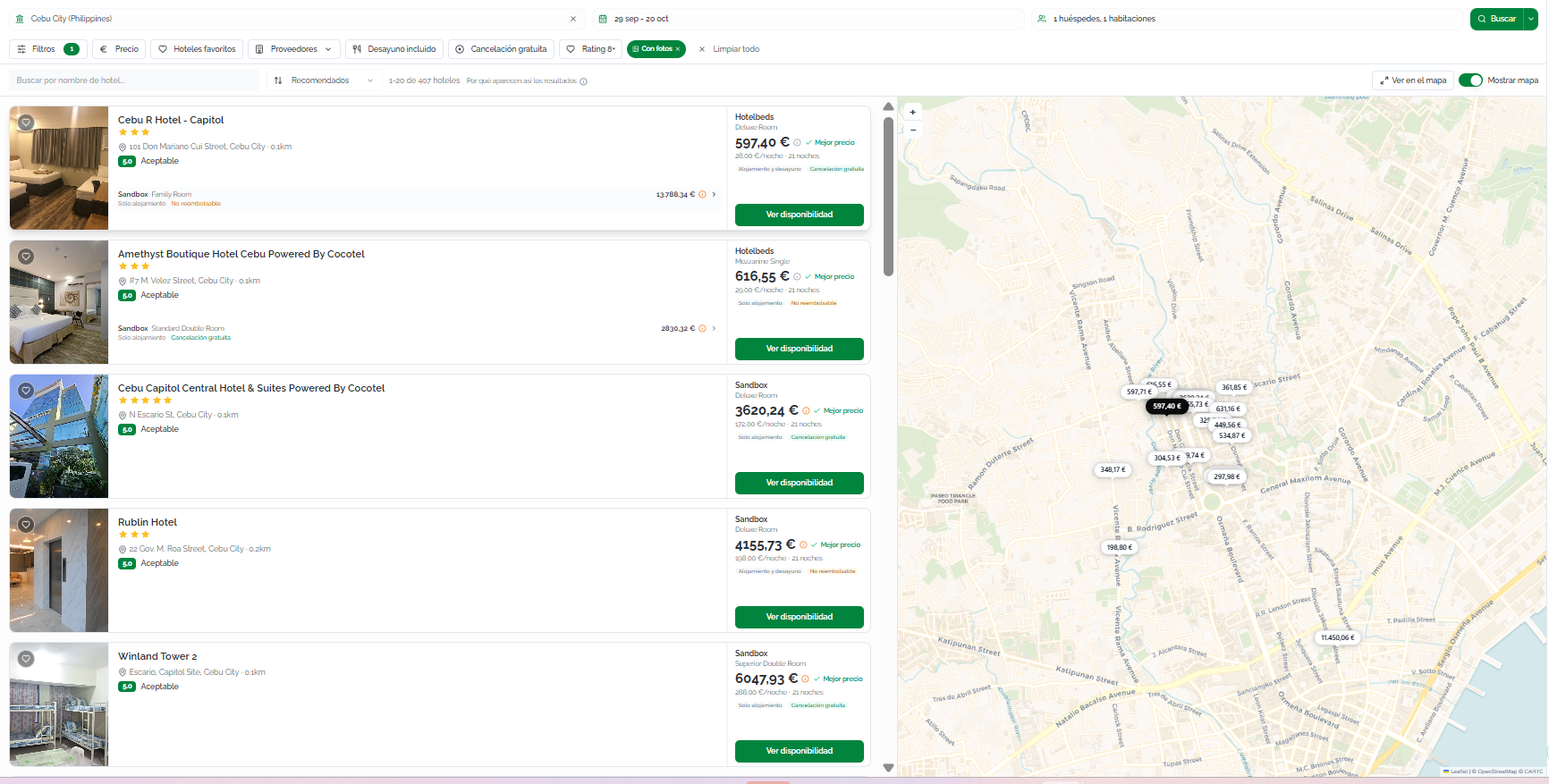
Bundleport queriesconsulta availabilityla acrossdisponibilidad allen selectedtodos supplierslos andproveedores displaysseleccionados resultsy progressively,muestra addinglos themresultados asde eachforma supplierprogresiva, responds.incorporándolos a medida que cada proveedor responde.
BelowLa thepresentación searchde bar,los progressresultados indicatorsdependerá showdel thetipo statusde ofdestino eachseleccionado supplier,en alongla withbúsqueda:
Debajo de la barra de búsqueda, unos indicadores de progreso muestran el estado de cada proveedor, junto con el número de hoteles encontrados y proveedores que han respondido (por ejemplo, 81+ hotelshoteles · 4/6 suppliersproveedores).
TheLa searchbarra barde remainsbúsqueda permanece visible aten thela top.parte Yousuperior canpara modifyque anypuedas criteriamodificar andcualquiera clickde Searchlos tocriterios runy arealizar newuna query.nueva búsqueda en cualquier momento.
⚠️ImportantImportanteResultsLos areresultados cachedse foralmacenan en caché durante 60 minutes;minutos; ifsi younecesitas needdatos updatedactualizados, data,haz click clic en SearchingBuscar refreshingrefrescando cachecaché.
HotelTarjetas cardsde hotel
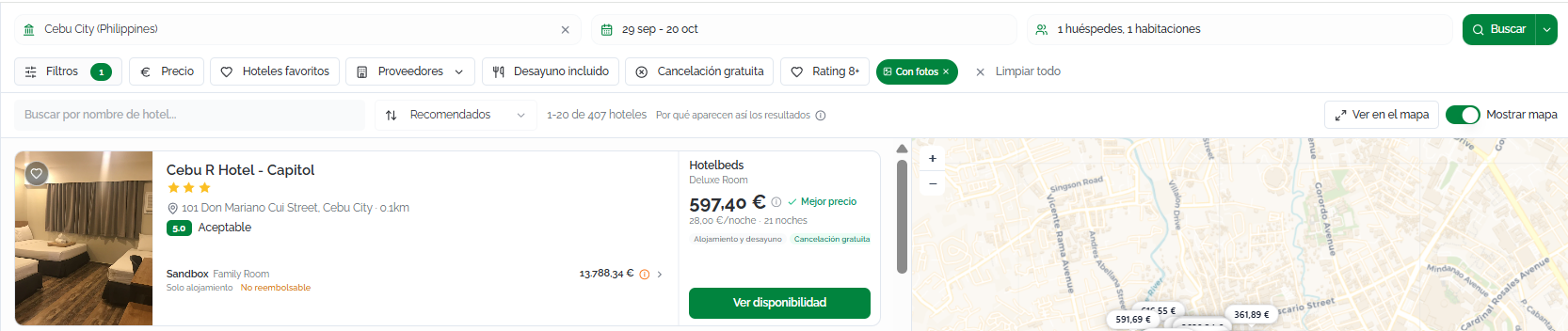
EachCada hotel isse displayedmuestra ascomo auna cardtarjeta withcon thela followingsiguiente information:información:
HotelFotografíaphotodel hotel (ifsiavailable)está disponible).Name,Nombre,starcategoríacategory,enaddress,estrellas,anddireccióndistanceytodistanciathealcenter.centro.GuestPuntuaciónratingde los huéspedes (forporexample,ejemplo, 8.6ExcellentExcelente)andynumbernúmeroofdereviews.reseñas.FeaturedOfertaofferdestacadafromdelthemejorbestproveedor:supplier:nombresupplierdelname,proveedor,roomtipotype,demealhabitación,plan,régimen, precio totalandyper-nightporprice,noche,cancellationpolíticapolicy,deandcancelaciónindicationeofindicaciónadditionaldecosts.costes adicionales.IfSiotherhaysuppliersofertashavedeoffersotrosforproveedorestheparasameel mismo hotel,theyaparecenappearcomoaslíneasadditionaladicionaleslinesenonlathemismasame card.tarjeta.
YouPuedes canmarcar markhoteles hotelscomo asfavoritos favoriteshaciendo byclic clickingen theel hearticono icon,de andcorazón, accessy allacceder availablea roomstodas andlas rateshabitaciones byy clickingtarifas disponibles haciendo clic en ViewVer availabilitydisponibilidad.
Cuando la búsqueda se realiza por Ciudad o POI, los resultados se presentan como un listado de hoteles. Si la búsqueda se realiza por Hotel, el listado se centra en el establecimiento seleccionado, mostrando directamente sus tarifas disponibles.
Sorting
Ordenar resultados
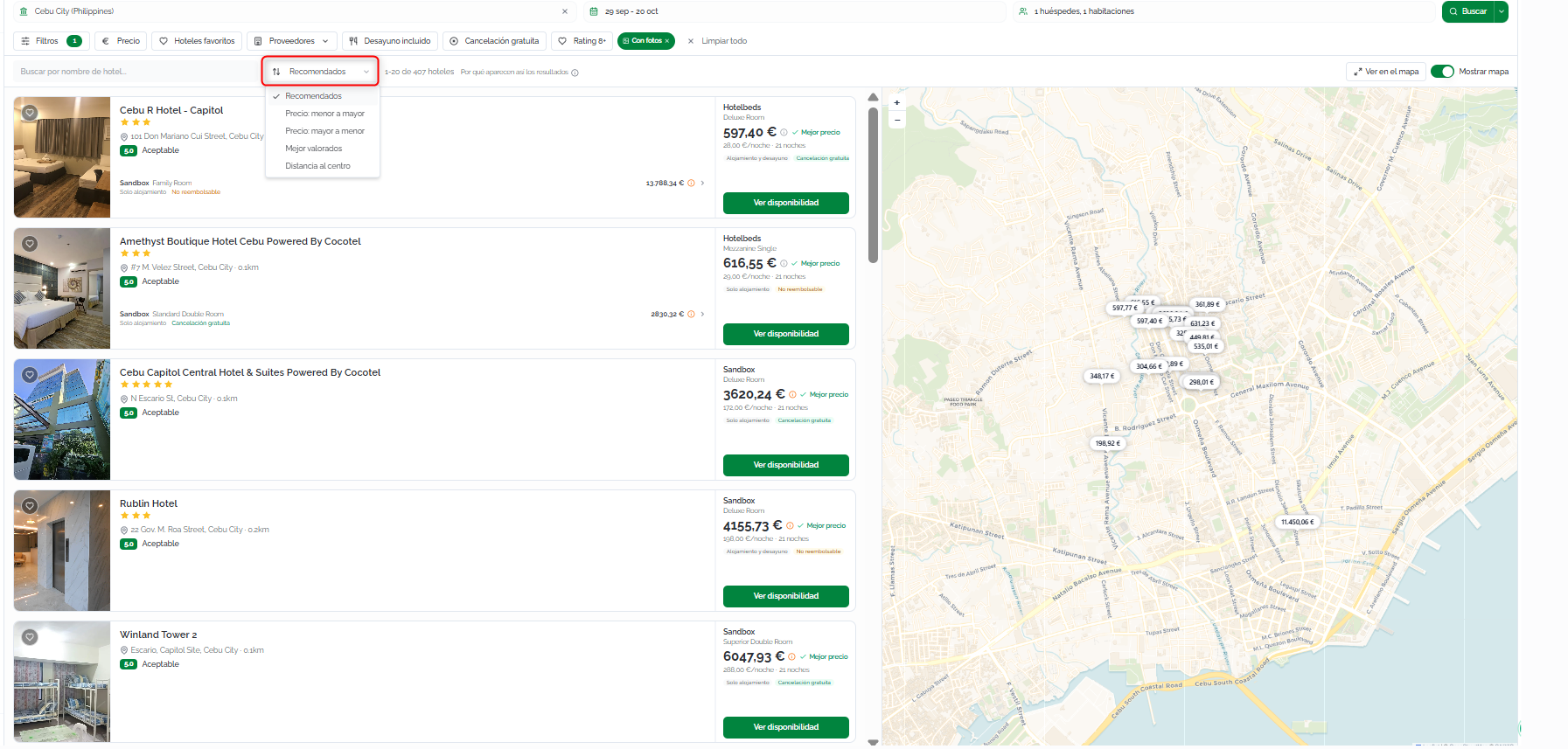
ByPor default,defecto, resultslos areresultados sortedse usingordenan thesegún el criterio RecommendedRecomendados. criteria.Puedes Youcambiarlo canhaciendo changeclic thisen byel clickingselector thede sortorden. selector.Los Thecriterios availabledisponibles criteria are:son:
RecommendedRecomendados (default)por defecto):calculatedcalculadobasedaonpartirlocation,dereviews,ubicación,price,reseñas,popularity,precio,andpopularidadfavorites.yThefavoritos.weightLosofpesoseachde cada variablecansebepuedenadjustedajustarinen losAgencyAjustessettingsde agencia.Price:Precio:lowmenortoahigh:mayor: Ordenasortsdesdefromlatheopcióncheapestmásoption.económica.Price:Precio:highmayortoalow:menor: Ordenasortsdesdefromlatheopciónmostmásexpensive option.cara.TopMejorrated:valorados: Ordenasortsporbypuntuaciónguestderating.huéspedes.DistanceDistanciatoalcenter:centro: Ordenasortsporbyproximidadproximityaltocentrothedeldestination's center.destino.
Filters
Theℹ️Información Las opciones de ordenación están disponibles cuando la búsqueda devuelve un listado de hoteles (por ciudad o POI). En las búsquedas directas por hotel, el resultado se centra en el establecimiento seleccionado.
Filtros
Cuando la búsqueda devuelve un listado de hoteles (por Ciudad o Punto de interés (POI)), puedes utilizar los filtros para localizar más rápidamente el alojamiento que mejor se adapte a las necesidades del cliente.
Si la búsqueda se realiza directamente por Hotel, los filtros permanecen disponibles para ayudarte a revisar las opciones del establecimiento seleccionado, aunque algunos filtros orientados a localizar hoteles (como la distancia al centro o el nombre del hotel) pueden no estar disponibles o no tener efecto.
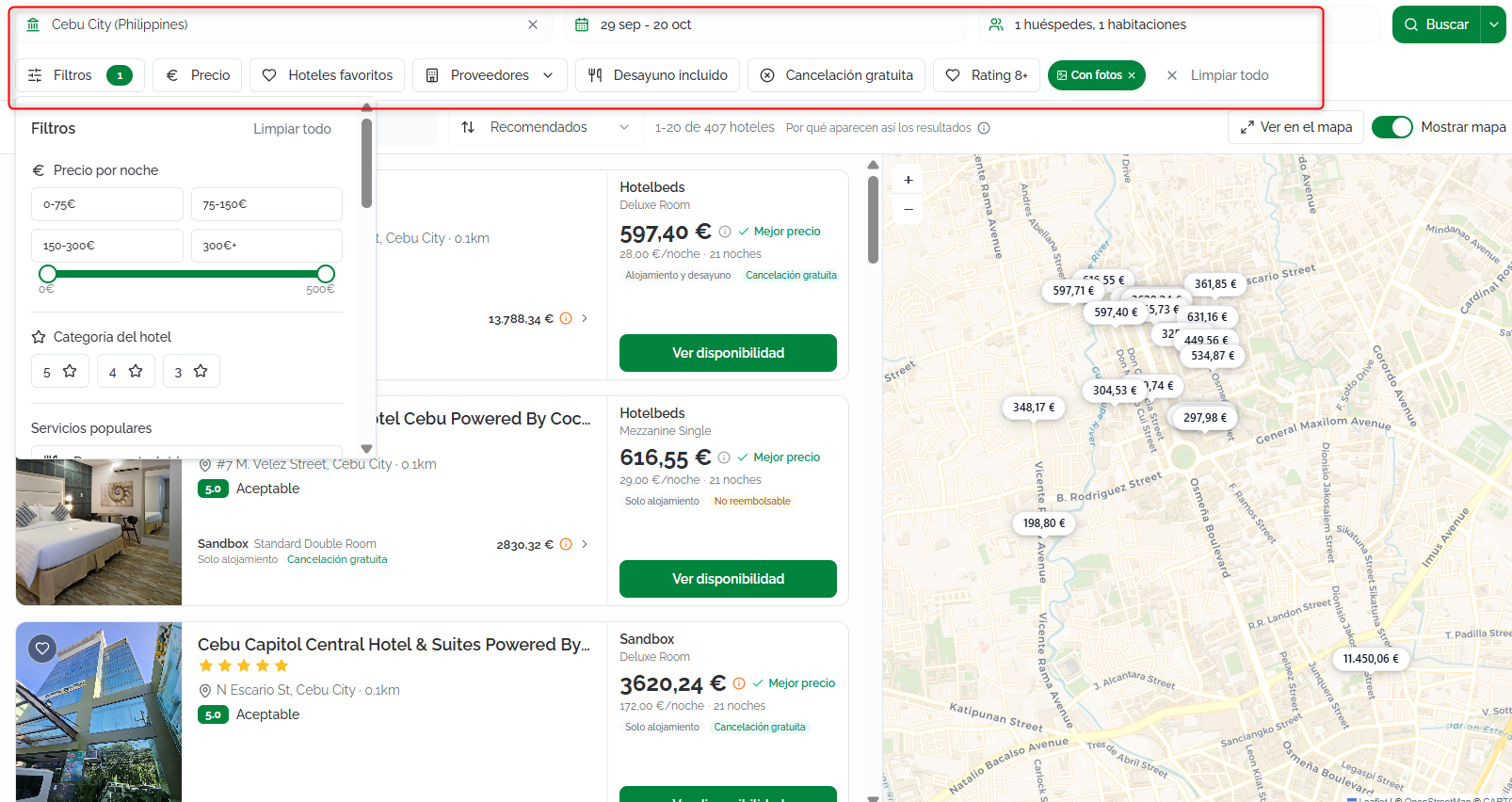
La barra horizontal filterde barfiltros offersofrece thelas followingsiguientes options:opciones:
Panel de filtros
Haz clic en FilterFiltros para abrir el panel (clicklateral Filterscon totodas openlas theopciones side panel):disponibles:
PricePrecioperpornight:noche:priceestablecerange.un rango de precio para limitar los resultados.HotelCategoríacategory:del hotel:numberfiltraofporstars.número de estrellas.PopularServiciosamenities:populares:breakfast,muestrafreeúnicamentecancellation,hotelesproximityquetoofrecenthecaracterísticascenter.como desayuno incluido, cancelación gratuita o proximidad al centro.Facilities:Instalaciones: filtra por servicios como wifi,pool,piscina,gym,gimnasio,amongspa,others.aparcamiento, entre otros.AccommodationTipostypes:de alojamiento:hotels,limita los resultados a hoteles, resorts,apartments,apartamentos,etc.apartahoteles, villas y otros tipos de alojamiento.GuestValoraciónrating:de huéspedes:minimummuestraaverageúnicamentescore.hoteles con una puntuación mínima.DistanceDistanciatoalcenter:centro:distancefiltraradius.los resultados según la distancia al centro del destino o al punto de interés seleccionado, cuando corresponda.ContentCalidadquality:del contenido:withpermitephotos,mostrarwithúnicamentedescription,hotelesmultipleconsuppliers,fotografías, descripción, múltiples proveedores, topsellersventasonly,ofavoritesmarcadosonly.como favoritos.
Filtros rápidos
QuickLos filtersfiltros (accessiblemás directlyutilizados fromestán thedisponibles bar):directamente sobre el listado de resultados:
Price:Precio:pricelimitarange.los resultados a un rango de precios.FavoriteHoteleshotels:favoritos:favoritesmuestraonly.únicamente los hoteles marcados como favoritos.Suppliers:Proveedores:specificvisualizasupplier.únicamente las ofertas de un proveedor concreto.BreakfastDesayunoincluded:incluido:offersmuestrawithúnicamentebreakfasttarifasonly.que incluyen desayuno.FreeCancelacióncancellation:gratuita:optionsmuestrawithúnicamentefreetarifascancellationcononly.cancelación gratuita.- Rating 8+:
hotelslimitawithlos resultados aratinghotelesofcon8unaorvaloraciónhigherigualonly.o superior a 8. WithConphotos:fotos:hotelsmuestrawithúnicamentephotoshotelesonlycon imágenes disponibles (enabledactivadobypordefault)defecto).Hotels:Hoteles:filterbuscaby a specificun hotelname.concreto dentro del listado de resultados. Este filtro resulta especialmente útil cuando la búsqueda inicial se ha realizado por ciudad o por un punto de interés.
ℹ️Information
Información Click Si realizas una búsqueda por Clear allCiudad too removePOI, allpuedes appliedcombinar filters.varios filtros (por ejemplo, precio, categoría y valoración) para reducir rápidamente el número de resultados y encontrar el alojamiento más adecuado. Haz clic en Limpiar todo para eliminar todos los filtros aplicados.
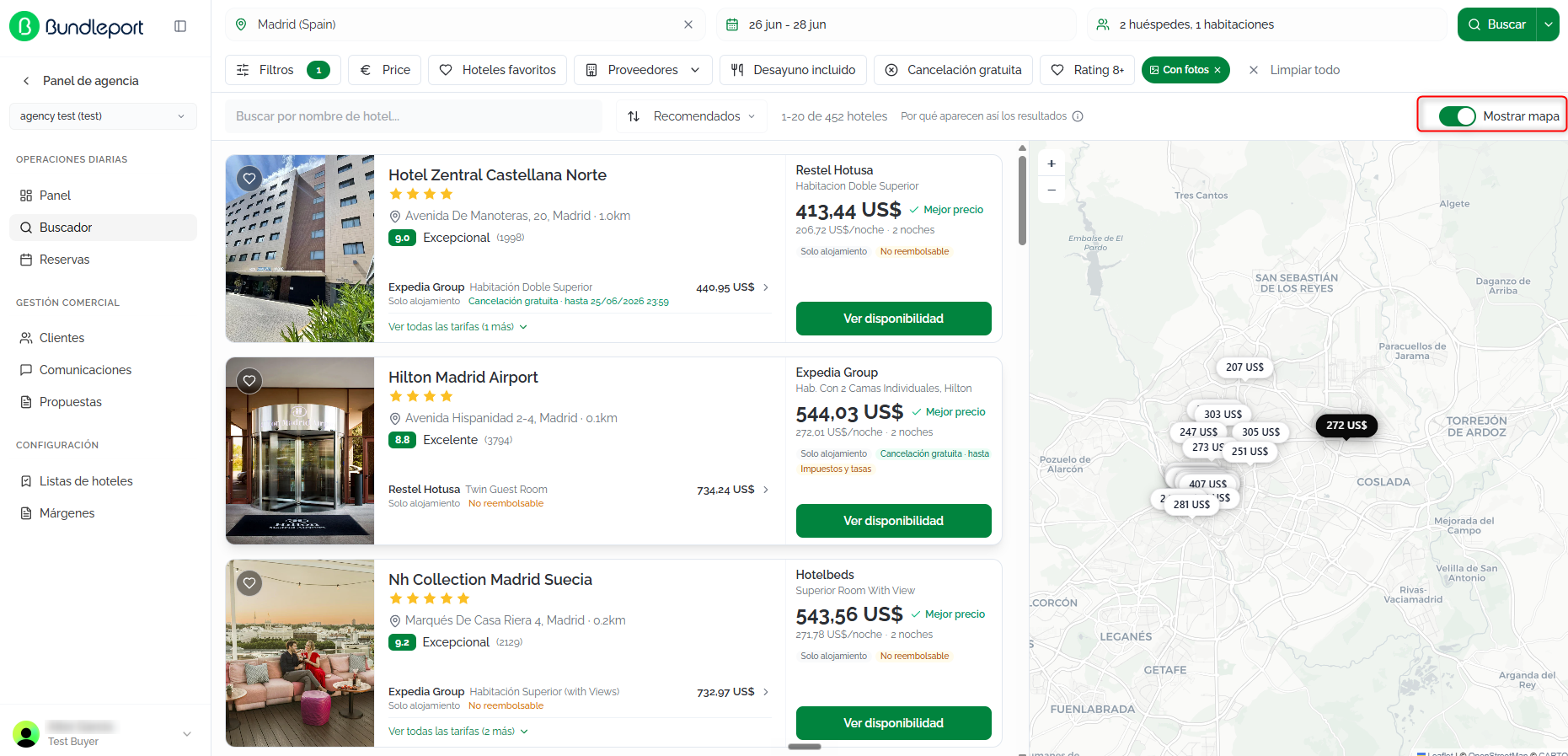
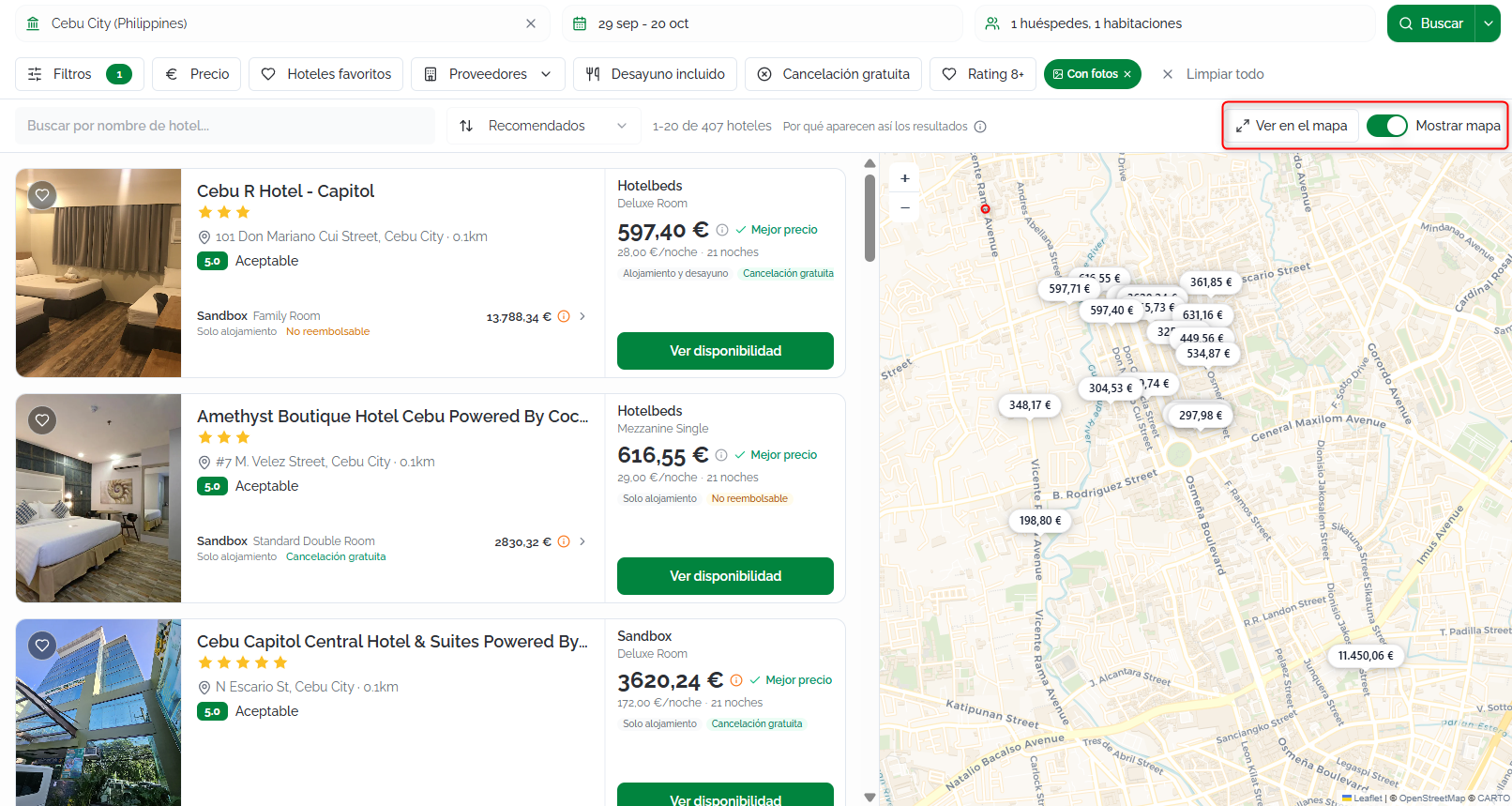
ViewVer onen mapmapa
ClickHaz clic en ShowMostrar mapmapa topara viewvisualizar thela locationubicación ofde thelos hotelshoteles onen anun interactivemapa map.interactivo.
Hotelcontenido details
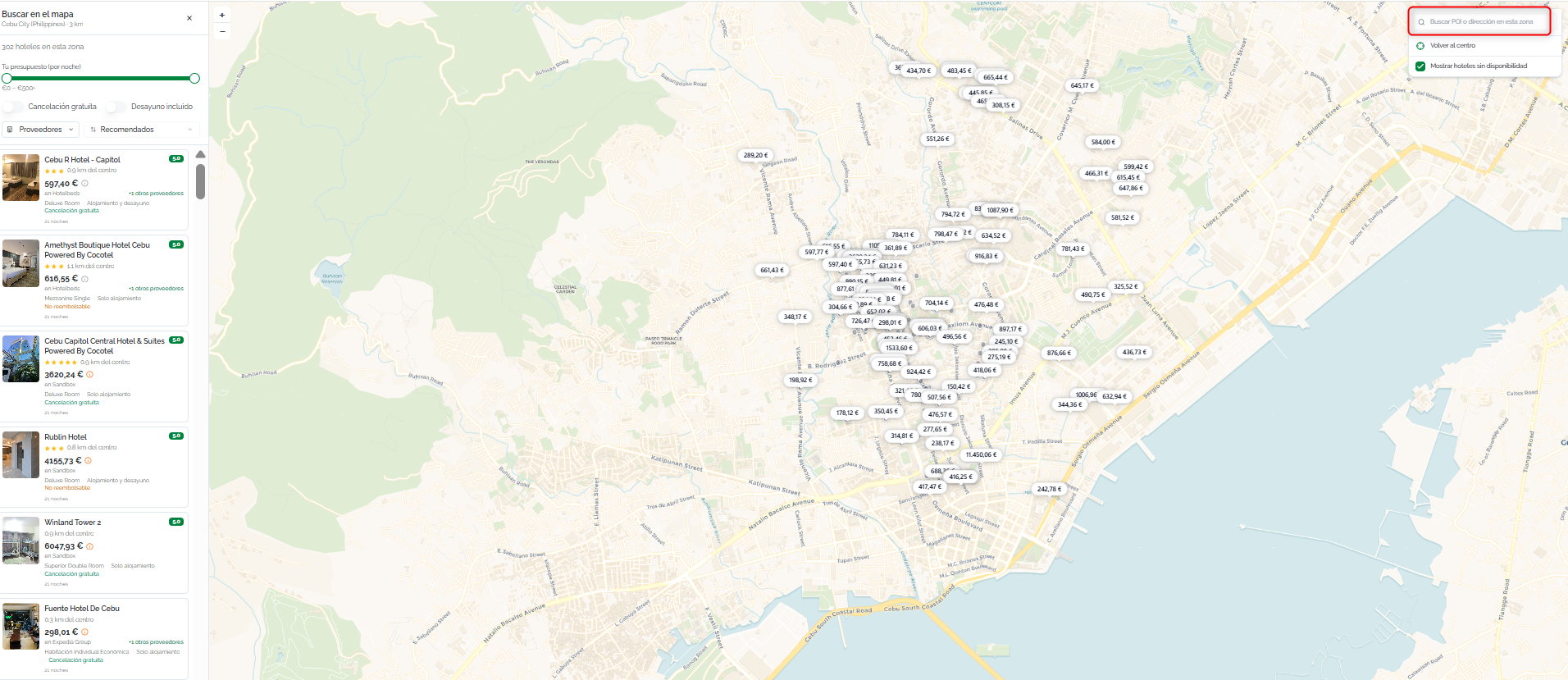
del Tomapa viewse alladapta availableal roomstipo andde ratesbúsqueda for a hotel, click View availability on its results card.
The details page includes:realizada:
HeaderHotel::hotelelname,mapastarcentracategory,laandvistaaddress.en el establecimiento seleccionado para que puedas consultar su ubicación exacta y el entorno.PhotoCiudad:gallery:sehotelmuestranimagestodoswithlosnavigation.hoteles disponibles dentro de la ciudad seleccionada, facilitando la comparación de su ubicación.Description:Puntodescriptivedetext about the hotel and its services.
YouIntroduce canel modifynombre thede search criteria for that hotel from theun Modifyhotel, searchuna ciudad panel.o un punto de interés en el buscador. Mientras escribes, se mostrarán sugerencias para ayudarte a encontrar rápidamente el destino o alojamiento que buscas.
Una vez seleccionada la opción deseada, la búsqueda se completará automáticamente y podrás consultar la disponibilidad de hoteles y sus tarifas.
Puedes alternar entre la vista de listado y la vista de mapa en cualquier momento sin perder los criterios de búsqueda ni los filtros aplicados.
Los filtros y el criterio de ordenación permanecen activos al cambiar de vista, por lo que el mapa mostrará únicamente los hoteles que cumplan las condiciones seleccionadas.
💡Tip
ℹ️Información When you openLa avista hotel'sde details,mapa moreresulta optionsespecialmente mayútil appearcuando thanbuscas werealojamiento showncerca onde theun resultspunto page.de Thisinterés, iscomo becauseun theaeropuerto, platformuna runsestación ade second,tren, hotel-specificun search,recinto queryingferial, alluna connectedplaya suppliers.o Inuna theatracción initialturística, destinationya search,que somete supplierspermite prioritizecomparar speedvisualmente andla don'tubicación returnde all available rates. Because of this, we recommend always checking thecada hotel detailsrespecto toal makelugar sure you see every option.
seleccionado.
Selecting
Detalle adel room
hotel
InPara theconsultar toda la información de un establecimiento y sus tarifas disponibles, haz clic en AvailableVer roomsdisponibilidad section,desde you'llla findtarjeta alldel thehotel.
Puedes returnedacceder byal eachdetalle supplier.del Youhotel canindependientemente filterde thesi resultsla usingbúsqueda these followingha controls:realizado por Hotel, Ciudad o Punto de interés (POI).
La página de detalle reúne toda la información necesaria para evaluar el alojamiento antes de realizar una reserva, incluyendo:
Supplier:Cabecera:tabsnombreatdelthehotel,topcategoríawithentheestrellasnameyofdireccióneachcompleta.
Desde el panel Modificar búsqueda puedes cambiar cualquiera de los criterios de búsqueda, como el destino, las fechas, la ocupación o los proveedores, sin necesidad de volver al inicio del buscador.
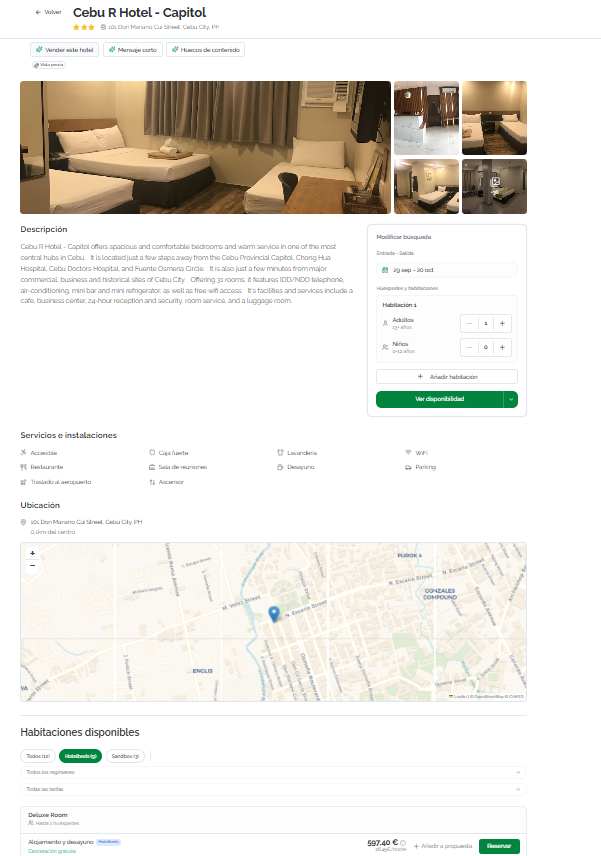
ℹ️Información Si has llegado al hotel desde una búsqueda por Ciudad o Punto de interés (POI), el detalle conserva el contexto de la búsqueda para que puedas revisar fácilmente la ubicación del establecimiento antes de continuar con la reserva.
ℹ️Información Al acceder al detalle de un hotel, la plataforma realiza una segunda consulta específica sobre ese establecimiento a todos los proveedores seleccionados. Esto permite recuperar habitaciones y tarifas adicionales que algunos proveedores no incluyen en la búsqueda inicial para optimizar el tiempo de respuesta.
Seleccionar una habitación
En la sección Habitaciones disponibles encontrarás todas las opciones devueltas por cada proveedor. Puedes filtrar los resultados con los siguientes controles:
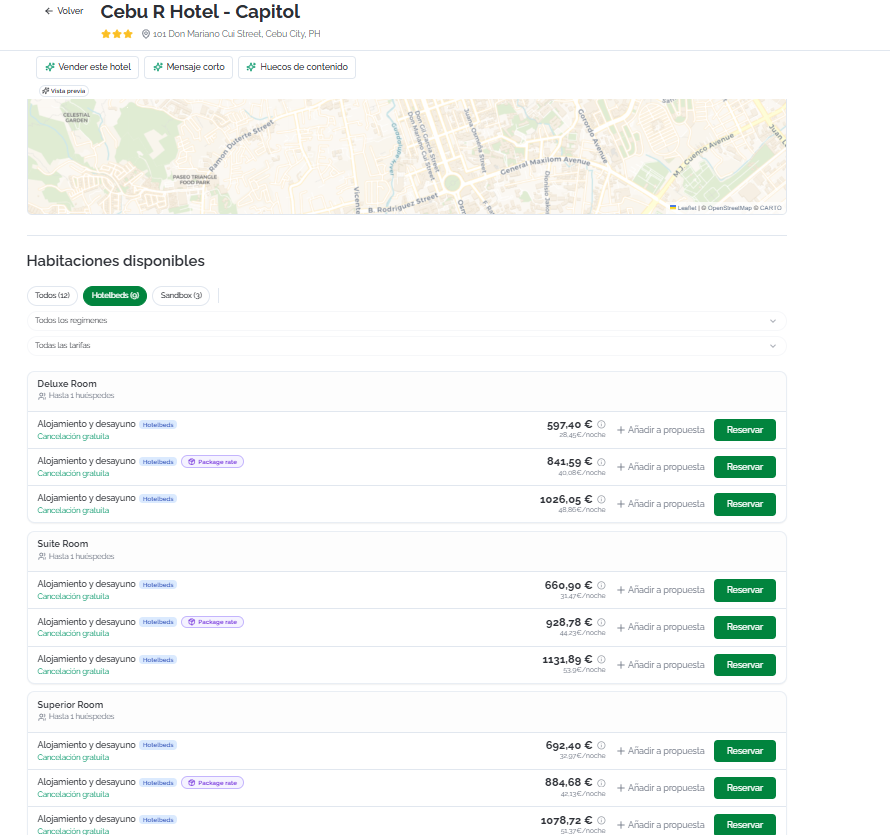
EachCada roomopción optionde shows:habitación muestra:
RoomNombretypedelnametipo de habitación (forporexample,ejemplo, Deluxe Double)andymaximumocupaciónoccupancy.máxima.MealRégimenplan included.incluido.Supplier.Proveedor.CancellationPolíticapolicy:de cancelación:FreeCancelacióncancellationgratuitaoroNon-refundableNo reembolsable.ClickHaztheclicinformationeniconel icono de información ℹ️toparaviewverpenaltyeldetails,detallepricedebreakdown,penalizaciones,anddesgloseremarks.de precios y observaciones.TotalPreciopricetotalandypriceprecioperpornight.noche.AddAñadirtoaproposal:propuesta:addsañadethelaoptionopcióntoaanunaexistingpropuestaorexistentenewoproposalnuevawithoutsinbooking.reservar.Book:Reservar:startsiniciatheelcheckoutprocesoprocess.de checkout.
OnceUna you'vevez selectedseleccionada thela optionopción youque wantdeseas toconfirmar, confirm,haz clickclic en BookReservar.
CompletingCompletar thela bookingreserva
OnEn thela página CompleteCompletar bookingreserva, page,rellena fillla insiguiente the following information:información:
AssociatedClienteclientasociado (optional)opcional):linkvinculathelabookingreservatoaanunexistingclienteclientexistentesoparait'squerecordedquedeinregistradatheirenhistory.suClickhistorial. Haz clic enSearchBuscarclient.cliente...toparasearchbuscarbypornamenombreoro email.IfSitheelclientclientedoesn'tnoexist,existe,clickhaz clic enNewNuevoclientclientetoparacreatecrearloone directly.directamente.GuestInformacióninformation:de huéspedes:enterintroducethelosdetailsdatosofdeeachcadapersonpersonastaying,queorganizedsebyalojará,room:organizados por habitación:Title:Tratamiento:selectseleccionatheeltitletratamiento (Mr.Sr.,Mrs.Sra., etc.).First name:Nombre:guest'snombrefirstdelname.huésped.Last name:Apellidos:guest'sapellidoslastdelname.huésped.
ContactPersonaperson:de contacto:contactlosdetailsdatoswilldebecontactousedsetousaránsendparabookingenviarconfirmationsconfirmacionesandyupdates.actualizaciones de la reserva.UseUsarmymisaccountdatosdetails:de cuenta:enableactivathisestaoptionopcióntoparaautomaticallyrellenarfillautomáticamenteinlosthecamposfieldsconwithlosyourdatosaccountdedetails.tuIfcuenta.you'veSiselectedhasaseleccionadoclient,unthecliente,fieldslosarecamposfilledseincompletanwithcontheirsusdetailsdatosbypordefault.defecto.Email:Correo electrónico: dirección de emailaddressparaforlascommunications.comunicaciones.FullNombrename:completo:firstnombreandylast name.apellidos.Phone:Teléfono:contactnúmeronumber.de contacto.Address:Dirección:postaldirecciónaddress.postal.
SpecialPeticionesrequests:especiales:free-textcampofielddefortextorequestslibretoparatheincluir solicitudes al hotel (latehoracheck-in,dehighllegadafloortardía,room,habitacióncrib,en planta alta, cuna, etc.).SpecialLasrequestspeticionesareespecialespassedseontrasladanto theal hotelbutperocannotnobeseguaranteed.pueden garantizar.AcceptanceAceptaciónofdeterms:términos:beforeantesconfirming,decheckconfirmar,themarcatwolasrequireddosboxes:casillas obligatorias:AcceptanceAceptaciónofdethelostermstérminosandyconditions,condiciones,cancellationlapolicy,políticaanddepaymentcancelaciónconditions.y las condiciones de pago.AcceptanceAceptaciónofdethelassupplier-specificcondicionesconditionsespecíficasapplicabledeltoproveedortheaplicablesbooking.a la reserva.
ℹ️InformationInformaciónIfSi theel clientcliente isya alreadyestá registeredregistrado andy hastiene travelersviajeros setconfigurados, up,puedes youautocompletar canlos auto-fillcampos thede guesthuéspedes fieldsseleccionando byel selectingviajero the corresponding traveler.
correspondiente.
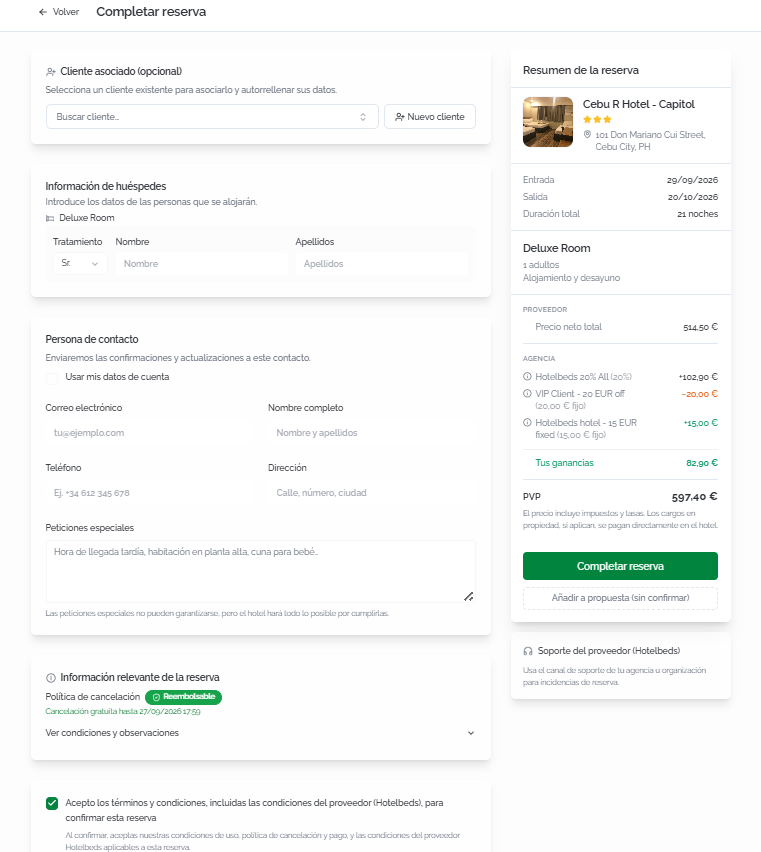
BeforeAntes confirming,de checkconfirmar, theverifica Bookingen summary sideel panel tolateral makeResumen surede allla thereserva informationque istoda correct:la información es correcta:
- Hotel,
address,dirección,dates,fechas,lengthduración,oftipostay,deroomhabitación,type,régimenmealyplan,númeroanddenumber of adults.adultos. PriceDesglosebreakdown:de precio: Base (net)neto), Markup (percentageporcentajeandeamount)importe), Subtotal,DiscountDescuento (ifsiapplicable)aplica),ChargesCargosatenthe propertypropiedad (payableaatpagartheen el hotel),andyPayPagonowahora (finalimporteamount)final).
⚠️ImportantImportanteRelevantInformación bookingrelevante information:de la reserva: reviewrevisa thela cancellationpolítica policyde and,cancelación ify, needed,si expandes necesario, despliega ViewVer conditions,condiciones, charges,cargos andy remarksobservaciones to checkpara penalties,consultar additionalpenalizaciones, charges,cargos andadicionales suppliery remarks.
observaciones del proveedor.
ClickHaz clic en CompleteCompletar bookingreserva topara confirm.confirmar.
BookingConfirmación confirmationde la reserva
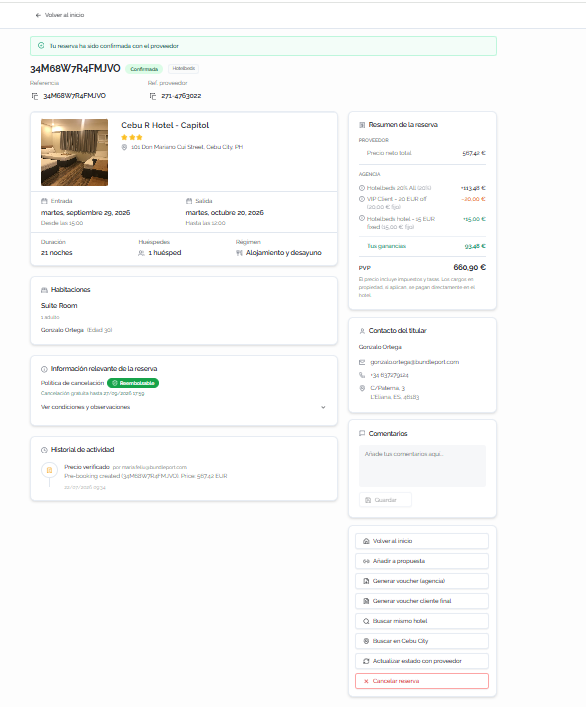
OnceAl confirmed,confirmar, ase pagemuestra isuna displayedpágina withcon alltoda thela bookinginformación informationde organizedla intoreserva theorganizada followingen sections:las siguientes secciones:
AvailableAcciones actionsdisponibles fromdesde theel sidepanel panel:lateral:
BackVolvertoalhome:inicio:returnsregresatoathelasearchpáginaengine'sdehomeiniciopage.del buscador.Add to proposal:adds the booking toAñadir anewpropuesta:orañadeexistinglaproposal.reserva a una propuesta nueva o existente.GenerateGenerar voucher (agency)agencia):generatesgeneratheel voucherforparathelaagencyagencia (downloadsdescargathedelfilearchivoasenaformato PDF).GenerateGenerar voucherforclienteend client:final:generatesgeneratheel voucherforparatheelendclienteclient.final.BeforeAntesdownloadingdethedescargar el voucherasen formato PDF, se solicitará la validación de los datos de la agencia que se mostrarán en el documento. En caso de no ser correctos, es posible acceder directamente aPDF,losyou'llajustesbecorrespondientesaskeddesdetoelvalidate the agency details that will appear on the document. If they're incorrect, you can access the relevant settings directly from the samemismo modal.SearchBuscarsamemismo hotel:runslanzaaunanewnuevasearchbúsquedaforparatheelsamemismo hotel.SearchBuscarinen [destination]destino]:runslanzaaunanewnuevasearchbúsquedainentheelbooking'sdestinodestination.de la reserva.CancelCancelarbooking:reserva:startsiniciatheelcancellationprocesoprocess.de cancelación.
FAQs
Why do I see more options when I open a hotel's details than on the results page?
Because when you open the details, the platform runs a second, hotel-specific search querying all suppliers. In the general destination search, some suppliers prioritize speed and don't return all available rates. Always check the details before deciding.
How long are results kept in cache?
Results are stored for 60 minutes. If you need updated data, click Search with fresh cache.
Can I book without linking a client?
Yes. Linking a client is optional, but recommended to keep an organized booking history.
Are special requests guaranteed?
No. They're passed on to the hotel, but fulfillment depends on the property's availability.
What are "Charges at the property"?
These are fees or charges (such as the tourist tax) that the guest pays directly at the hotel. They're not included in the amount charged online.
What is the markup in the price breakdown?
It's the commercial margin your agency applies on top of the supplier's net price. You can configure markup percentages in Agency settings
How do I customize the order of recommended results?
The "Recommended" criteria weighs location, reviews, price, popularity, and favorites. You can adjust the weight of each variable in Agency settings
What happens if the price changes between search and confirmation?
The platform verifies the price with the supplier before confirming the booking. If there's been a change, you'll be notified before completing the process so you can decide whether to continue.
Can I add an option to a proposal instead of booking directly?
Yes. Both when selecting a room and at checkout, you can click Add to proposal to include the option in an existing proposal or create a new one